Server Version#: 1.19.3.2843
Player Version#: 4.34.2
Lately been noticing this in my syslog:
May 24 08:53:40 omv Plex Media Server[5555]: No data written!
May 24 08:53:40 omv Plex Media Server[5555]: decoder returned no data
Followed by this:
May 24 08:55:27 omv Plex Media Server[5555]: ERROR: Could not open the input file (No such file or directory)
May 24 08:55:29 omv Plex Media Server[5555]: ERROR: Could not open the input file (No such file or directory)
Corresponding to this in the Plex logs:
May 24, 2020 08:53:40.001 [0x7ff38b7ee700] ERROR - [Transcoder] [eac3_eae @ 0x16bb840] error reading output
May 24, 2020 08:53:40.002 [0x7ff4167fc700] ERROR - [Transcoder] Error while decoding stream #0:1: Unknown error occurred
I have the Plex logs (not at Debug level) as well as some of the syslog if needed, but I couldn’t find anything not quoted here. These errors repeat a lot. For years I’ve pointed Plex to a Transcoder temporary directory on an NVMe drive, but for fun I changed that directory to blank. Made no difference.
I’m not aware of any impact to viewing in Plex, it’s only concerning because I have no idea what’s going on.
If it helps, until you can tell me where to find how many directories are being monitored, I can say it’s likely there are greater than 8192 directories if it means what I think it means.
Each of my movies is in a separate directory. There are 7772 movies in a library I share, and another 17 in a non-shared library. Many of these directories have subdirs for Behind The Scenes, Trailers, etc.
Also 361 TV shows shared, with the normal show directory layout (Seasons and Specials). And another 42 TV Shows in a non-shared library.
Thanks Chuck, I’m sure you’re on to the problem. One caveat is that my PMS is not configured to update automatically. I initiate scans manually. But I suspect that isn’t key.
Running find as shown against my single top level directory yields 15,867. The odd thing is, that’s almost double the 8,192 limit. Meaning I’d have expected to see these errors long ago. But I suppose I could have missed it, I don’t gaze on my syslog often.
Would you please clarify for me where exactly I will see the message ‘No space left on device’ if there is one?
The error will be in Plex Media Server.log , or one of its rollover files, after a PMS restart.
Per the 'decoder returned no data" error, there are a couple possibilities. I do not know which, if any, apply to your use-case.
Temp or PMS directory on a network share - File locking / Notification isn’t supported yielding conflicts / failures when more than one file streaming. Plex uses Notify for the transcoder whether you use it or not.
I’ve found this in a rolled Plex Media Server.log repeatedly:
May 24, 2020 08:52:47.731 [0x7ff4167fc700] ERROR - [Transcoder] Error while decoding stream #0:1: Unknown error occurred
May 24, 2020 08:52:47.732 [0x7ff415ffb700] ERROR - [Transcoder] Could not write header for output file #0 (incorrect codec parameters ?): No space left on device
Is that the message you mentioned?
If by Temp you mean /tmp and by PMS directory you mean the Plex metadata directory, then neither is on a network share. What is on a share is the high level directory I scanned just now.
Plex seems to work normally from the viewer’s point of view.
I suppose corruption is possible. Any suggestions for how to narrow that down?
But why is automatic update key? Won’t it be a problem if I kick off scanning for my libraries manually also (as I do)?
I will bump to 65,536 because I neglected to point out that there is an Audio Library I forgot about and a small Photo library as well. But the total directory entries I gave you (15,867) is correct, because all the libraries hang off the same top level dir.
I am confused about the calculation of memory required though. If I use the last example given here: Increase the number of directories Linux can monitor (Notify), then I come up with 262,144 * 512 = 134,217,728 bytes = 134 MB. But the example indicates the system had 8 GB of RAM. So that’s way more RAM than needed, right?
If the calculations are correct, then my 65,536 * 512 = 33,554,432 bytes = 33 MB. I have 4 GB of RAM now. So I don’t need to buy more RAM, right?
PMS sets an inotify_watch on each monitored directory.
Enabling automatic update activates use of the inotify kernel service.
When PMS is done loading the table, it waits for the next ‘event’ .
The kernel sends an event when changes are detected for a particular directory. PMS automatically knows what changed and can go scan the directory again to find out what did change then proceed accordingly. Maybe it was new media, maybe it was a deletion.
The EAE (Dolby) portion of the transcoder also uses two inotify slots.
your math is correct. 64K slots @ 1/2 KB per slot = 32MB of RAM added to the kernel.
The caution about adding is for those configurations (such as memory-limited NAS systems) where 2GB or 4GB of RAM is all that’s available. In those cases, allocating 512K slots (I’ve seen it happen) is a huge waste of resources and has a down-stream impact on overall performance.
root@omv:/var/log/openmediavault# tail !$
tail /etc/sysctl.conf
# Protected links
#
# Protects against creating or following links under certain conditions
# Debian kernels have both set to 1 (restricted)
# See https://www.kernel.org/doc/Documentation/sysctl/fs.txt
#fs.protected_hardlinks=0
#fs.protected_symlinks=0

fs.inotify.max_user_watches=65536

root@omv:/var/log/openmediavault#
I’ll add another reply if the problem comes back. Once again, thank you so much for your help!
BTW I’m going to open a new, unrelated thread requesting as much hand-holding as I can get in migrating my Plex data to another system. I swear I’ve done this repeatedly over the years in 2 different ways but this time around can’t make headway. My prior thread was inconclusive but openmediavault was a possibly confounding factor. This time I’m rebuilding the system from scratch with Debian 10 and no openmediavault, just to eliminate that variable. Later!
I’m running on Debian so I used this from what I gleaned from the discussions around this issue:
Add following to override.conf in /etc/systemd/system/plexmediaserver.service.d:

[Service]
Environment="TMPDIR=/srv/dev-disk-by-label-data1/plex_media_server_tmpdir"

Oh, and just to be ultra ultra clear, the dir after TMPDIR= is wherever you want your Plex temp dir to be. This is just an example.
Since I made this change all the errors I reported have gone away. So far.
I hope @ChuckPa will chime in one way or the other.
And it clearly is. Furthermore it really is using my dir and not /tmp:
root@omv:~# ls -l /tmp
total 0
root@omv:~# ls -l /srv/dev-disk-by-label-data1/plex_media_server_tmpdir
total 4
drwxrws--x+ 2 plex nogroup 4096 May 29 14:51 pms-93012f88-3670-4e4f-9abf-604d989e3ae1
root@omv:~#
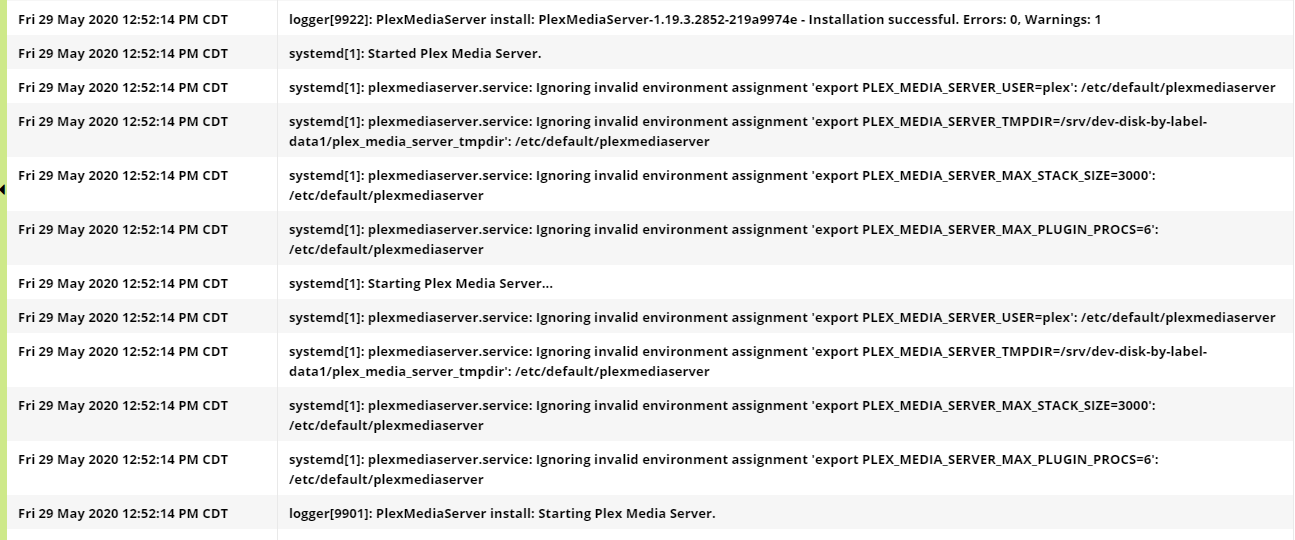
Perhaps I misread the errors in syslog I reported earlier; they’re referencing /etc/default/plexmediaserver not systemd override. And yet I truly had reverted to using /tmp as I showed.
To sum up I have no idea what’s going on and need guidance as to exactly how to specify /tmp override. And what’s the purpose of /etc/default/plexmediaserver vs systemd override. OTOH it appears to be working the way I want. For now.