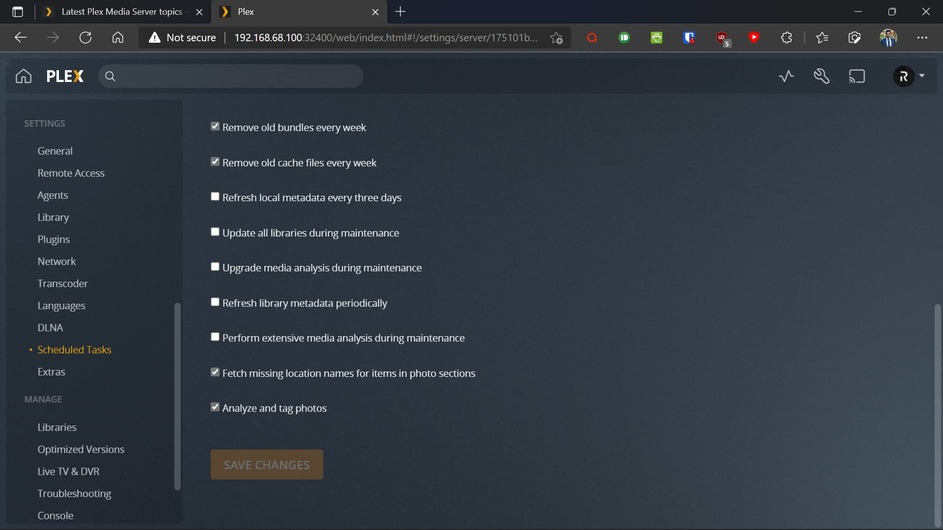
Server Version#: 1.24.4.5081
Server OS: Ubuntu Server 20.04 LTS
Media Location: Rclone with Cache enabled
Hi,
For a few days, I’m noticing that my plex server is unavailable from around 2 am to 4:30 am. At this time my CPU & RAM usages are very high. I’ve installed Netdata on my system so I get notifications & that’s how I figure out this problem. Even at this time I can’t SSH to my server also all other things just suddenly stopped working. As this is my headless server I can’t identify the problem. So today I waited & start noticing that after 2:10 am PMS started doing something. I don’t know what is it doing but I suddenly start getting notifications from Netdata regarding high CPU & RAM usages. Even when I try to see which app is doing this it seems like that time Netdata may be stopped because it doesn’t have the information for that time. I’m uploading the 2 Logs file. 1st one is when things start getting ugly & 2nd one is when things getting normal. Help me to fix the problem.
1st Log: Plex Media Server Logs_2021-10-21_02-12-08.zip (2.9 MB)
2nd Log: Plex Media Server Logs_2021-10-21_04-09-19.zip (2.4 MB)
3rd Log: Plex Media Server Logs_2021-10-21_04-49-04.zip (2.7 MB)
Netdata last 2hours report:
Note:
I’ve disabled all kinds of analyzing functions along with chapter thumbnail or preview options. Only Intro detection is enabled. RAM transcoding is enabled.
The J3355 CPU, being a dual core, will be challenged to respond well when it’s in the middle of running maintenance (generating video thumbnails, performing analysis, etc).
This is seen quite commonly on the NAS platforms but not as severely as you seem to describe
Given you’re running full up 20.04.3, what appears to be Desktop, there will be that added processing load of all those processes -vs- NAS platforms which are very cut down and sized for it, this is pretty normal .
My recommendation is to shorted the time window and shift it to a time when it is known to be “less available” (because there is less playback possibility). Let the analysis of multiple files span multiple days versus trying to get them all done at once.
I’ve disabled all kinds of generating video thumbnails, performing analysis, etc CPU intensive functions. Just Intro detector is enabled. It’s a headless Ubuntu 20.04 server edition OS means no GUI. What exactly Plex doing when it’s unavailable can you please tell me from the log ??
I use cron to optimize the DB every 12 hours. As I have got a large library, it keeps everything smooth. Is there any way to find out what exactly Plex doing? Usually, when Intro detection going on I see a circle keeps going on the top right side of the web player “Activity” logo. But at this time there is nothing going on. Everything is still as it should be. Even the alert tab is blank. But I clearly can tell something is going on the behind !! Is there any way to find out ?
ps -ef | grep -i plex is your best tool to see which processes are active.
Coupled with top (not htop), you can see which process(es) are consuming CPU.
If we can see which processes are running, we can start to focus in on what.
Yesterday night I just set some cronjobs to monitor what is going on. It seems like Plex Transcoder is doing something in the background. But no one is playing anything on Plex at that time. Maybe it’s connected to Scheduled Tasks because for the test today I set the ST start time to 3 am & boom, the problem now starts from 3 am instead of 2 am. Whatever it’s doing the problem not happening after ST stop time. I’ve provided some processes below with extremely high usages, detected through your command ps -ef | grep -i plex Please tell me what plex is doing & how to fixes it.
Recorded at 03:28 am
plex      598390  465639 90 03:28 ?        00:01:43 /usr/lib/plexmediaserver/Plex Transcoder -codec:1 aac -analyzeduration 20000000 -probesize 20000000 -i /home/plex/SamFTP/WebSeries/SZ/Tales of the City (TV Series 2019– ) 720p [Dual Audio]/Season 01/Tales of the City S01 E06-E10  720p NF WEBRip x264 MSubs [Dual Audio][Hindi 5.1+English 5.1] - mkvC.mkv -filter_complex [0:1] aresample=async=1:ocl='5.1':rematrix_maxval=0.000000dB:osr=44100[0] -map [0] -metadata:s:0 language=hin -codec:0 flac -b:0 4096k -f flac -map_metadata -1 -map_chapters -1 -t 8147.8005000000003 /tmp/ramdisk/Transcode/Detection/7fae57be-1067-4603-a1de-496e7b771d06 -map 0:3 -f null -codec ass nullfile -y -nostats -loglevel quiet -loglevel_plex error -progressurl http://127.0.0.1:32400/video/:/transcode/session/be083781-9ffb-4154-ab26-3de4fed697e2/9e4daee0-8dff-4353-a114-60aa2f1abcac/progress

Recorded at 05:27 am
plex      605745  603362 89 05:27 ?        00:01:49 /usr/lib/plexmediaserver/Plex Transcoder -codec:1 aac -analyzeduration 20000000 -probesize 20000000 -i /home/plex/SamFTP/WebSeries/SZ/Tales of the City (TV Series 2019– ) 720p [Dual Audio]/Season 01/Tales of the City S01 E01-E05  720p NF WEBRip x264 MSubs [Dual Audio][Hindi 5.1+English 5.1] - mkvC.mkv -filter_complex [0:1] aresample=async=1:ocl='5.1':rematrix_maxval=0.000000dB:osr=44100[0] -map [0] -metadata:s:0 language=hin -codec:0 flac -b:0 4096k -f flac -map_metadata -1 -map_chapters -1 -t 8464.9850000000006 /tmp/ramdisk/Transcode/Detection/24ec5619-b72b-4000-bac7-d65580ae5d35 -map 0:3 -f null -codec ass nullfile -y -nostats -loglevel quiet -loglevel_plex error -progressurl http://127.0.0.1:32400/video/:/transcode/session/c4f29a51-997d-4105-9ecd-6c39f52d9f2b/ec698c9b-64b8-4977-a577-6978a2c93869/progress

Recorded at 08:59 am
plex      620855  618763 82 08:59 ?        00:00:27 /usr/lib/plexmediaserver/Plex Transcoder -codec:1 aac -analyzeduration 20000000 -probesize 20000000 -i /home/plex/SamFTP/WebSeries/SZ/Tales of the City (TV Series 2019– ) 720p [Dual Audio]/Season 01/Tales of the City S01 E01-E05  720p NF WEBRip x264 MSubs [Dual Audio][Hindi 5.1+English 5.1] - mkvC.mkv -filter_complex [0:1] aresample=async=1:ocl='5.1':rematrix_maxval=0.000000dB:osr=44100[0] -map [0] -metadata:s:0 language=hin -codec:0 flac -b:0 4096k -f flac -map_metadata -1 -map_chapters -1 -t 8464.9850000000006 /tmp/ramdisk/Transcode/Detection/806e78a2-ffb2-43ac-9d3f-7502a467a3da -map 0:3 -f null -codec ass nullfile -y -nostats -loglevel quiet -loglevel_plex error -progressurl http://127.0.0.1:32400/video/:/transcode/session/c25bfaed-9b9c-442c-80d1-ec5dd37f42ff/bc9bb707-16a3-40a9-975f-364b26d4aa3c/progress
Sorry, but I had several things to do yesterday and before everything closed (Saturday).
You’re running
Oct 20, 2021 16:59:30.144 [0x7f8488710b38] INFO - Plex Media Server v1.24.4.5081-e362dc1ee - Ubuntu PC x86_64 - build: linux-x86_64 debian - GMT 06:00
Oct 20, 2021 16:59:30.144 [0x7f8488710b38] INFO - Linux version: 20.04.3 LTS (Focal Fossa), language: en-US
Oct 20, 2021 16:59:30.144 [0x7f8488710b38] INFO - Processor Intel(R) Celeron(R) CPU J3355 @ 2.00GHz
Oct 20, 2021 16:59:30.145 [0x7f8488710b38] INFO - Compiler is - Clang 11.0.1 (https://plex.tv e0c29d5827bc4eaaa2ceb882cbeed224b0960173)
on the J3355 (which is a dual core )
This entry:
Recorded at 05:27 am
plex      605745  603362 89 05:27 ?        00:01:49 /usr/lib/plexmediaserver/Plex Transcoder -codec:1 aac -analyzeduration 20000000 -probesize 20000000 -i /home/plex/SamFTP/WebSeries/SZ/Tales of the City (TV Series 2019– ) 720p [Dual Audio]/Season 01/Tales of the City S01 E01-E05  720p NF WEBRip x264 MSubs [Dual Audio][Hindi 5.1+English 5.1] - mkvC.mkv -filter_complex [0:1] aresample=async=1:ocl='5.1':rematrix_maxval=0.000000dB:osr=44100[0] -map [0] -metadata:s:0 language=hin -codec:0 flac -b:0 4096k -f flac -map_metadata -1 -map_chapters -1 -t 8464.9850000000006 /tmp/ramdisk/Transcode/Detection/24ec5619-b72b-4000-bac7-d65580ae5d35 -map 0:3 -f null -codec ass nullfile -y -nostats -loglevel quiet -loglevel_plex error -progressurl http://127.0.0.1:32400/video/:/transcode/session/c4f29a51-997d-4105-9ecd-6c39f52d9f2b/ec698c9b-64b8-4977-a577-6978a2c93869/progress
Tells me it’s running video analysis and including the requirement for the ASS subtitles. This is the “Deep Analysis”.
It’s also dealing with Hindi subtitles. You might want to curate that out of your media files (aka. English only or no subtitles at all)
If it’s too much for the system, turn Deep Analysis off.
My first recommendation – Curate the media. Use Mkvtoolnix-GUI and keep only those streams you want and will use. There is no sense including everything you downloaded.
First, how to turn off this “Deep Analysis” ? Secondly, I’ve mounted all my movies/shows from a Read-Only source through Rclone. And the library is Huge.
Also please mention is there any problem if I disable Deep Analysis ?
Deep analysis = Perform extensive media analysis during maintenance
The only factor you will manually manage after disabling deep analysis is Adaptive Bit Rate transcoding. PMS will determine a bit rate at start and then stick with that bit rate throughout.
FWIW: I leave it turned off and manage bit rates based on the average as indicated in the video file’s header. I have no interest in squeezing every little Kbit out of my connection
Metadata is highly unlikely to change. If I spot an error, I’ll refresh manually.
If I upgrade media, I’ll analyze it manually.
It seems like deep analysis is already turned off in my screenshots. You can see my first post too. Then why it is doing ? Also have a look at my screenshots & can you tell me is there any other CPU-intensive process/function that I should turn off ?
it’s going to do normal analysis. That takes CPU.
I also know , ASS subtitles are not as efficient as SRT subtitles when it’s playing back but don’t have any ASS here to compare with for an exact measurement.
Is it trying to process HEVC HDR ? If so, that’s the one thing the J3355 cannot handle. It will handle HEVC SDR (8-bit) but not HDR (10-bit). The J3455 has that capability.
If any files include DoVi (Dolby Vision), it will bury both CPU variants.
Oct 22, 2021 09:16:27.324 [0x7f939d13bb38] DEBUG - [Transcode] We're going to try to auto-select an audio stream for account 27251957.
Oct 22, 2021 09:16:27.324 [0x7f939d13bb38] DEBUG - [Transcode] Selecting best audio stream for part ID 927028 (autoselect: 1 language: en)
Oct 22, 2021 09:16:27.324 [0x7f939d13bb38] DEBUG - [Transcode] Audio Stream: 2247783, Subtitle Stream: 2247784
Oct 22, 2021 09:16:27.359 [0x7f939d13bb38] DEBUG - [Transcode] MDE: Selected protocol hls; container: mkv
Oct 22, 2021 09:16:27.359 [0x7f939d13bb38] DEBUG - [Transcode] MDE: analyzing media item 914187
Oct 22, 2021 09:16:27.359 [0x7f939d13bb38] DEBUG - [Transcode] MDE: E9 - Chapter Nine: The Gate: Direct Play is disabled
Oct 22, 2021 09:16:27.359 [0x7f939d13bb38] DEBUG - [Transcode] MDE: E9 - Chapter Nine: The Gate: media must be transcoded in order to use the hls protocol
Oct 22, 2021 09:16:27.359 [0x7f939d13bb38] DEBUG - [Transcode] MDE: E9 - Chapter Nine: The Gate: selected audio stream is not the first audio stream and direct play stream selection is not enabled
Oct 22, 2021 09:16:27.359 [0x7f939d13bb38] DEBUG - [Transcode] MDE: E9 - Chapter Nine: The Gate: no direct play video profile exists for http/mkv/hevc
Oct 22, 2021 09:16:27.359 [0x7f939d13bb38] DEBUG - [Transcode] MDE: E9 - Chapter Nine: The Gate: no direct play video profile exists for http/mkv/hevc/eac3
Oct 22, 2021 09:16:27.359 [0x7f939d13bb38] DEBUG - [Transcode] MDE: E9 - Chapter Nine: The Gate: no direct play video profile exists for http/mkv/hevc/aac
Oct 22, 2021 09:16:27.359 [0x7f939d13bb38] DEBUG - [Transcode] MDE: Stranger Things - S2 E9 - Chapter Nine: The Gate: selected media 0 / 914187
HEVC HDR UHD or simple 8-bit?
If it’s HDR / UHD – that’s the answer – The J3355 does not have UHD capability.
You have file names which include “HEVC”. Most times they are UHD
After monitoring all my logs for last few days it seems like plex is doing the analysis for just 2 files. No other file is present in the logs. What it it really doing I don’t understand. You can check all logs I’ve porvided you’ll see that plex is touching just 2 files. From the source which I’m using for media has mostly 720P shows. 4K is impossible. Also please check the logs from 3am to 9am. This is my schedule task time.
Details of the file you’re talking about: Shei Je Holud Pakhi.txt (4.7 KB)
Details of the file I’m talking about: Tales of the City .txt (6.9 KB)
But it’s for a episode of Stranger Things. Look at the last line you provided. It’s details is: Stranger Things.txt (7.7 KB)
Btw, please focus on schedule task time 3am to 9am. This time is the problem time. & Please note that in the scheduled task time no one is playing anything on plex because it’s unavailable due to high load. So, wherever plex is doing it’s connected to scheduled task not for playing.