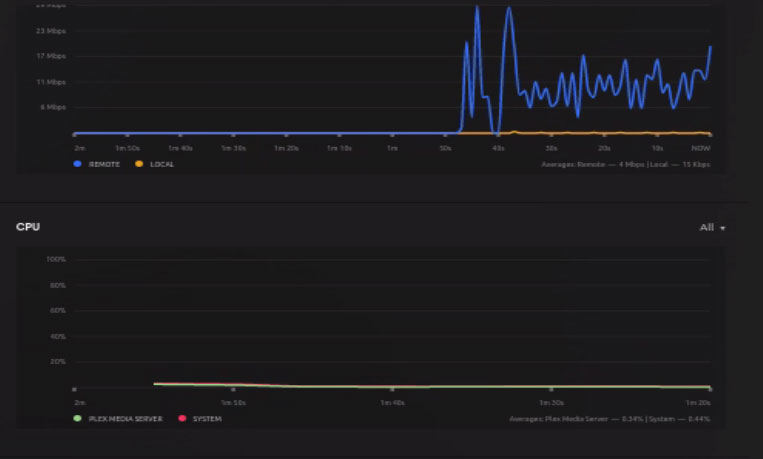
Server Version#: 1.31.1.6733
My current PMS was installed January 4, 2020 and up until about 6 months ago it has been flawless. About 6 months ago it started acting weird. Unusually high CPU usage (prior to this I never say it go above 20%).
Now, within 30 minutes of restart the CPU sits between 95 & 100% and videos wont play until PMS is restarted. At first I thought it was my GPU & transcoding that was causing this issue, but I noticed this high CPU usage happened when everything was direct playing.
I have downloaded the server logs, but since I’ve never really had any issues with PMS, I’m not even sure I got the correct logs.
Credit detection uses CPU.
(it examines every frame of the video file)
It was configured by engineering to be OPT-OUT (turn off) instead of you turning it on.
The setting is in each library section. - advanced.
This is one of the most common issues so far.
I don’t use credit detection, video preview thumbnails or intro video markers
did you turn it off? It’s on by default
I will need your DEBUG Log files ZIP to see what it is doing
Please get it at a high point and then capture the ZIP
also, a ps -ef | grep plex will be really helpful.
Apparently 1 of my libraries still had the detect credits turned on. I have now verified all of them are turned off.
As I mentioned, I’ve never had to deal with the log files. Do I just use the “Download Logs” button under Troubleshooting?
:/$ ps -ef | grep plex
plex      2224 25282  0 19:44 ?        00:00:02 Plex Plug-in [com.plexapp.agents.plexthememusic] /usr/lib/plexmediaserver/Resources/Plug-ins-bc0674160/Framework.
bundle/Contents/Resources/Versions/2/Python/bootstrap.py --server-version 1.31.1.6733-bc0674160 /usr/lib/plexmediaserver/Resources/Plug-ins-bc0674160/PlexThemeMu
sic.bundle
plex      2248 25282  1 19:44 ?        00:00:05 Plex Plug-in [com.plexapp.agents.fanarttv] /usr/lib/plexmediaserver/Resources/Plug-ins-bc0674160/Framework.bundle
/Contents/Resources/Versions/2/Python/bootstrap.py --server-version 1.31.1.6733-bc0674160 /usr/lib/plexmediaserver/Resources/Plug-ins-bc0674160/Fanart-TV.bundle
plex      2277 25282  0 19:45 ?        00:00:02 Plex Plug-in [com.plexapp.agents.opensubtitles] /usr/lib/plexmediaserver/Resources/Plug-ins-bc0674160/Framework.b
undle/Contents/Resources/Versions/2/Python/bootstrap.py --server-version 1.31.1.6733-bc0674160 /usr/lib/plexmediaserver/Resources/Plug-ins-bc0674160/OpenSubtitle
s.bundle
plex      4361 25282  0 19:48 ?        00:00:01 Plex Plug-in [tv.plex.agents.movie] /usr/lib/plexmediaserver/Resources/Plug-ins-bc0674160/Framework.bundle/Conten
ts/Resources/Versions/2/Python/bootstrap.py --server-version 1.31.1.6733-bc0674160 /usr/lib/plexmediaserver/Resources/Plug-ins-bc0674160/PlexMovieNew.bundle
plex      4939 25282  1 19:48 ?        00:00:01 Plex Plug-in [com.plexapp.agents.imdb] /usr/lib/plexmediaserver/Resources/Plug-ins-bc0674160/Framework.bundle/Con
tents/Resources/Versions/2/Python/bootstrap.py --server-version 1.31.1.6733-bc0674160 /usr/lib/plexmediaserver/Resources/Plug-ins-bc0674160/PlexMovie.bundle
plex      4966 25282  0 19:49 ?        00:00:00 Plex Plug-in [tv.plex.agents.series] /usr/lib/plexmediaserver/Resources/Plug-ins-bc0674160/Framework.bundle/Conte
nts/Resources/Versions/2/Python/bootstrap.py --server-version 1.31.1.6733-bc0674160 /usr/lib/plexmediaserver/Resources/Plug-ins-bc0674160/PlexSeries.bundle
thecli3+  5182 21075  0 19:51 pts/0    00:00:00 grep --color=auto plex
plex     25282     1 99 17:46 ?        05:30:25 /usr/lib/plexmediaserver/Plex Media Server
plex     25347 25282  0 17:46 ?        00:00:28 Plex Plug-in [com.plexapp.system] /usr/lib/plexmediaserver/Resources/Plug-ins-bc0674160/Framework.bundle/Contents
/Resources/Versions/2/Python/bootstrap.py --server-version 1.31.1.6733-bc0674160 /usr/lib/plexmediaserver/Resources/Plug-ins-bc0674160/System.bundle
plex     25404 25282  0 17:46 ?        00:00:03 /usr/lib/plexmediaserver/Plex Tuner Service /usr/lib/plexmediaserver/Resources/Tuner/Private /usr/lib/plexmediase
rver/Resources/Tuner/Shared 1.31.1.6733-bc0674160 32600
Yes, Under Troubleshooting “Download Logs” will be mid page.
When you click it, there will be a pause and then it will download a ZIP to wherever downloads go.
All you need to do is drag & drop that ZIP file here in your Reply window,
It has been about 45 minutes since I last restarted PMS and disabled the detect credits on the rogue library. CPU usage is currently sitting at 38% with 7 remote streams (all Direct Play, zero transcoding)
Plex Media Server Logs_2023-03-11_16-51-01.zip (6.4 MB)
I’m seeing several playbacks and transcodes. If 38% in the Plex report then that’s not bad for what I’m seeing of all the activity.
The CPU is handling the audio transcodes and remuxes well. Very nice.
Is anything objectionable to you ?
Prior to 6 months ago when the high CPU usage started, I never saw it go above 20% and was typically under 10%.
Right now I have 7 streams (6 remote, 1 local) all Direct Play and still sitting at about 38%. Maybe I’m overreacting … just seems strange that for 2 years CPU usage was minimal but now it’s not. When it gets above 75% is when videos no longer play. So far, disabling the detect credits in the rogue library seems to be a help.
I typically see DirectPlay at about 3-4% on my CPUs.
Using that metric, It’s reasonable to be about 21% CPU
I didn’t dig deep into the agent longs to see what they are doing, if anything.
One thing they have done in the 1.3x.x series is to rework internals.
The biggest thing I’m concerned about is your 100% at restart.
TheCli3nt:
Now, within 30 minutes of restart the CPU sits between 95 & 100% and videos wont play until PMS is restarted. At first I thought it was my GPU & transcoding that was causing this issue, but I noticed this high CPU usage happened when everything was direct playing.
When that happens, can you force it down (systemctl) and then make a tar.gz of the entire logs directory so nothing is lost and attach it here ?
Finding a few things now which are making sense.
This IP / app is beating on your server. Your server is constantly opening/closing the connections. That’s ot good. It’s chewing through socket resources – 1,862 sockets in this one log file alone. That will drive your whole machine nuts.
Mar 11, 2023 15:49:52.483 [0x7f72c5c4db38] DEBUG - Request: didn’t get any data from 174.27.71.162:55300: End of file
Metadata is refreshing (32 items)
Mar 11, 2023 15:49:48.953 [0x7f72bc768b38] DEBUG - [Req#1f4] Activity: registered new activity 5f255097-2461-4cf7-a46a-fb703181ddc6 - “Updating Metadata”
Recommend you first get control of that stray user. That easily can drive your CPU load up like crazy.
Regarding that IP address … what log file did you find that in?
I have blocked the ip in my firewall, but would like to monitor the logs
Since blocking that IP address the CPU usage is sitting right where I’m used to seeing it.
Crossing my fingers it remains this way.
Plex Media Server.log and the rollovers.
Take the ZIP you gave me and open in a text editor. You’ll see it really quickly.
If you know who that is, they need fix (reinstall) their player.
For pseudo-random numbers, use birthdays as the ports, eg – 04/01/93 → 40193
I checked my Tautulli logs and while it is from the town my brothers live in, it is from a different ISP than they use. Since it was port scanning (55300, 55301, 55302), I just blocked the IP address completely.
Going on 1 hour since blocking of IP and restarting PMS and it’s still sitting at sub-10% CPU usage. Thank you!
Any time! Glad I could help.
I keep forgetting about port scanners.
I went the hard route and put up a pfSense box.
I created a rule which only allows those IP addresses/DNS names I know into the port.
To everyone else, I don’t exist on the internet (which is good when you have as much stuff on my servers (work & personal) as I do.
So after about 5 hours of perfect performance, I have been watching CPU usage slowly climb back up.
Looking through the logs, the only thing I see in newest log download is the following error many times
Unable to find client profile for device; platform=Vizio SmartCast, platformVersion=2.3.0-2125.0003, device=Vizio SmartCast 2.3.0-2125.0003, model=E50x-E1
Plex Media Server Logs_2023-03-12_16-15-35.zip (6.5 MB)
That’s nothing to worry about.
There is no default (xml) profile for Vizio. It uses the new direct negotiation protocol.
I will let engineering know they forgot to suppress that error message.
I am seeing Tautulli HAMMER your machine. Slow down that refresh time. It’s hitting it multiple times a second.
Mar 12, 2023 14:40:32.994 [0x7f5478aa0b38] DEBUG - [Req#1030b] Audio Stream: 1082427, Subtitle Stream: -1
Mar 12, 2023 14:40:32.994 [0x7f54a977cb38] DEBUG - Completed: [172.56.153.243:58963] 200 GET /status/sessions (30 live) #102c8 TLS GZIP 1ms 7843 bytes (pipelined: 14)
Mar 12, 2023 14:40:32.994 [0x7f54a977cb38] DEBUG - Completed: [172.17.0.4:35866] 200 GET /library/metadata/111119 (30 live) #1030b GZIP 6ms 1586 bytes (pipelined: 3)
Mar 12, 2023 14:40:32.997 [0x7f54775e3b38] DEBUG - Request: [172.17.0.4:35866 (WAN)] GET /library/metadata/111026 (30 live) #1030d GZIP Signed-in Token (ctOSMedia) (ddff1243c62d (Tautulli))
Mar 12, 2023 14:40:33.004 [0x7f54775e3b38] DEBUG - [Req#1030d] There were 1 top-level paths for Sons of Anarchy.
Mar 12, 2023 14:40:33.005 [0x7f54a997fb38] DEBUG - Completed: [172.17.0.4:35866] 200 GET /library/metadata/111026 (30 live) #1030d GZIP 7ms 3585 bytes (pipelined: 4)
Mar 12, 2023 14:40:33.010 [0x7f547955bb38] DEBUG - Request: [172.17.0.4:35866 (WAN)] GET /library/metadata/111112 (30 live) #1030e GZIP Signed-in Token (ctOSMedia) (ddff1243c62d (Tautulli))
Mar 12, 2023 14:40:33.014 [0x7f54a977cb38] DEBUG - Completed: [172.17.0.4:35866] 200 GET /library/metadata/111112 (30 live) #1030e GZIP 4ms 827 bytes (pipelined: 5)
Mar 12, 2023 14:40:33.016 [0x7f54733edb38] DEBUG - Request: [172.17.0.4:35866 (WAN)] GET /library/metadata/111026 (30 live) #1030f GZIP Signed-in Token (ctOSMedia) (ddff1243c62d (Tautulli))
Mar 12, 2023 14:40:33.022 [0x7f54733edb38] DEBUG - [Req#1030f] There were 1 top-level paths for Sons of Anarchy.
Mar 12, 2023 14:40:33.023 [0x7f54a997fb38] DEBUG - Completed: [172.17.0.4:35866] 200 GET /library/metadata/111026 (30 live) #1030f GZIP 6ms 3585 bytes (pipelined: 6)
Mar 12, 2023 14:40:33.030 [0x7f54a4641b38] DEBUG - Request: [172.17.0.4:35866 (WAN)] GET /library/metadata/631661 (30 live) #10310 GZIP Signed-in Token (ctOSMedia) (ddff1243c62d (Tautulli))
Mar 12, 2023 14:40:33.036 [0x7f54a4641b38] DEBUG - [Req#10310] We're going to try to auto-select an audio stream for account 1.
Mar 12, 2023 14:40:33.036 [0x7f54a4641b38] DEBUG - [Req#10310] Selecting best audio stream for part ID 985672 (autoselect: 1 language: en)
Every refresh is a new socket connection – just as bad as that stray IP address.
At this point I feel like I’m going to have to reinstall PMS …
What will that buy you? I don’t see any unusual PMS activity.
I saw the stray IP
Both of those aren’t PMS fault.
Recommend:
Stop Tautulli
Evaluate CPU load – See if it returns to normal.
One problem at a time.