Well now… I feel a Rum coming on. LOl 
Whats next keelhauling?
Well now… I feel a Rum coming on. LOl
Whats next keelhauling?

Hi there, i have the message “Corrupt database - Plex Media Server was unable to open its media database.” since the last update. It looks like i have no backups (newest is from 2020… in that folder). i ran your ps1 script and it looked like it it did what it should do, see the log:
PlexDBRepair.log (2.4 KB)
But the error message still appaers.
How it happend:
Before the update of the Plex Server I deleted a Library (German: Mediathek) in Plex, i saw a message that a Database optimization was running that message dissapaerd and then I Updated the Plex Server from the Web GUI.
Environment: Windows 10, Plex Server Version 1.40.2.8395
Can someone help? Sorry I’m not sure if this is the right place to ask  But im little lost… As I have a bunch of family members waiting for the return of my plex…
Your logs are confusing.
According to them you have no errors so I’m also a bit confused.
Can you go look in
"%LOCALAPPDATA%\Plex Media Server\Plug-in Support\Databases"
and see what’s there?
You should have valid databases:
Question:
Note: I’ve asked the contributor who wrote the PS1 version to come here and assist. (I don’t know Windows)
just now got back to this, my reply was also meant as a joke, I’m 40% sure you’re not a porcupine.
@ChuckPa thank you for the quick reply! IT looks for me that it catched the right database, the first time it also took a while to repair it, but i lost the logs from that first run… the .original file i created a copy, right after the first error and before i did anything to the database (you can see the size is bigger on that one)
Do you have a working PMS at this point?
I think you do?
Read what it says.
@ChristianKent thank you, but waiting doesn’t help. I think its just a random message. The PMS stopps immidiatly after klicking on ok.
That message doesn’t appear when plex is stopped. Check the logs.
if the DB is damaged internally (the data structures) – it won’t create a backup.
Given the last backup was in 2020, it’s been damaged a long time.
That’s a level of damage DBRepair cannot fix.
Regret to suggest – Start over
We made a minor release to support MacOS Start/Stop commands,
where I added a test like this → sleep 2; IsRunning && sayStarted;
Conversely I used → sleep 2; IsRunning || sayStopped;
Notes:
sleep 1 works for me, but it was left longer to give slower machines more time.HapticOkay=0Best wishes to Chuck! Let us know if you guys have any problems.
Would you like another tweak for MacOS?
sure i can have a look
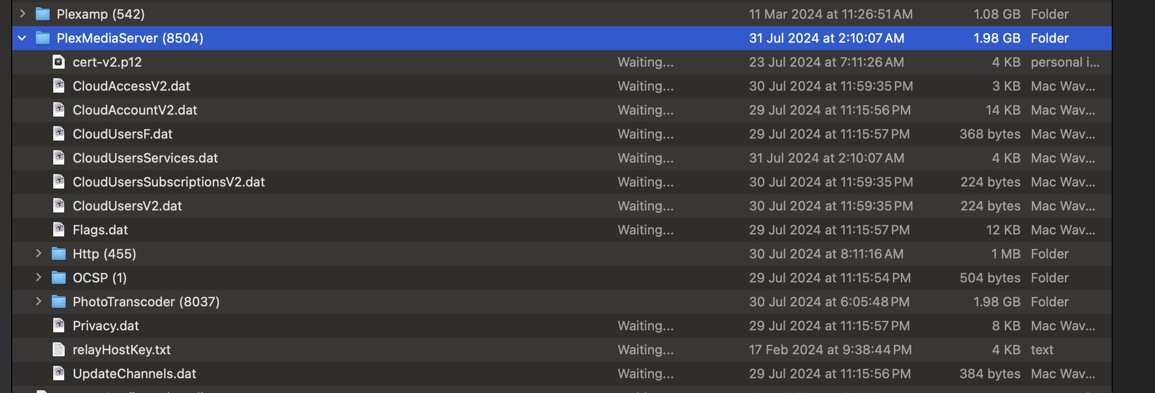
Hi, recently I have noticed an issue with Photo Transcoder size. Using the normal Tool of Right Click/ Get info was indicating a Folder size which would be considered fairly normal. When digging deaper Via System settings or using Disc Drill was totally different.
Examples: Info - 9.5GB
System Data / Photo Transcoder - 110GB
It was indicating there was a lot of Hidden Cache files.
My solution was to Shut down Plex Media Server, Delete Photo Transcoder Folder, Empty Trash, Restart my Mac Mini.
Normality returned to both Info and System Data reports. 1.87GB and 14.87GB. I don’t store much on the internal Apple drive, iPad backups, a few Docs.
Do you have any idea what is happening? I have been using DBRepair regularly every couple weeks and all seemed to be going smooth.
it’s possible that Drill Doctor is inspecting lower level data structures including deleted files it can recover. The find Chuck used in the script and tools like du and ls always match what I see from Get Info (AFPS), though. I can’t find any other hidden files and don’t know how to inspect the file structures. You might ask the Drill Doctor people how to replicate their numbers on the command line.
I see what your saying, what was concerning is that MacOS System Settings/General /Storage, indicated a large System Data allocation. Very similar to Disc drill.
Your correct in that Disc Drill can show Deleted and Lost Data, but it also shows existing Data separate. This is were I was checking out. The alarm bells were ringing when MacOS reported a very high System data sector.
So as being curious, I have written to this discussion in case there is a possible issue.
The above screenshots indicate all is well again, as the two reports match now and System Data is now were it should.
Thanks for your time nibbles, much appreciated
May I ask how you got the System Data / Photo Transcoder - 110GB
value you mentioned? My system doesn’t break down System Data any further than what you pictured, but maybe I read it wrong.