DBRepair development

This was from Disc Drill, similar to the second screenshot prior to my solution. The difference in the Graph at the top and the listed System Data in the ledger indicated that Photo Transcoder Folder had a lot of hidden data now deleted.

I’m no expert on this stuff, so I downloaded Disc Drill (Free) to see what was going on. Result being a lot more free space on my Mac Mini internal drive.

What was concerning me, was the PlexDBRepair not disposing the Cache correctly.

By default, I only prune (delete) files more than 30 days old

If you wish to prune files more or less aggressively, set the environment variable prior to launching DBRepair.sh

This will remove Photo Transcoder Cache image files (jpg, jpeg, png, and ppm) older than 15 days.

Adjust accordingly per desired aggression level :smiling_imp:

export DBREPAIR_CACHEAGE=15
1 Like

While not very keen on providing a “Usage Stats” report,
I will provide one if desired.

The caveat here is that it WILL take a long time to run a du

Please consider:

root@glockner:/vol/plexmediaserver/Plex Media Server# time du -hs *
1.4G	Cache
16M	Codecs
17M	Crash Reports
0	Diagnostics
0	Drivers
59M	Logs
1.6G	Media
19G	Metadata
4.0K	plexmediaserver.pid
0	Plug-ins
2.8G	Plug-in Support
4.0K	Preferences.xml
936K	Profiles
93M	Scanners
16K	Setup Plex.html
0	Updates

real	2m13.517s
user	0m3.827s
sys	0m8.053s
root@glockner:/vol/plexmediaserver/Plex Media Server# 
root@glockner:/vol/plexmediaserver/Plex Media Server# time du -hs .
25G	.

real	0m3.085s
user	0m1.300s
sys	0m1.755s
root@glockner:/vol/plexmediaserver/Plex Media Server# 

I don’t have much loaded here and this is a 14 core Xeon w/ 256 GB RAM.

Thank you for the offer, I can get by. Fall over no problem, get up totally different story. :rofl: :rofl:

Then don’t fall down

:stuck_out_tongue:

That can be the problem :face_with_head_bandage:

@ChuckPa I posted this on the Plex discord and was directed to post it in this forum thread here.

I upgraded my Plex Media Server on my Synology NAS and it crashes whenever I upload my backed up databases. Specifically, the blobs database file appears to be the issue.

I rolled back the plex update previously and that made the issue go away, but I decided to push forward with updating it since I also wanted to update my NAS to the latest version of its OS as well.

Current Plex Media Server Version#: PlexMediaServer-1.41.0.8992-8463ad060-x86_64_DSM72

Based on my Plex Media Server logs, it appears to be a sqlite issue with a duplicate column. Screenshot of the log:

I tried to run the PlexDBRepair tool, but it tells me the blob file is corrupt and it fails to repair it. The log for the repair tool doesn’t appear to say anything too specific about what is failing in the blob db file. Here’s a screenshot of the utility’s output in ssh when i ran it.
image

For now I just restored the main library.db file and didn’t restore the library.blobs.db file and the server runs, but just appears to be missing a ton of posters.

Anyway, any help with fixing this would be great! I really thought I’d get somewhere with the logs and repair tool, but I’m stumped at this point.

Recap of the main error messages in the Plex Media Server log file:

Exception inside transaction (inside=1) (/home/runner/actions-runner/_work/plex-media-server/plex-media-server/Library/DatabaseMigrations.cpp:342): sqlite3_statement_backend::prepare: duplicate column name: data for SQL: ALTER TABLE ‘media_provider_resources’ ADD ‘data’ blob

Exception thrown during migrations, aborting: sqlite3_statement_backend::prepare: duplicate column name: data for SQL: ALTER TABLE ‘media_provider_resources’ ADD ‘data’ blob

Database corruption: sqlite3_statement_backend::prepare: duplicate column name: data for SQL: ALTER TABLE ‘media_provider_resources’ ADD ‘data’ blob

Error: Unable to set up server: sqlite3_statement_backend::prepare: duplicate column name: data for SQL: ALTER TABLE ‘media_provider_resources’ ADD ‘data’ blob (N4soci10soci_errorE)

If you look at the documentation (README.md)

You will find that the IGNORE command tells the tool to ignore UNIQUE CONSTRAINT errors. (it also says this in the menu)

It seems, for now, you have a mismatched library.db and blobs.db … This will not work well.

Get them in sync again ASAP!!!

You might have to use REPLACE to select the most recent valid backup DB’s and then refresh media & metadata after replacing

1 Like

Ok, I was able to get use the ‘automatic’ command after using the ‘ignore’ command and it ran through everything.

When i run a ‘check’ command both library and blobs database come back as OK. Yes!!!

I tried to run the server again and it crashed right away. I looked and it just seemed like the permissions on the repaired databases got wiped so I fixed that quick, but the server crashed again after fixing permissions.

Looks like based on the server log, I have a duplicate column name error again, but it’s a different column this time. So… some progress? Very tiny victory, maybe? Screenshot below:

I tried the ‘replace’ command in the repair tool and it tells me there are no valid matching library and blobs backups. Not sure why my old instance of plex was working fine with the mismatched databases, but the update doesn’t. And by old, it wasn’t very old. Just the previous version before the current update. But I don’t want to sit on an older version of plex forever so I’ll keep working towards getting it working on the latest version here.

What are my options? If i just wipe out my bad blobs db, will it create a new one that matches with the working library db? If that’s the case, what do I lose that would normally be stored in the blobs db that I might have to manually fix in the Plex UI? If I can even fix anything. I saw a lot of posters were missing when I just moved only the main library db over before during troubleshooting, but I wasn’t sure what is exactly in the blobs db.

Or, ideally, there’s another way to repair, but I’m guessing that might not be the case.

That’s an error which my tool cannot fix.

What you’re seeing is PMS and blobs are still out of sync even though the DB (at the sqlite level) is ok.

I can’t fix these because my tool doesn’t know what each version of PMS might / might-not want nor does it know how to do the DB upgrades/downgrades between versions (that’s in the PMS code)

Choices here are:

  1. Use the tool and try REPLACE to an earlier version
  2. STAY in the tool but start PMS and confirm success or failure.
  3. UNDO the previous replace if that didn’t solve it
  4. REPLACE again using a different DB backup date
  5. If still not resolved – UNDO to revert to the most current DB.
  6. Exit
  7. Delete Blobs db
  8. Allow PMS to repopulate
    – Scan all files (all sections)
    – Refresh all metadata (all sections)
    – If it wants to analyze – let it
    – If it wants chapter thumbnails – let it
    – If it wants music analysis – let it
    – You get the idea :wink:
2 Likes

Yeah, I had tried REPLACE and it couldn’t find a valid match.

But I’m ok with the other option of just deleting the blobs db and letting PMS repopulate it so thank you for confirming that will work. It’s much better than starting over completely!

I was really worried if the databases were out of sync that I’d just have to throw everything out and start over.

Thank you so much replying quickly today! It really helped me out!

Folks:

dbirch is working with me so that I may assemble a collection of some known damaged databases.

The purpose of this is to improve my DBRepair.sh tool in more extreme cases.

There are multiple ways to repair/recover a damaged DB.

If possible, I’m looking to augment my tool to recover the data better than it currently is and make better choices about how to handle the repair cases (example: when is it appropriate to go from “severity one” → “severity two” → “severity three” procedure and then augment the tool to perform this work automatically while being simultaneously informative).

Anyone willing to assist – Please feel free to speak up.

2 Likes

11 posts were split to a new topic: Recoverting from failed Blobs DB

ALL:

I’ve decided what the next feature to add to DBRepair will be.

Credit & Intro Detection temp file deletion

For folks I’ve helped, I’m constantly seeing residual junk files.
These junk files are , based on date/time stamps, leftovers from early releases which had Intro & Credit detection that didn’t always cleanup.

I would like to ask / request info from folks about which files you see on your machines.

I ask this so I know:

  1. Pathnames where they are found
  2. Naming convention(s) used.

With this info, I’ll be able to complete the work I’ve already started and provide version 1.09

:slight_smile:

4 Likes

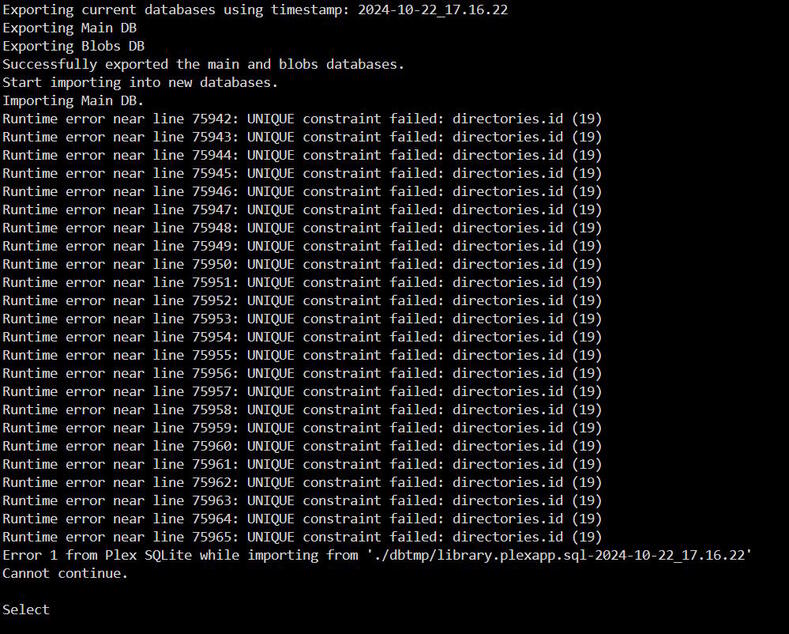
Im on an unraid box and am getting the dreaded db corrupt message. Ive tried the automatic fix option (2) and the manual (5) but get this error. Any suggestions? Thank you too for providing the tool.

When I look in Plex console it shows:

SQLITE3:0x80000001, 11, database corruption at line 84326 of [a29f994989]

SQLITE3:0x80000001, 11, statement aborts at 10: [SELECT di.id,di.library_section_id,di.parent_directory_id,di.path,di.created_at,di.updated_at,di.deleted_at FROM directories di WHERE di.parent_directory_id=:C1] database disk image is malformed

LibraryUpdater: exception updating libraries; pausing updates briefly before retrying: std::exception

@angusmckinnon

Notice the error is a 'UNIQUE" constraint error.

This happens when there are duplicate record IDs. PMS wants unique IDs.

This is normally easy to recover from by using the “IGNORE” command to ignore these.

HOWEVER, you also show the database has a hard corruption of its content (line 84236)

At this point, the best recovery is to use REPLACE and get the most recent valid backup available (should be only a week old)

If that doesn’t work or you don’t have any valid backups, you’ll have to proceed with what you have.

To proceed with this type failure.

  1. Enable IGNORE mode
  2. Now do AUTO
  3. Ignore the UNIQUE errors as they stream by (the tool will ignore them too)
  4. Disable IGNORE mode
  5. AUTO one more time.
  6. Check the DB.
  7. If that’s not working … and you have no viable backups, start PMS, survey the damage, decide how you want to proceed.
3 Likes

Thank you very much @ChuckPa that seemed to fix it. I just enabled the ignore, ran the auto repair and this time it completed. Turned off the ignore, ran the auto repair again and it completed. No errors.

I didnt have to use the Replace part.

Fingers crossed and see how it goes. The number of reddit and blog posts I read before stumbling across this thread was crazy. Surprised this isnt built into Plex itself. My initial problem was that Plex wasnt adding new content despite me being able to see it on the server in the directories.

Thank you again.

ALL:

I have, as previously planned, an update for everyone.

In this update, v1.09.00

I have added PURGE; Delete all transcoder temp files and images > 24 hours old.

It will clean up everything in /tmp which was created by PMS but isn’t needed anymore.


I’m open to suggestions about naming this because “prune” and “purge” are a bit confusing.

As always,
Comments & Input appreciated and welcomed.

EDIT:
Thread got a little long – cleaned up 2 year old comments.

NUKE it

Other choices on the table so far are:

  • Delete
  • Clean
  • Wipe
  • Flush