DBRepair development

I doubt we’ll ever see DBRepair in Plex or shipped with Plex.

@michael_766

When you look at the tool’s menu, you have STOP and START menu options.

A common command line is:

#   ./DBRepair.sh  stop auto start exit

It’s setup this way so you can perform other actions as you deem appropriate.

ALL:

I’m contemplating one more pair of commands but not totally convinced how much benefit it provides.

  • Backup
  • Restore

I’m not convinced about how many of the DB files to backup. Suggestions requested.

I would add md5sum to the backup for each of the two DB files.

Thinking about usage would be:

./DBRepair.sh   backup "/path/to/backup/directory"
./DBRepair.sh   restore "/path/to/backup/directory/BackupFileName"

In the menu (interactive), it would ask for input before proceding. A blank line (no path given) would return to the menu.

2 Likes

But is there a reason to not ship it with Plex? Doesn’t take up much space. And if anyone ask for help with any database issues you’ll know they have this already installed to point them to run.

1 Like

@michael_766

Plex has not ask me for permission to include it.
Also, if they include it, there is a sense of “their version” which they’d be obligated to support.

3 Likes

Would It be possible to add an option for clearing out any DVR and Tuners? Think one of the tuners may have caused an issue where one of my libraries won’t load the recommended page any more. For now going to try fixing it manually from Clear all DVR settings and start again Windows Plex Server - #2 by OttoKerner

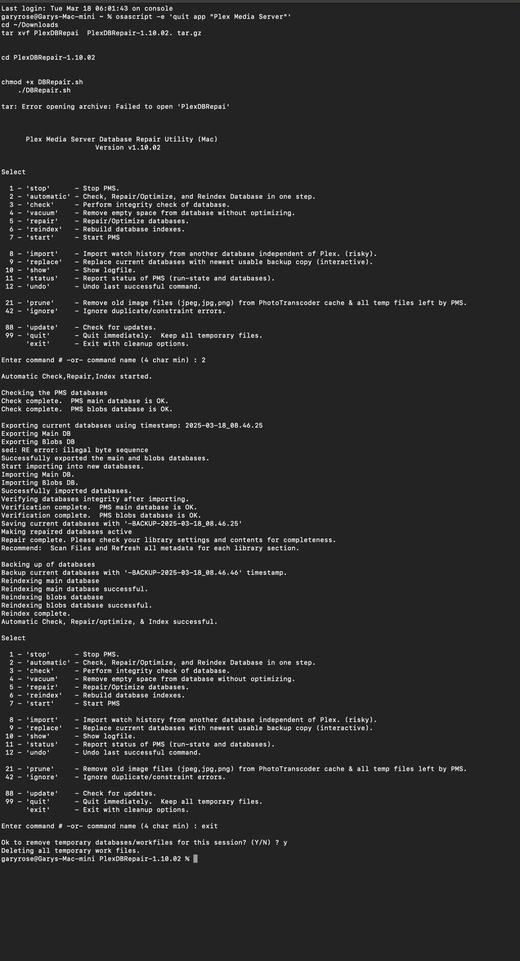
Hi, after running DBRepair 1.10.0`2, I have noticed the following.

MacOS

Does this indicate any issue I need worry about, it appears on every repair in terminal?

sed: RE error: illegal byte sequence

Cheers

@SE56

Yes, that’s significant. What were you doing to cause it ?

I do not know, Is there a common way it can happen. It seems it is not causing a issue that I can detect.

It shows up in Terminal after using PlexDBRepair.

when you ran it, what was it doing / which commands did you issue ?

1 Like

“2” and finished with “exit”

@SE56

I found where the error is occurring – EXCEPT – this is original code.
I do not understand why it’s failing now.

Are you using an old or new version of MacOS (some new ‘undocumented features’ ?)

Regardless, let’s see if we can circumvent it.


  • Open a terminal window.

  • Type the following and confirm the error

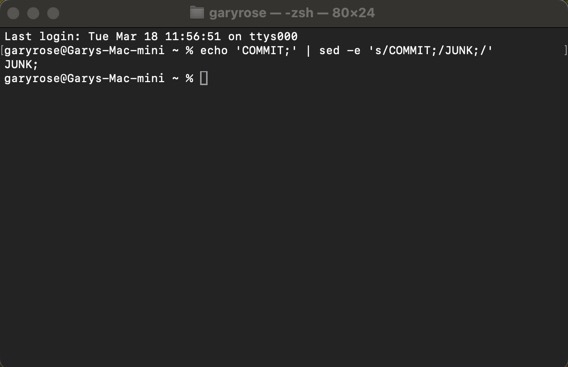
echo 'COMMIT;' | sed -e 's/COMMIT;/JUNK;/'

  • If you confirm the same RE error, now try

echo 'COMMIT;' | sed -e 's/COMMIT\;/JUNK\;/'

Confirm you don’t get any errors
AND
You get JUNK; as the output.

[chuck@lizum ~.2001]$ echo 'COMMIT;' | sed -e 's/COMMIT\;/JUNK\;/'
JUNK;

MacOS 15.3.2


Same

Tried next one

Same Error :thinking: There probably been 2 small updates since release
@ChuckPa

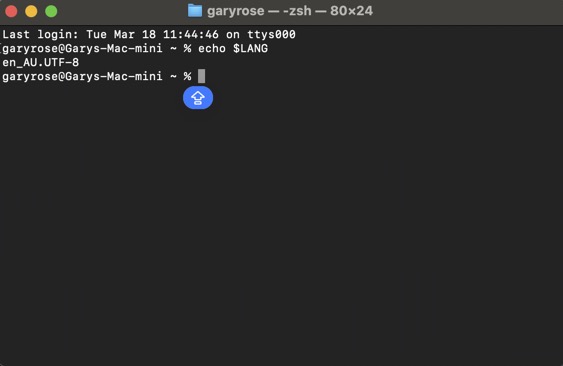
Have you modified your shell environment? What’s your $LANG?

%echo $LANG

By definition of REs (Regular Expressions), the semicolon in s/COMMIT\;/ will be taken literally.

You’ve not shown me where the command line reports the error.

Can you, using the command line, replicate the RE errors your tool output showed ?

I can’t replicate it here.

The second example will, by definition avoid the problem

This is where it’s occurring but there should be TWO of them.


    # Edit the .SQL files if all OK
    if [ $Fail -eq 0 ]; then

      # Edit
      sed -i -e 's/ROLLBACK;/COMMIT;/' "$TMPDIR/library.plexapp.sql-$TimeStamp"
      sed -i -e 's/ROLLBACK;/COMMIT;/' "$TMPDIR/blobs.plexapp.sql-$TimeStamp"
    fi

No I have not changed anything other than MacOS updates

@Volts

as requested

I requested this please:

echo 'COMMIT;' | sed -e 's/COMMIT;/JUNK;/' 

See if this is the error.

If not then I’m going to need some serious DEBUG help with MacOS because there’s some stupid new bug in otherwise rock solid code.

Could this be possibly be the following, introduced recently.

I have it disabled

OOOOOOH, this is going to get ugly.

no error on that regular expression (the only one used in “Auto” processing.

I will do my best to figure out what’s happening but i’m leaning toward a MacOS bug.

Stable code doesn’t just ‘fail’ after all this time.

Sh.t, that a nasty outcome :face_with_peeking_eye: