I see if I can get ahold of my MacOS guy and have him try it.
My Mac Mini died last year
I see if I can get ahold of my MacOS guy and have him try it.
My Mac Mini died last year
So should I try manual commands?
are you confortable with the Linux shell / bash ?
Nah, not at all
Before I rip this apart.
You’ve not had any trouble until this update of MacOS ?
(DBRepair hasn’t changed in months either)
I have not noticed prior to 15.3, thats when this AI rubbish was introduced
Thanks. That really points the finger at Apple.
Have you the time to talk to them about it?
I realize we’ll need to get a repeatable example of the failure for them to take action — which means running the code in full verbose debug and then examining it.
I’ll work on a procedure for you to capture that verbose output
So what harm is the error to my Mac or more important PMS. God help me if Plex craps itself, divorce or a shooting 
As for Talking to apple I would not know where to start considering this is all third party analysis.
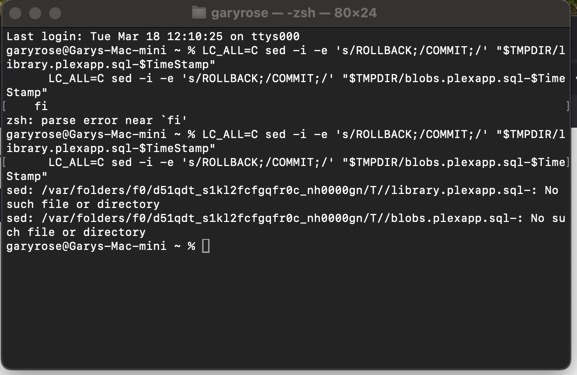
My guess is this: regex - RE error: illegal byte sequence on Mac OS X - Stack Overflow
Try prefixing the sed commands with LC_ALL=C.
# Edit the .SQL files if all OK
    if [ $Fail -eq 0 ]; then

      # Edit
      LC_ALL=C sed -i -e 's/ROLLBACK;/COMMIT;/' "$TMPDIR/library.plexapp.sql-$TimeStamp"
      LC_ALL=C sed -i -e 's/ROLLBACK;/COMMIT;/' "$TMPDIR/blobs.plexapp.sql-$TimeStamp"
    fi
WTH? Why now ?
Maybe the database has some new extended text characters now, a movie or person name with something, or an emoji even.
@SE56 … you could share a database file, zipped up?
I’m sorry I meant to modify the script, that’s the section @ChuckPa identified as the likely failing commands.
The SQL won’t cause a RE error.
Setting LC=C controls the operation of sed arguments
Standby please, I’m crafting a test
Instructions, just run it


So just zip it and post
DBRepair-test.sh.zip (17.1 KB)
I gave you the tar.gz.