DBRepair development

    # HOTIO Plex container
    elif [ -d "/config/Plug-in Support" ]; then

      PLEX_SQLITE="/app/usr/lib/plexmediaserver/Plex SQLite"
      AppSuppDir="/config"
      PID_FILE="$AppSuppDir/plexmediaserver.pid"
      DBDIR="$AppSuppDir/Plug-in Support/Databases"
      LOGFILE="$DBDIR/DBRepair.log"
      LOG_TOOL="logger"

      HostType="HOTIO"
      return 0
    fi

Not sure if you want to check against /app/usr/lib/plexmediaserver instead of /config/Plug-in Support up to you.

So I got a friend to modify it but its not ideal. I mounted to DBrepair in another folder in Appdata, and then added it to the docker. That part probably isnt needed but the rest should be good.

So this is how he killed the service on Unraid, maybe add that to the Github? As that was a big issue.

Im going to share your whole script because he needed to adjust a couple things to get it to recognize the Hotio Image.
DBRepairHOTIO.zip (8.7 KB)

The guy who helped me is going to comment this too to make sure you get the details straight from the intelligent source and not the newby :slight_smile:

So I ran the other Hotio DB repair script that I shared a few comments up yesterday, it sped up Plex a lot and reduced the DB size a lot. BUT after running this script, OH MY GOD did it speed up Plex!! Everything is instant now. I have a fairly large library, about 16000 movies and a lot of tv shows, my DB was about 950MB. Im sure even larger libraries will benefit even more.

THANK YOU

So you’re happy with the results ?

would you ask your friend to comment please?

AppSuppDir points to the directory ABOVE “Plex Media Server”
DBDIR always includes “Plex Media Server” in the path

What’s written doesn’t show where “Plex Media Server” is.

    if [ -d "/config/Plug-in Support" ]; then
      PLEX_SQLITE="/app/usr/lib/plexmediaserver/Plex SQLite"
      AppSuppDir="/config"
      PID_FILE="$AppSuppDir/plexmediaserver.pid"
      DBDIR="$AppSuppDir/Plug-in Support/Databases"
      LOGFILE="$DBDIR/DBRepair.log"
      LOG_TOOL="logger"

      HostType="HOTIO"
      return 0

    elif [ -d "/config/Library/Application Support" ]; then
      PLEX_SQLITE="/usr/lib/plexmediaserver/Plex SQLite"
      AppSuppDir="/config/Library/Application Support"
      PID_FILE="$AppSuppDir/Plex Media Server/plexmediaserver.pid"
      DBDIR="$AppSuppDir/Plex Media Server/Plug-in Support/Databases"
      LOGFILE="$DBDIR/DBRepair.log"
      LOG_TOOL="logger"

      HostType="Docker"
      return 0
/config/Plug-in  Support/Databases

does not seem right. Where’s the "Media’ and “Metadata” directories ???

I don’t think I could be more happy lol I am curious if I still get the slowsql sleep 200ms error though or the same amount of crashing. Ill find that over the next few days.

Now if you can write a script that tells plex to scan every file and analyze for intros, generate preview thumbnails and chapter thumbnails, that would be god like!! I have such a big library that I often need to kill plex for something and when I bring it back all those jobs get dropped. Analyze the library only seems to work on preview thumbnails and not the other 2 things.

I believe Analysis and Intro Detection are single endpoints where you can tell the server to “Do everything”. I will ask about that.

1 Like

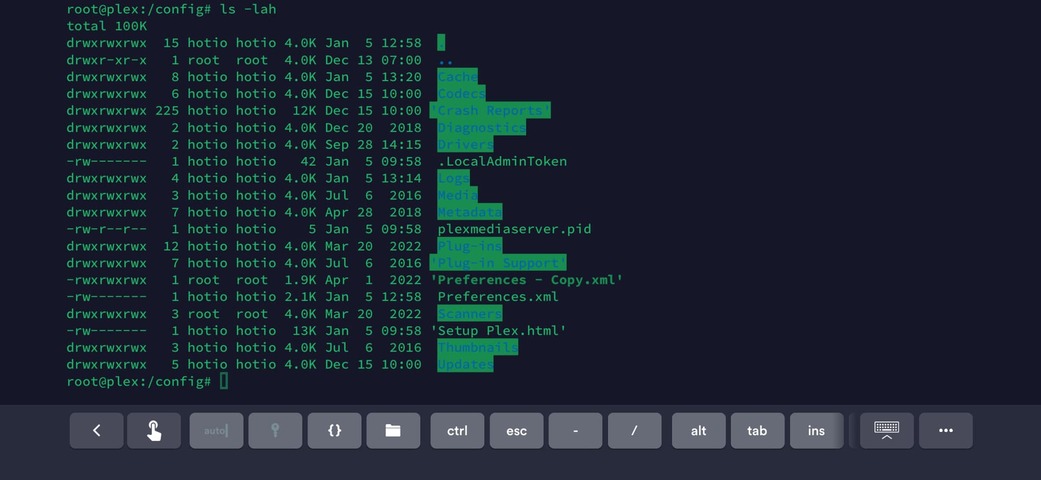
there is no Plex Media Server directory for that image.

That’s interesting.

I’ve never seen PMS startup and NOT create “Plex Media Server” under
“PLEX_MEDIA_SERVER_APPLICATION_SUPPORT_DIR”

Care to share that trick?

here is the container service

you could also check that repo for the install scripts.

after reading that i checked the app directory and it does symlink it

root@plex:/app/config# ls -lah
total 8.0K
drwxr-xr-x 2 root root 4.0K Dec 13 02:26  .
drwxr-xr-x 1 root root 4.0K Dec 15 10:00  ..
lrwxrwxrwx 1 root root    7 Dec 13 02:26 'Plex Media Server' -> /config

Edit: mobile backticks suck!
Edit2: Moderator supplied backticks rule!

I will indeed check that.

All Linux distro packages root themselves at AppSupp but then create “Plex Media Server” underneath it with the usual underneath that.

Plex official does that, so does Linuxserver and binhex… so I’m curious :slight_smile:

Ah, so you did cheat :stuck_out_tongue:

LOL i hadn’t checked hotio’s image prior to this whole ordeal before helping mongoose out.

now we know haha.

¯_(ツ)_/¯

1 Like

agreed… “Now we know” :roll_eyes:

:rofl:

1 Like

Let me know when/if you update the script to support Hotio. I am going to do a big write up on the Unraid and Plex subreddits about improving Plex performance and this will be one of the tools I will talk about. I want to wait until you update it though.

@Sittingmongoose

Take this for a test drive please?

  1. save your existing (just in case)
  2. Untar this
  3. Stop PMS
  4. Testdrive

DBRepair-Hotio-Proto.tar (40 KB)

Please share the command you use to stop plex?
(for the README)

I will try it out tomorrow, ill let you know!

You’re making me wait? :angry: LOL

Thanks.

I have a bunch of people watching right now lol

I used s6-svc -d /run/service/plex on his system