I have some shows that I originally had in 720p, and now I got 1080p to replace them. I deleted the 720p files manually and scanned the library a few times since then. Plex still shows that the episodes have a duplicate and when I check the get info, it still lists the 720p file there, which now anyway shows as “unavailable”. How can I get it to remove them? Apart from moving the whole show out of my folder, then scanning, then move it back and scan again? (I have done that a couple of times, but is there no better way?)
Not sure this will do it, but it’s worth a try:
Go to Settings > Troubleshooting.
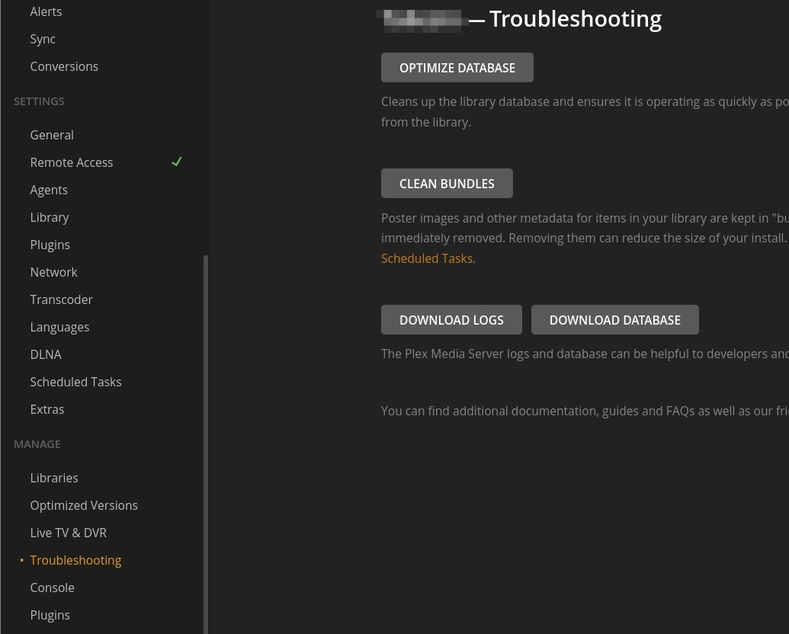
Here you will see buttons labeled “Optimize Database” and “Clean Bundles.” You should run both of those. Then, go back to the Home page. Click the Action menu on your Movies library, go to Manage Library, and run “Empty Trash” (why they don’t put an ‘Empty Trash’ button on the Troubleshooting page, I don’t know).

If you do a lot of add/delete operations, you should run these steps occasionally anyway. It can help maintain your server’s performance.
I think that Empty Trash will be enough to fix this.
No harm in the other steps, of course.
You can Empty Trash for each library via Settings → Manage → Libraries. That’s not much faster, but at least it’s still near the Troubleshooting page.
Or for every Library on the server. On the Home page, under the list of pinned items on the left, click More. Then click the kebab ⋮ menu next to your server name, and choose Manage Server → Empty Trash.
… and if you don’t want that to happen again:
Settings → Library → Empty trash automatically after every scan
I did all this, unfortunately, the duplicates are still showing 
Is your server updated?
All up to date yes. Well, in the end I moved it out of the media folder, then deleted the show from the system, then moved it back and rescanned. Now it is all proper. Not too nice but well, at least it works now.
Yeah, but you probably lost your watching history
Unlikely - that is held in some mayonnaise jars on Funk and Wagnall’s front porch.
If the stuff changes libraries - it’s over.
Not even then! Watched status is saved by account_id+media guid. It doesn’t care about the Library. It’s as as persistent as glitter.
If you watch something in one Library, delete it, empty trash, clean bundles, delete the library, create a new library, and add the same thing back … Plex knows you’ve watched it.
(But removing and re-adding media loses the added_at dates, or any customized metadata, if that’s something you care about.)
There’s some evil combination that mysteriously murders the Rasputinish Watched Status…
I blew up a whole bunch of TV Shows recently ‘testing’ the New Agent.
When I finally did the big switch - everything else was fine…lol
Oh, that’s fair. When switching agents if everything goes smooth and it completes Upgrade Matching, it migrates the watch status.
I bet your old watch status is still down in the tar pits, fossilizing.
It’ll stay there… we got over it… (and reset manually).
Doc? it hurts when I do that.
Don’t do that!
Hahaha 
I had not started watching that show yet, so no problem. And even it that happens, simply watch the episode you had up next and it will be back in the list
