Things can get messed up if you de-authorize the server from your account. By just deleting it from the list of authorized devices, the server itself still remembers that it used to be linked to your account.
So if you next delete your actual account or try to claim the server with a different account, things are set to go south.
Let’s try to do this one last time
shut down the Plex Media Server app on your server
for safety… make a backup of the full registry or the Plex registry keys
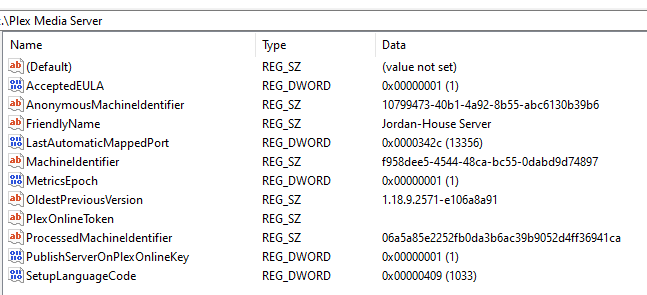
open the Registry on the machine running the Plex Media Server and search for HKEY_CURRENT_USER\Software\Plex, Inc.\Plex Media Server
Make sure the following registry keys are deleted (not just their values)
PlexOnlineHome
PlexOnlineMail
PlexOnlineToken
PlexOnlineUserName
Save the registry with those updates
Re-start the Plex Media Server app on your system
Access the web interface of the Plex Media Server using the local address
if you’re working on a different machine in the same network… open http://[IP address of the device]:32400/web
if you’re working on a different machine and on a different network… you’ll need to first establish a SSH tunnel to the machine … let’s look at that if you need this option
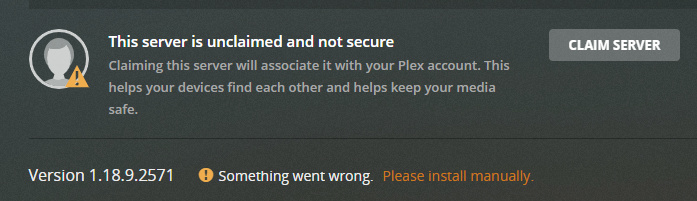
Go to Settings > Server > General and click on Claim Server
Did all the steps that you listed and still having an issue.
Step 4 for registry i only have PlexOnlineToken so I just deleted that and saved it.
Now when I claim server, it’ll just spin and then go back to claim server.
I did notice right before it stop spinning, the window in the middle came up saying error with signing into plex. If though I am already signed in
First screenshot is after all steps were done
Ran through all the steps again and still running into same issue.
Curve ball of a question. Could my ISP be doing something that’s causing these issues. I remember you said something about what you saw in the logs. Just a thought?
■■■■ I even went on my VPN to see if that’ll do anything and got same results
Looks like some handshake as part of the sign-in / claim are timing out.
Are you sure there’s nothing on your PC / router that’ll interfere with the communication?
You said you’re using a VPN… this could actually interfere with the authentication for the server sign-in – worth a shot
No nothing at all. Only thing I did on the router side of things was configure port forwarding for plex. and I used the VPN to see if it would do anything and then shut it back down. Should I possibly do a factory reset on the router? All firewall options are down on my PC. I don’t think it could be that since they are off
Issue has been resolved. After running though a few things in my head the issue was narrowed down to a program i downloaded. No idea which program but wasn’t any program with antivirus or firewall. Just removed the recent programs I installed that I dont need anymore and Plex is working again and I can claim server and have no more issues. Thank you both for all the help and everything!