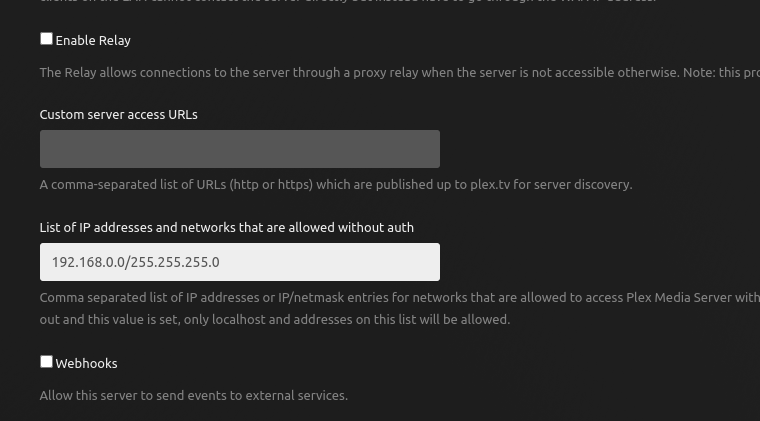
When you have that preference fixed, and PMS restarted,
Please retest and grab a fresh set of logs.
Let’s see how far we’ve gotten
When you have that preference fixed, and PMS restarted,
Please retest and grab a fresh set of logs.
Let’s see how far we’ve gotten
Most recent logs… but the Shield is now active as a player (never a server).
Also some context you said when I made a preference change… I have done nothing to this VM other than restart it a couple of days ago when I anted the auto drivers blacklisting to be picked up by Proxmox, but never a single setting change to this VM.
It was made by be on my end???
Plex Media Server Logs_2025-04-06_21-08-16.zip (2.7 MB)
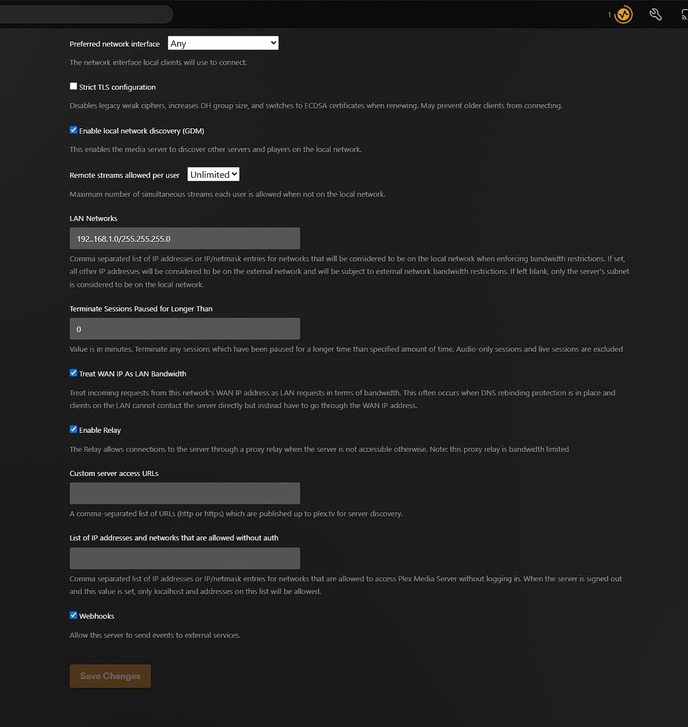
Yes, In your Settings - server - Network - Show Advanced
This is my setting.
This is where the preference is displayed and set.
This is what you need to fix.
For you..
192.168.1.0/255.255.255.0Good call, I forgot about that change. Here is what did do
I used CIDR notation for the same
also, edit made
Then we’re not looking at the right server.
What’s the IP address of that server ?
Your logs are full of the errors so it’s impossible for me to see .
We can try this:
Logs directorytar.gz of the Logs directory and attach it here.I’m setup for both ZIP and tar.gz files
give a few moments (grab a snsck? 5 minuts) I’ll have it stopped.
No, not lan aware, 192.168.1.215 = Plex x.x.1.240 proxmox x.x.1.210 NAS fwiw
Proxmox? I’ll try not to hold that against you.  lol
lol
What’s important is the IP which the VM itself has.
The Proxmox host IP doesn’t matter.
Thought not, but thought I’d throw the IP out here
all stopepd.zip (3.1 MB)
7z not allowed extension
proxmox is a comfy couch… hear about optons in the beyond… but it comfy here
You’re on Linux:
sudo bash
cd "/var/lib/plexmediaserver/Library/Application Support/Plex Media Server"
tar cfz /tmp/PlexLogs.tar.gz ./Logs
you then upload the /tmp/PlexLogs.tar.gz
I sent you a PM.
We resolved the problem.
A network mount problem had crept in.
It’s all resolved.
First off, big shout out to @ChuckPa Not a simple problem, and it took a critical thinker with some read coding chops figure it out.
Out the gate, to anyone using plex, It is not required, nor should it be, but cleaning up your authorized devices That have not been used a while my have stopped this from happening to me.
UPDATE from OP: Probably NOT. Am I leaving this post here? Yes for four reasons I will start here, and add more blow.
There is no way to know for certain, not without a perfect log file that captured every single keystroke or action taken on any related hardware on my network prior to this happening. So without a literal time machined as @ChuckPa said, it was a network mount problem. Ultimately, we can only know the state of how things are now, and have some really good ideas what happened
And looking at the state of the room, seeing only spots where the furniture may have been, Could it have been a PEBKAC issue? sure. Could it have been caused by accidentally pulling in an out dated variable? I think so. I’ve see weirder tings happen in Production Code.
Clean your data. challenge assumptions, and have a good night.
If ANYONE can catch this happening or figure out how to recreate it.
PLEASE !!! Let me know.
This topic was automatically closed 90 days after the last reply. New replies are no longer allowed.