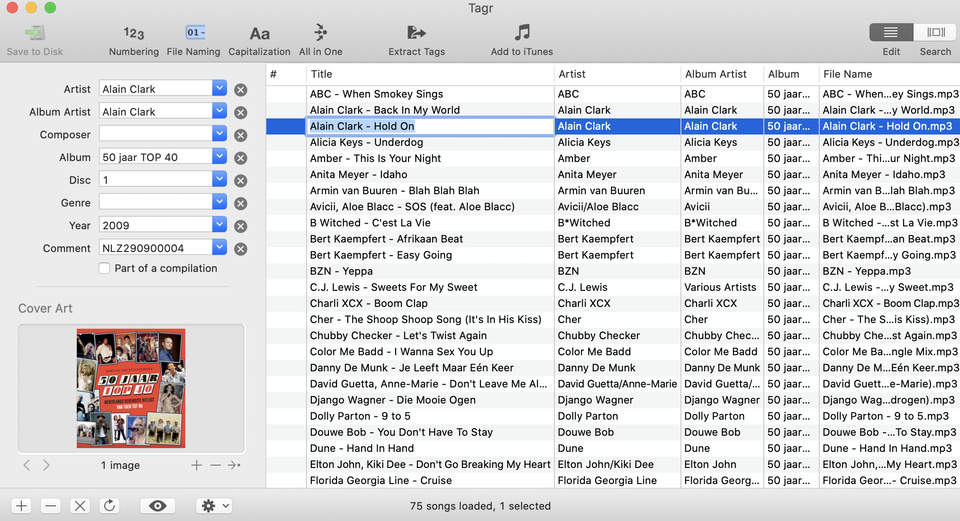
I have the problem that when I add music different albums arise? This while the album tag has the same name.
How can I solve this?
Server Version#: 1.19.1.2701
Player Version#: 1.12.0.1232-aacabe78
I have the problem that when I add music different albums arise? This while the album tag has the same name.
How can I solve this?
Server Version#: 1.19.1.2701
Player Version#: 1.12.0.1232-aacabe78
Both the folder organization and the embedded meta tags need to agree on the following:
So, for proper function of Plex, you need to organize your music into a folder structure like this:
Music / AlbumArtist / AlbumTitle / Tracks
(“AlbumTitle” can also be a Single or EP release.)
If you enable ‘Prefer local metadata’, all your tracks must have complete and correct embedded meta tags.
The meta tag ‘AlbumTitle’ must have identical content for all tracks of an album.
The ‘Disc Number’ does not belong into the Album Title tag, but into a separate ‘Disc Number’ tag!
All tracks must also have identical content in the ‘Album Artist’ meta tag. For sampler albums, this is usually “Various Artists”.
Each track must also have the ‘Track Number’ metatag populated.
Here is an example how this works:
“Album Artist” must have identical content for all tracks of one album.
In this case this can be ‘Various Artists’ or whatever you choose.
A playlist is not an album, though.
Do the tracks have each a “Track Number” meta tag?
Are they all stored within the same folder?
The numbers don’t have a Track Number. After I correct all numbers with a Track Number it works. Thank you for your help