I name my Chinese subtitles zh-Hans and zh-Hant, because that’s how MKVToolNix would name them if I were to select the language and script through the GUI. This in itself seems to be no problem for Plex, because when the subtitle file is separate Plex will identify filenames containing zh-Hant as being Chinese (Taiwan), this is wrong but that’s a different matter.
When the subtitle is embedded into an MKV file however, as I like to do since it leaves me with 1 smaller file, it will only read “Chinese”. When there’s both Simplified and Traditional it’s not that bad because the first is Simplified, the second is Traditional. When there’s only one or the other it’s impossible to tell whether it’s Simplified or Traditional.
The fix is quite simple really, just read one more data field on the subtitle, if not empty try to match, if empty or no match fall back to what it’s now.

That way it would even be possible to read e.g. es-419 or pt-BR…

Thank you for your consideration.
Agree with your request (I’m a native English speaker and sadly only speak one language but like to have multiple text subtitles just in case).
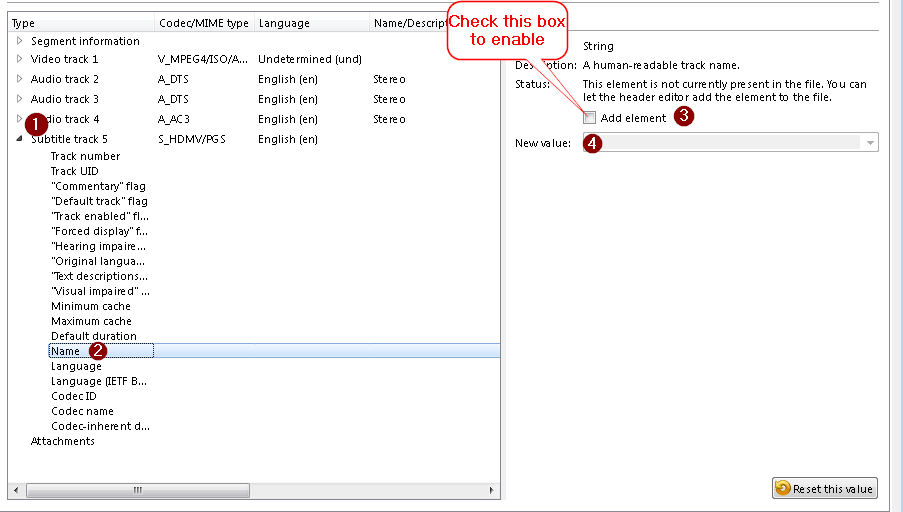
That said, once thing you can do to help alleviate this since you are embedding the subtitles within the MKV container and using MKVToolNix, is to give the subtitles a title so that you can distinguish it (this will only work with internal subs, which is hopefully obvious but just want to point that out).
From MKVToolNix:
Result in Plex (please don’t “roast” me about my possibly incorrect titles  I got to a “standard” naming for me for Chinese subs and I’m still somewhat confused lol).

That should at least help while you wait to see if this ever gets implemented (it would also be helpful for Portuguese since there is pt-PT and pt-BR and probably some others, technically English as that has different variations like en-US, en-GB, en-IE (Ireland)), so overall a good suggestion (I can’t vote as I have no votes left) just figured I’d try and give you a workaround for now.
-Shark2k
1 Like