Server Version#: 1.29.0.6244
Player Version#: 9.10.1.36024
Plex fails to direct play and switches over to transcoding the video (while also burning in compatible subtitles) on my Fire TV Stick 4K.
This happens since a short time all those media played without an issue before.
I noticed, that the culprit is the “frame rate matching” setting. Disabling this setting solves the issue, but leaves me without proper frame rate matching.
I played two movies, both with 1080p and 4K versions in library, with and without subtitles, just hitting play and explicitly choosing the 4K version, with and without framematching enabled. Fire Stick 4K connected to an 1080p SDR TV.
Interesting is also that when just hit play, it chooses the 1080p version on one movie (as expected), but the 4K version on the other (I only noticed that after ending my test)…
2022-11-10_Client Log.txt (633.3 KB) 2022-11-10_Plex Media Server.log (998.0 KB)
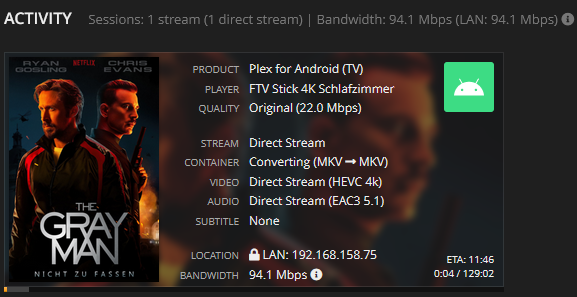
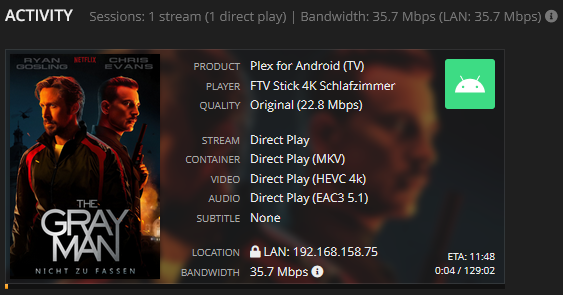
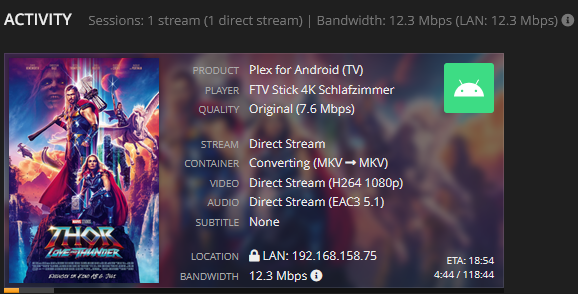
Framerate matching diabled, just hit play:
Framerate matching disabled, choosing 4K version:
Framerate matching enabled, just hit play:
Framerate matching enabled, choosing 4 K version:
Framerate matching enabled, just hit play:
Framerate matching enabled, choosing 4 K version:
Framerate matching disabled, just hit play:
Framerate matching disabled, choosing 4 K version:
I don’t know why it just converts the container on “gray man” though. I’m sure I had other videos where the video was transcoded even without subtitles present, when framerate matching is enabled.
When starting Thor 4 with subtitles DISABLED and framerate matching enabled, Plex chooses to direct stream the container while copying audio and video.
If i then ENABLE the forced subtitle while playing the playback switches to Direct Play.
Yes. I must also apologize for not getting back sooner
Resolve mystery #2
When you have subtitles in the file but you DISABLE subtitles, PMS must REMUX the file to strip them out. This is the definition of DirectStream.
When you have the subtitles in the file but leave them ENABLED, PMS can send the file AS-IS WITHOUT MODIFICATION. This is the definition of DirectPlay. (PMS can directly play the file without any alteration of the container or contents)
I am still working on the first issue. I am trying to recreate your scenario using content I’ve ripped from my disks (which I keep as-is at full strength). I have the Spears & Munsil test disks.
I am testing using 1.29.2, FireTV 4K Max, and 2021 LG C1 OLED 48".
Eh lol, no. When a file Direct Plays all tracks only are selected by the player at the client side (no interaction at all at the server side), thats the definition of Direct Play. Of course a file can also direct play, if I disable the subtitle. It does on the EXACT same hardware with framerate matching disabled.
This all comes down to the bug, where for some reason Plex decides that Direct Play is not possible, when framerate matching is enabled.
Sorry, I didn’t mean to sound harsh or anything.
I may have the time to reproduce the issue tomorrow with a Fire TV 4K Max and maybe also a 4K TV, instead of the Fire TV 4K and an 1080p TV.
Did you saw from my logs, that the switching to Direct Stream with framerate matching enabled
[TranscodeFallbackBehaviour] Detected direct play failed, falling back to transcode (starting: true)
seems to be caused by an error in the AUDIO section:
Suppressed: com.google.android.exoplayer2.audio.u$b: AudioTrack init failed 0 Config(48000, 252, 191998)
			... 13 more
Caused by: com.google.android.exoplayer2.audio.u$e: AudioTrack write failed: -6
	at com.google.android.exoplayer2.audio.g0.k0(SourceFile:206)
	at com.google.android.exoplayer2.audio.g0.Y(SourceFile:24)
	at com.google.android.exoplayer2.audio.g0.f(SourceFile:370)
	at com.google.android.exoplayer2.audio.l0.Y(SourceFile:45)
	at x2.p.b(SourceFile:62)
	at x2.p.render(SourceFile:46)
	at com.google.android.exoplayer2.w1.p(SourceFile:91)
	at com.google.android.exoplayer2.w1.handleMessage(SourceFile:220)
	... 3 more
I can confirm I have the same issue. I installed plex on my firestick 4k yesterday and I am getting an error for 4k dolby vision and hdr content if I have Frame Rate Switching enabled in plex. If I set it to off they play but at 60hz which is unacceptable. 1080p SDR content plays fine with Frame Rate Switching and the refresh changes correctly.
Other than that DV plays very well in plex on the fire stick 4k with no stutters as opposed to my shield tube where plex stutters sporadically.




 , let me go redo what I did and try again.

