Server Version#: 1.20.0.3133
Player Version#: 8.4.1.19323
I have been having issues playing HEVC/H.265 files to clients which support direct play and have not had issues previously. I am unsure when the issue started but I cannot play the files on plex clients on Bravia (Android) TV, Nvidia Shield and Apple TV.
Have tried Wired and Wireless connections.
The worse offender is Bravia. While Nvidia will start playing after I wait long enough, Apple TV stutters but the Bravia refuses to play the file and freezes on the first frame.
Before someone tells me its a wifi/network issue. Emby Server running on the same QNAP NAS and the emby client running on all the above mentioned devices have no issues direct playing the file.
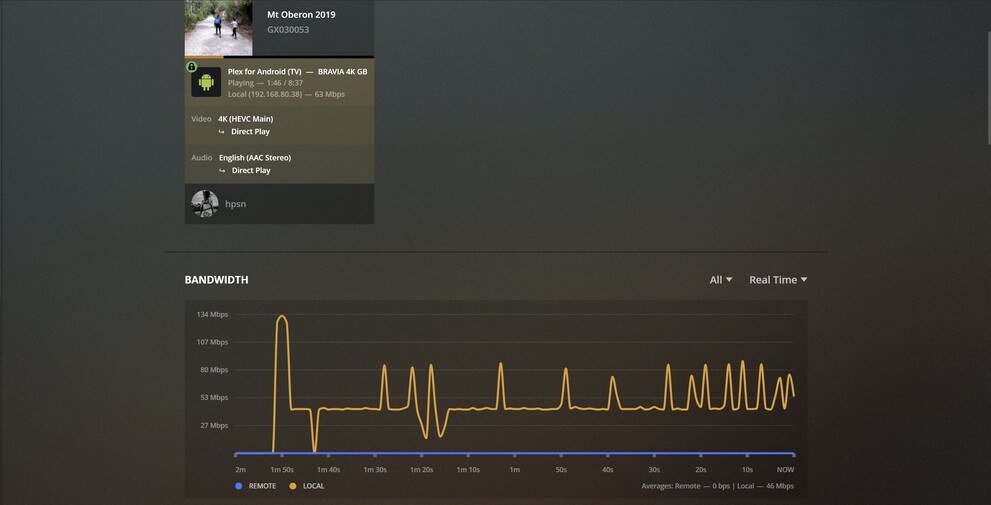
I see a weird behaviour with Plex bandwidth consumption and have provided a screenshot below.. is this normal? It consistently falls back to 63 Mbps and then just does this see saw…
I have also attached the log from the Bravia client and the Plex Server running on QNAP NAS.
Appreciate if someone can tell me if they something wrong.
I cannot speak to the Bravia (mine died a few years ago)
I do have a Shield Pro 2019
The Plex app has no trouble direct-playing files when the enhanced player is on.
a. Please do check that as it was initially off by default.
b. Your enhanced player mode might still be off. Please turn it on for the Shield.
c. Subtitles & Audio are handled by the app.
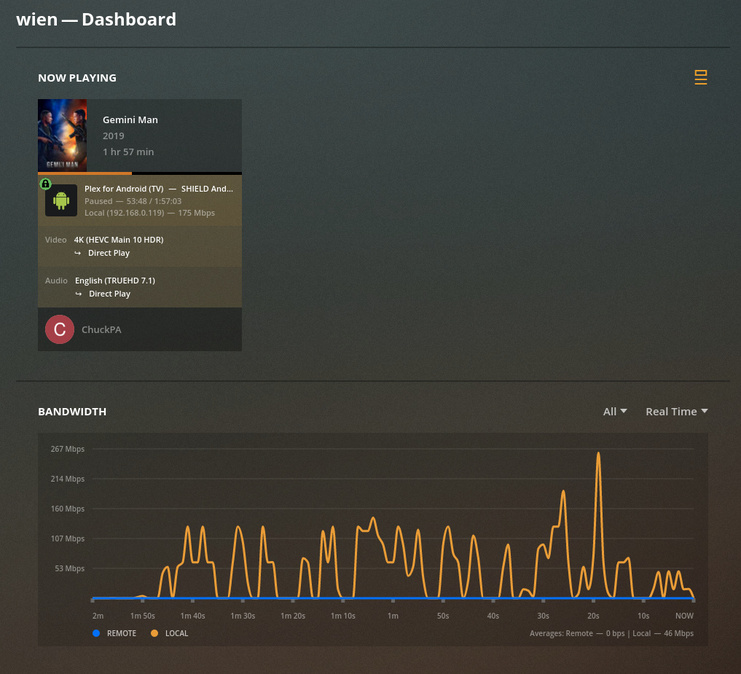
The bandwidth chart you’re seeing is how the network is actually being utilized.
a. The initial full speed & sustained burst to load the player buffer and start playback
b. The server keeping the buffer full although there is a period of low data demand
c. Followed by those fluctuations (both up and down) inclusive of that string of spikes which probably coincides with fast action or rapid scene changes.
CGI imagery very commonly generates a lot of these because the edges are crisp and data rate demanding for those moments.
In a nutshell, Is this normal? I cannot be 100% definitive without seeing the XML / media info but it seems to be a 4K image and not the least bit surprising to me. When I am playing HEVC 2160p, I see bandwidth like this all the time.
I will do what I can to help you with the devices I also have. I hope that’s enough to figure out what’s happening with everything else?
Didn’t need you to speak from experience, hence attached the client log. I would also go as far as saying, forget it’s a Bravia and treat it like any other Android TV (if it is a software issue). Again, to help you help me, I did attach the log.
Great!
Thank you for suggesting the enhanced player mode and I will look further in to Nvidia Shield and Enhanced player. Is the enhanced player available for other Android Clients, such as the Bravia TV? I do see a “Enable new video player” option and I have enabled and disabled this with no improvement.
Makes sense, it was just an observation and thank your explaining.
Please ignore the bandwidth chart, my issue more is that the media is not playing at all.
I have also attached the media info. Hope this helps further MediaInfo.xml.txt (2.5 KB)
Thanks for the XML but that file (forgive me) is seriously messed up.
Someone really cooked that video file. A good HEVC rip from 2019 should be BT2020 (UHD - 10 bit color) . This file has BT709 (SDR - 8 bit color). but maybe it’s a re-release so I will not linger.
It has 2 channel audio (AAC codec) which is the most compatible with everything.
I have an AppleTV 4K (gen 5). It does not stutter when the enhanced (new) player is enabled
Yes, “enhanced” = “new”. These are what you want.
I looked through the log you attached, The only activity I see there is attempting to play to the Bravia. Is this correct or did you restart PMS? (restarts cause it to start fresh log files – necessitates downloading and attaching the whole ZIP file for us)
I think the Bravia , like most Televisions, has a 100 Mbps network adapters. That makes streaming high bitrate content to them a bit problematic. Some have 100 Mbps wired while their WiFi is faster when others have the reverse. I am not an app guy. I am the server & OS guy. I try to but can’t keep up with everything out there and why my help is limited to those devices I own.
In the bandwidth chart you posted, that initial spike seems to be consistent with 100 Mbps content. (100 Mbps ethernet is actually about 134 Mbit raw – which is what the graph shows)
To give you a comparison on the media, here is one which I ripped myself.
Also please note the codec shows as HEVC and not HVC1 (your XML sample). – I find this odd. Are you getting transcoding?
Switching gears – because it might be part of the direct play problem.
I see you have your own domain on the QNAP
It looks like it’s hair-pin turning in your modem/router or VPN traffic ?
PMS sees it as an unknown domain.
Have you considered adding the domain to PMS so it “doesn’t spit fur balls” ?
Aug 01, 2020 13:42:41.139 [0x7ff8627f2700] DEBUG - Request came in with unrecognized domain / IP 'qnap.hpsn.info' in header Referer; treating as non-local
Aug 01, 2020 13:42:41.139 [0x7ff8627f2700] DEBUG - Auth: authenticated user 1 as hpsn
Thanks again for the detailed analysis. Let me clarify few things:
The file is a home video shot on a Go Pro Hero (forget what exact options) but that is the end result. The only 4K files i have are from that Go Pro with similar 4K settings. I might download a sample 4K file and see if I have the same issue.
Great!
If we can forget the Apple TV and the Nvidia Shield for now, I would appreciate it. I would like to solve the issue on Bravia Android TV first before I move on to the other clients.
Great, I have enabled this on the Bravia.
I stopped the PMS, remover the current log.
Started PMS
Played the file we have been analysing
Stopped PMS and copied the log fie
I did that so that you dont have to filter through additional noise. Just one file and hopefully that gives you enough info.
I am not using the wired adapter and am connected via 802.11ac wifi (5Ghz) but have also tried 2.4Ghz. Maximum rate I can achieve on the wifi connect is abot 450 Mbps. Also the emby client/server can direct play the file with no issues (same wifi/network).
No transcoding. If i set the Bravia Android Plex client Home Streaming to something like 1080p 20 Mbps and force transcoding. The file plays with no issues.
Yes I saw the logs re network/domain messages and I had done the following:
ensure the FQDN of the NAS running the plex server is set correctly
I am running dnsmaq for my internal dns and have set up an A record to ensure that all clients get the plex local IP when querying the hostname qnap.hpsn.info (and not the WAN IP)
The Go Pro. I unfortunately don’t know anything about them or how they encode but that does explain why I’m not understanding.
I will absolutely set the Apple and Nvidia to the side.
WiFi bit rate of 450 Mbps is more than enough. A 200 Mbps video would blow up most players anyway.
So we’re working on common ground, and can eliminate anything the Go Pro introduces, would you consider:
a. Create another “Other Videos” library section for “Test cases”
b. Download some test files, which I also have, from http://jell.yfish.us/
c. Use these test files to run through a quick suite of tests and figure out where it’s going sideways.
If you agree, I recommend:
20, 40, 60, and 80 Mbps H.264 and H.265 files. If you want to get the 100’s, that’s fine.
I am suggesting this because PMS or the players (players most likely) – one of them probably isn’t understanding how to handle “HVC1” .
To confirm or disprove that, these jellyfish files are our controlled data test case.
Can we refer it to as Bravia (Andorid TV) - I want to ensure that it is understood that it is an Android TV and not Sony OS or some other software version. Sorry to be… pedantic.
Yes, no problems
Yes, it seems so
The only thing I will add since my last post is that, that I enabled DLNA on PMS and used VLC as a DLNA client, had no issues playing the file over DLNA in addition to using VLC to play the file over SMB.
Sony Bravia 55X9000E
a. Software Version: PKG6.6520.0252PAA
b, Android OS Version: 8.0.0
c. Android Security Patch Level: 1 May 2019
d. Kernel Version: 3.10.79
Since when is streaming video with an adapter at 100Mbps probelematic?
Please if you do not know what you are talking about do not interject your opinion.
If a stream is maxing out a 100Mbps connection, we are all in for a world of hurt. Enterprise level hardware would have difficulties running Plex if what you stated was true. LMFAO
@ChuckPa , More than happy to provide a sample, however would prefer not to upload videos of my family on a public forum. Is there any way I can send you a link privately?
hvc1 is a tag for an H265/HEVC stream in an MP4 container. It’s not a different codec. It doesn’t apply to MKV containers.
hvc1 specifies that some encoding parameters will stay consistent throughout the stream. The alternative, hev1, would allow for changes mid-stream.
Apple devices do prefer the tag hvc1 over hev1, and Apple specifically recommends hvc1 in their HLS streaming docs.
hvc1 is more likely to be supported than hev1. If you choose x265 with an MP4 container, Handbrake produces files with hvc1, including for the Apple, Fire, and Chromecast 4K HEVC presets.
The stream itself is still H265/HEVC. I don’t think this changes any of the troubleshooting discussion one way or another, except that hvc1 isn’t a red flag by itself.