Server Version#: 1.31.2.6810
Player Version#: 4.113.2
I’m currently adding my SpongeBob Squarepants DVDs to my Plex server, and I’m having endless issues with the metadata agents. I don’t want to turn off metadata for my entire TV library, because most of the time it’s helpful. For SpongeBob though, every data source is a mess. TMDB seems to be the closest, but it’s by air date instead of what’s actually in a season DVD. For whatever reason, they air in basically random order, and then they organize them into seasons later. Anyways - around 75% of the episodes are matched incorrectly and I’m having to manually edit them. There are a lot of episodes. I’m not even doing the descriptions and it’s just taking forever. I’d honestly prefer there werent episode names or descriptions at all. Just display the episode number, grab the thumbnail from the video file, and it’d be good.
Any suggestions? I’d really like to be able to just shut off the agents for a specific series
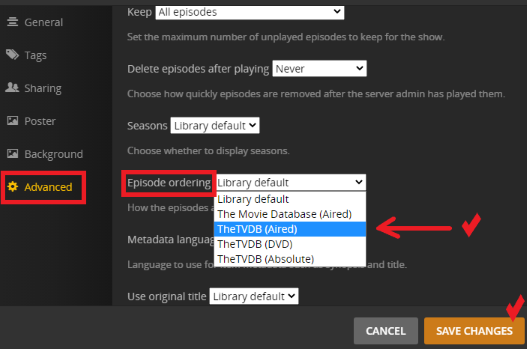
TVDB is closer than TMDB, but as an example, “Have You Seen This Snail” is considered a special on TVDB for some reason. It’s S04E05. It’s a double feature, but it’s still episode 5. And even if TVDB was correct, that’d mean I need to disable TMDB for my TV library for it to be correct?
I’m not seeing any good possible solutions in my search
Ah, I didn’t see that that was an option for a series. I kept looking in the specific season. That is ALMOST entirely correct, except E29 and E30 are inverted in TVDB, for some reason… So close. I’m fine to manually change those two, I guess.
There actually does seem to be a few more inversions… Very strange. This is close enough for me though. Maybe it’s fine for the other seasons… We’ll see.
Yeah unfortunately the DVD order doesn’t always fit the exact DVD you bought. Some are so far off they don’t even have the same episodes, so hopefully it’s closer than that lol