Disc Number Not Being Recognized

Server Version#: 1.29.2.6364-7000
Player Version#: not sure—running from browser

I am looking for help resolving a track and disc organizing problem.

I have uploaded files for a 5-disc set and Plex is not recognizing the disc number for several files from the fifth disc. I am using the recommended method of [disc]-[track] [song title].mp3 for all files, but for a subset of the disc 5 titles, they are being read as single track albums. Below are screen shots of the relevant metadata for one of the files.

Thanks for the assistance!


I separate by Disc N folder structure and use Picard to rename and tag

[chuck@lizum music.1992]$ cd Supertramp
[chuck@lizum Supertramp.1993]$ cd Supertramp\ -\ Paris/
[chuck@lizum Supertramp - Paris.1994]$ ls -la
total 8
drwxr-xr-x  4 chuck chuck   46 Mar  6  2018 ./
drwxr-xr-x 16 chuck chuck 4096 Jun 26  2019 ../
drwxr-xr-x  2 chuck chuck 4096 Mar  6  2018 Disc 1/
drwxr-xr-x  2 chuck chuck  330 Mar  6  2018 Disc 2/
[chuck@lizum Supertramp - Paris.1995]$ ls -la *1
total 271072
drwxr-xr-x 2 chuck chuck     4096 Mar  6  2018 ./
drwxr-xr-x 4 chuck chuck       46 Mar  6  2018 ../
-rw-r--r-- 1 chuck chuck  9298686 Jun 20  2016 01 - School.mp3
-rw-r--r-- 1 chuck chuck 40037165 Mar 10  2017 02 - Ain't Nobody but Me.flac
-rw-r--r-- 1 chuck chuck 28612129 Mar 10  2017 03 - The Logical Song.flac
-rw-r--r-- 1 chuck chuck 50091727 Mar 10  2017 04 - Bloody Well Right.flac
-rw-r--r-- 1 chuck chuck 20856661 Mar 10  2017 05 - Breakfast in America.flac
-rw-r--r-- 1 chuck chuck 24901328 Mar 10  2017 06 - You Started Laughing.flac
-rw-r--r-- 1 chuck chuck 47753291 Mar 10  2017 07 - Hide in Your Shell.flac
-rw-r--r-- 1 chuck chuck 48401522 Mar 10  2017 08 - From Now On.flac
-rw-r--r-- 1 chuck chuck  2568710 Mar  6  2018 cover (1).jpg
-rw-r--r-- 1 chuck chuck  2041963 Mar  6  2018 cover (2).jpg
-rw-r--r-- 1 chuck chuck  2568710 Mar  6  2018 cover (3).jpg
-rw-r--r-- 1 chuck chuck   416363 Mar  7  2017 cover.jpg
[chuck@lizum Supertramp - Paris.1996]$ ls -la *2
total 316644
drwxr-xr-x 2 chuck chuck      330 Mar  6  2018 ./
drwxr-xr-x 4 chuck chuck       46 Mar  6  2018 ../
-rw-r--r-- 1 chuck chuck 25027301 Mar 10  2017 01 - Dreamer.flac
-rw-r--r-- 1 chuck chuck 49771046 Mar 10  2017 02 - Rudy.flac
-rw-r--r-- 1 chuck chuck 32419722 Mar 10  2017 03 - A Soapbox Opera.flac
-rw-r--r-- 1 chuck chuck 48180176 Mar 10  2017 04 - Asylum.flac
-rw-r--r-- 1 chuck chuck 35981715 Mar 10  2017 05 - Take the Long Way Home.flac
-rw-r--r-- 1 chuck chuck 71566436 Mar 10  2017 06 - Fool's Overture.flac
-rw-r--r-- 1 chuck chuck  9325584 Mar 10  2017 07 - Two of Us.flac
-rw-r--r-- 1 chuck chuck 47340322 Mar 10  2017 08 - Crime of the Century.flac
-rw-r--r-- 1 chuck chuck  2568710 Mar  6  2018 cover (1).jpg
-rw-r--r-- 1 chuck chuck  2041963 Mar  6  2018 cover.jpg
[chuck@lizum Supertramp - Paris.1997]$ 

Thanks, @ChuckPa, but I don’t know what that means! :slightly_smiling_face:

I’ll probably need a less technical solution if one exists.

  1. Copy the Disc structure template
  2. Name your files as they exist on each disc. (Do not include the CD# in the track number)

Look at my naming style and structure. COPY IT :slight_smile:

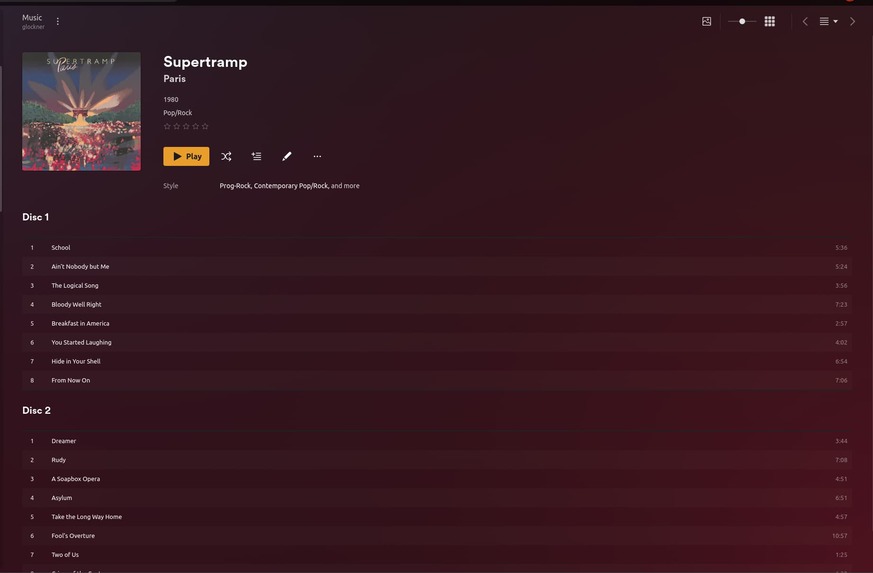
(Look at my directories and track files under the “Paris” album. – The directory listing)

If this helps, a simple directory listing (no details)

[chuck@lizum Supertramp - Paris.1998]$ ls -1R
.:
Disc 1/
Disc 2/

./Disc 1:
01 - School.mp3
02 - Ain't Nobody but Me.flac
03 - The Logical Song.flac
04 - Bloody Well Right.flac
05 - Breakfast in America.flac
06 - You Started Laughing.flac
07 - Hide in Your Shell.flac
08 - From Now On.flac
cover (1).jpg
cover (2).jpg
cover (3).jpg
cover.jpg

./Disc 2:
01 - Dreamer.flac
02 - Rudy.flac
03 - A Soapbox Opera.flac
04 - Asylum.flac
05 - Take the Long Way Home.flac
06 - Fool's Overture.flac
07 - Two of Us.flac
08 - Crime of the Century.flac
cover (1).jpg
cover.jpg

Don’t rely on file naming for this.
Use embedded meta tags. There are separate tags for “track number” and “disc number”.

@ChuckPa I appreciate your efforts here, but I still don’t fully understand. Once I copy the template and edit it for my situation, what do I do with it?

I confess that I really need step-by-step instructions, which may be beyond the scope of this forum.

@CoffeeDoc

As Otto correctly points out, we should use the metadata tags inside the files.

Which music management/renaming program do you use?

I use MusicBrainz “Picard”.

I have renaming rules which create the directory structure automatically as i add - match - rename my music files. It handles writing the tags correctly in the files so Plex has correct tags (artist, album, track name, disc number, and track number) information.

Here’s the link to what I have.

Here’s my renaming rule (runs on my computer – on Linux) but stores the files on the NAS when done.

This rule is awkward to read until you get used to the syntax.

$if2(%albumartist%,%artist%)/
$if(%albumartist%,%album%/,)
$if($gt(%totaldiscs%,1),Disc %discnumber%/,)$if($and(%albumartist%,%tracknumber%),$num(%tracknumber%,2). ,)$if(%_multiartist%,%artist% - ,)%title%

This topic was automatically closed 90 days after the last reply. New replies are no longer allowed.