why do you guys use {edition-Special Edition} and not [edition-Special Edition]
filebot cant handle curly brackets in the name and just takes things a big headache
Perhaps filebot needs updating then!
try telling them that lol
Square brackets work fine instead of curly ones. I’ve personally confirmed with Plex devs in the past since I also use filebot. Just use square brackets, it’ll be fine. I’ve tested it.
Filebot supports curlies, even though the developer thinks they’re ugly in filenames. 
The {plex} macros use curlies, and he specifically answered about how to do this for editions the other day:
Incorporating Plex's new "Editions" Feature - FileBot
{ "{edition-${tags.first()}}" }
[Square Brackets] already have a function in Plex, anything in [Square Brackets] is ignored by the Scanner that’s been a pretty long-established thing in Plex. I assume that’s why the Devs used { & } instead.
I don’t think it’s a good thing to use something that even though it currently might work it could change in the future. If it is a undocumented feature a future implement might change it and then you would need to rename all of your files again.
Because Emby uses brackets for this same function, and Plex doesn’t want to play nice. 
I really like this feature.
At first I had the same complaint as many, that there needs to be a way to collapse the movie down to single entry when in library view. I’m ok with it the way it is though, because now when you look at the Library view or search for a title, you’ll see the different editions, which is important given that on devices that display the Other Editions information in the details view, it’s too far down on the page to be visible unless one goes looking for it. I agree with what others have said on that point.
I did get the local extras to work with multiple editions by placing each edition in its own folder and then copying the extras files into each folder for that movie. That’s obviously a waste of server space but it works. It would be nice if there was a way to say to plex that these extras apply to all editions of a movie, but it seems like that would be tricky to implement, so I get it.
(EDIT: I just realized that on Windows, symbolic links could be used for this purpose if one wanted to spend the time to set it up - basically put the extras in folders in one edition and then make hard links to those folders in the other edition’s folders. I haven’t tried it yet but that should work.)
My only real complaint right now is that Roku doesn’t seem to be supported fully. I use multiple devices with Plex but my main home theatre device is the Roku. On Roku there is no way to distinguish between different editions of a movie (unless you manually edit the description or via cover art) nor does it display that there are other editions in the details view. So this is a major bummer but hopefully it’s something that will eventually be added to the Roku client.
Good stuff (mostly)
Yes, this! They really just need to move the position of where the other editions show up, and perhaps make it larger. (for example, on Plex for Windows it’s super tiny compared to the rest of the information in the details view!)
I found that the order you select the movies to be merged affects the results. The one you select first is the one that the others are merged with. So try selecting the “old” one first, then the “new” one. In my experience, the merged result keeps the metadata I had assigned to the “old” one.
I can confirm this, but know that Plex has had issues with Hardlinks in the same Library before. It started like a year or 2 ago when they scanner changed & started using the Inode instead of the name to identify files (My guess judging on behavior like renaming an episode from S00E01 to S01E100 & that episode, with it’s play status & metadata if they are locked moving instead of it being a new episode)
Previously if you had, say a Movie that you had a Hardlink of as an Extra for a different movie only 1 would be there, when you scanned the library it would flip from one to other each time. That no longer happens, but I have had Hardlink special features in the same library disappear & randomly reappear.
I am a Plex Pass member but still cant get this to work.
I just ripped all 3 editions of Close Encounters of a Third Kind 30th Anniversary which has the Theatrical, Sped Ed. and Directors Cut edition.
I named each their own MKV file and also put each one in their own separate directory on my Plex movies share folder and still it doesnt work (as per the suggested naming convention posted on the Plex FAQ area ) here:
https://support.plex.tv/articles/200381043-multi-version-movies/
I even went into the General Movie into area and edited/renamed the title but when I hit “Play Version” it only shows the bitrate not the title / edition of the movie.
What good is doing the braces { } in the filename to signify the different editions if its not going to work?
See my images below
Please advise
thanks
Image showing the naming convention used for each MKV file"
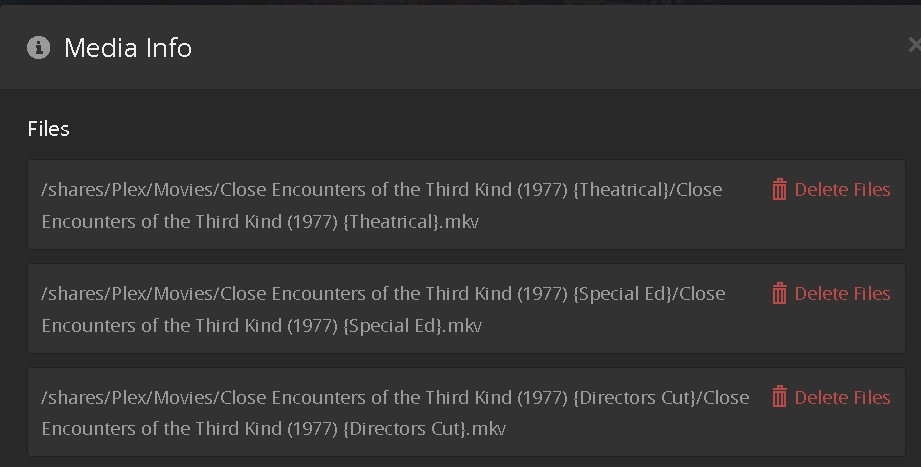
Image showing it doesnt show the “Edition name” like Theatrical, Directors Cut, Special Edition, etc as it should so you know which edition is which to play the one you want to play. if they are all the same Mbps and Resolution then this is of no use for us.

(Edited - corrected “version” to “Edition” where needed to avoid any confusion)
You have the tag wrong you need {edition-Theatrical} not {Theatrical}
Versions are different to Editions. You have followed the wrong instructions.
Yes I noticed that I did just go back and change it to be {edition-Theatrical} etc etc and did the rescan and split them apart and then re-merged them but STILL the same thing it only added the nice “header” icon in the top under the name but thats all it did
didnt fix the listing/names of what is shown when you say “Play version” as you still cant tell which version you are playing when you merge the 3 into one so its clean on your Library page

So until this is fixed I will still need to keep the 3 versions SPLIT apart and have excess clutter!!!

Yeah, you can’t Merge them into 1 unfortunately.
I’d recommend creating a collection that they are both in called Close Encounters of the Third Kind. Edit the collection & under the Advanced tab change Collection Mode to Hide items in this collection
This will make it so in your Library you only see 1 entry. When you select that entry you will have the different versions.
You can also add a Poster & background & Description to the Collection to make it look nice.
Unfortunately that’s the best we have at the moment
OK thanks I will try that. Sadly they didnt think of all of this (testing it with actual users) before releasing this new “feature”!! !!!??
…
Now Done
A decent work around for now but not the intended setup for making it intuitive and they need to fix the “Play Edition” for sure
or add “Play Version” and “Play Edition” options not just the “version” which is really only helpful for 4k, 1080p and 720 multiple versions
of the same movie.

I made 3 copies of the Poster and added the headings (in 3 diff colors) to match the primary poster colors, of Theatrical, Special Ed., Directors, so that its now easy to know which is which. since the title gets cut off on the list.
This is much easier now. But a LOT more work that the casual user is prob not willing to spend the time doing it
When you setup Plex its a given that you need a lot of IT, networking and PC savy for sure
Glad Im an engineer (in real life) so this is no biggie for me but if I was on the Plex team, this would have been brought up early in the beta testing phase before roll out

