Server Version#: 1.19.5.3112-b23ab3896
Player Version#: dlna clients
Perhaps I’m confused about how this is meant to work, but I can’t find a lot of information on how dlna transcodes. I am forced using VLC on an old iPad with IOS 9.3.x and as such am unable to use the Plex client or web client. Therefore I need to use DLNA to stream my media on the local network.
While the streaming does work, it appears not to be transcoding…or at least not to be doing it to the quality it is set to. I found this post here:
In it @OttoKerner discusses using the “setting” folders in DLNA, such as:
Choose Video - Preferences - Local Resolution - 720p
While I can see and access these folders and toggle the local options, it does not seem to make any difference to Plex. If I got back in to VLC (or other DLNA client) it shows the options I selected, but the client options in the advanced DLNA section of Plex don’t seem to reflect the options chosen. Additionally, if I manually change the options for the client IP in Plex, they always seem to reset.
Plex always shows that it is streaming at 1080p to my DLNA client regardless.
I would like to try to get the transcoding to a lower quality for performance reasons: i.e. I would rather my plex server transcode and deliver a lower quality of video to the devices because they seem to struggle/stutter with the higher quality stream.
Again, maybe I misunderstand Plex’s ability here, but should I not be able to force Plex to always transcode over DLNA to a specific quality…if not to all devices, then at least to a particular client?
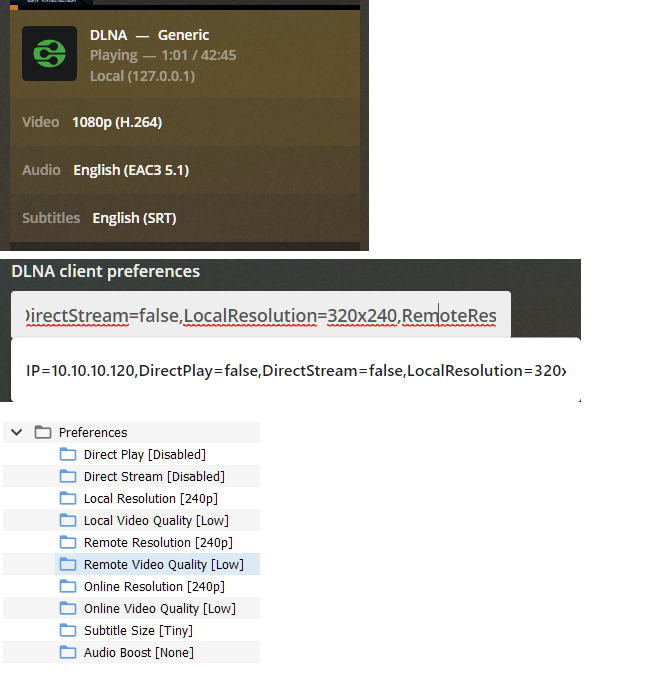
I wanted to update that I seemed to be incorrect in stating that the DLNA Client Preferences were not updating. On my one client I have the following listed:
As you can see I turned everything down to lowest settings (and modified subtitle size). But these settings seem to make no effect. The video appears the same on the DLNA client and Plex dash still reports it is streaming at 1080p.
Here are some pictures that show what I am talking about:
Plex is playing at 1080p even though my settings on the DLNA client via Plex and shown also reflected from the client (VLC) are stating a lower resolution:
What I am confused about is that my Plex server is @ 10.10.10.102 and my VLC client is @ 10.10.10.120.
However the log seems to indicate it is mapping my Plex server to a generic profile. No where in the logs does it ever show the IP of any of my actual clients connecting, it only ever shows the server’s IP. I think that might be a big part of the puzzle, but not exactly sure how.
Well, I don’t have an answer on this, I’m not sure why the above settings don’t work.
However, I approached this a different way in trying to make a DLNA user profile for all VLC clients.
I don’t think my profile is perfect, but I am able to get it to transcode to lower resolutions using a block like this:
This works to force 320x240 (or whatever else I choose), but I have found that using mpegts and H264 I am unable to seek at all in the file even with TranscodeSeekOffering set (to any value).
Seek seems to work with other codecs other than H264, but they don’t stream properly (only see a few frames, but audio is working so I can tell they seek).
I don’t know if there is a solution to get seeking working with mpegts and H264 and I can’t live without seeking as there is no way to get back to watching something you’re in the middle of.
As such, I’m not sure it is worth pursuing this since it appears if I successfully get it to transcode, then seeking is no longer an option.