Server Version#: 1.24.5.5160
Player Version#: 7.24.1
Hi,
I see some items similar to this, but not quite the same - by all means point me to another thread, if this really is a duplicate.
I was having issues with Downloads to my iPad failing, thinking it was a Download issue … but it was not in the end. Rather, it’s because the Downloads > Video Quality setting does not seem to really work / force a bit rate. I have found that some videos (FHD it seems?), even if I set the Download quality to 3 Mbps, the transcoded video is ~ 10 Mbps (hence the size / download issue). Is this a known issue, that the bit rate is not used for Downloads? And is a fix coming?
I have not seen this issue. It is working as expected for me. If you can reproduce and get me both the ios logs and your server logs, I’d be happy to take a look.
Just wanted to jump in here and ask a follow up question…
Is it really necessary to transcode a file with the following properties? It appears that in Downloading to iOS, everything gets transcoded.
General
Complete name                            : FILENAME.mp4
Format                                   : MPEG-4
Format profile                           : Base Media
Codec ID                                 : isom (isom/iso2/avc1/mp41)
File size                                : 1.47 GiB
Duration                                 : 50 min 35 s
Overall bit rate                         : 4 155 kb/s

Video
ID                                       : 1
Format                                   : AVC
Format/Info                              : Advanced Video Codec
Format profile                           : High 10@L4.1
Format settings                          : CABAC / 4 Ref Frames
Format settings, CABAC                   : Yes
Format settings, Reference frames        : 4 frames
Codec ID                                 : avc1
Codec ID/Info                            : Advanced Video Coding
Duration                                 : 50 min 35 s
Bit rate                                 : 3 701 kb/s
Width                                    : 1 920 pixels
Height                                   : 910 pixels
Display aspect ratio                     : 2.110
Frame rate mode                          : Constant
Frame rate                               : 23.976 (24000/1001) FPS
Color space                              : YUV
Chroma subsampling                       : 4:2:0
Bit depth                                : 10 bits
Scan type                                : Progressive
Bits/(Pixel*Frame)                       : 0.088
Stream size                              : 1.31 GiB (89%)
Title                                    : FHD / FHD
Writing library                          : x264 core 161 r3027 4121277
Encoding settings                        : cabac=1 / ref=3 / deblock=1:0:0 / analyse=0x3:0x113 / me=hex / subme=7 / psy=1 / psy_rd=1.00:0.00 / mixed_ref=1 / me_range=16 / chroma_me=1 / trellis=1 / 8x8dct=1 / cqm=0 / deadzone=21,11 / fast_pskip=1 / chroma_qp_offset=-2 / threads=12 / lookahead_threads=2 / sliced_threads=0 / nr=0 / decimate=1 / interlaced=0 / bluray_compat=0 / constrained_intra=0 / bframes=3 / b_pyramid=2 / b_adapt=1 / b_bias=0 / direct=1 / weightb=1 / open_gop=0 / weightp=2 / keyint=250 / keyint_min=23 / scenecut=40 / intra_refresh=0 / rc_lookahead=40 / rc=crf / mbtree=1 / crf=18.0 / qcomp=0.60 / qpmin=0 / qpmax=81 / qpstep=4 / ip_ratio=1.40 / aq=1:1.00
Color range                              : Limited
Color primaries                          : BT.709
Transfer characteristics                 : BT.709
Matrix coefficients                      : BT.709
Codec configuration box                  : avcC

Audio #1
ID                                       : 2
Format                                   : AAC LC
Format/Info                              : Advanced Audio Codec Low Complexity
Codec ID                                 : mp4a-40-2
Duration                                 : 50 min 35 s
Bit rate mode                            : Constant
Bit rate                                 : 256 kb/s
Channel(s)                               : 2 channels
Channel layout                           : L R
Sampling rate                            : 48.0 kHz
Frame rate                               : 46.875 FPS (1024 SPF)
Compression mode                         : Lossy
Stream size                              : 92.7 MiB (6%)
Title                                    : Stereo / Stereo
Language                                 : English
Default                                  : No
Alternate group                          : 1

Audio #2
ID                                       : 3
Format                                   : AC-3
Format/Info                              : Audio Coding 3
Commercial name                          : Dolby Digital
Codec ID                                 : ac-3
Duration                                 : 50 min 35 s
Bit rate mode                            : Constant
Bit rate                                 : 192 kb/s
Channel(s)                               : 6 channels
Channel layout                           : L R C LFE Ls Rs
Sampling rate                            : 48.0 kHz
Frame rate                               : 31.250 FPS (1536 SPF)
Compression mode                         : Lossy
Stream size                              : 69.5 MiB (5%)
Title                                    : 5.1 Channel / 5.1 Channel
Language                                 : English
Service kind                             : Complete Main
Default                                  : Yes
Alternate group                          : 1
Blockquote
And as a follow up to that, it appears to take forever to transcode based on the following usage that is based on the following transcode usage profile:
I may be missing something in your response, but the original format is already h264 in an mp4 container. In the iOS app, I have the setting for the Download Format set at ‘Original’ so there should be NO transcode necessary.
As far as the second part of my question, why is the transcode taking so long? There is nothing in the respective plex transcoder command line that appears to be beyond my systems capabilities and totally overwhelm it…
Thank you! In the settings it was set rather than during the actual download.
I do, however, think that the actual conversion process is flawed. During an ‘optimize’ on the server, this process takes relatively short period of time, while a download conversion, as listed above, would take multiple hours if not days to complete.
Hi! I’m experiencing the same on iPadOS: The download quality setting seems to be ignored. I do see that the issue has been reproduced; is there a fix or a workaround?
The workaround I have been using - experiment a bit, set the value lower than your desired. It will reduce the bit rate, it just takes a bit of playing to get roughly what you want. Works for now though.
 . Here are my settings,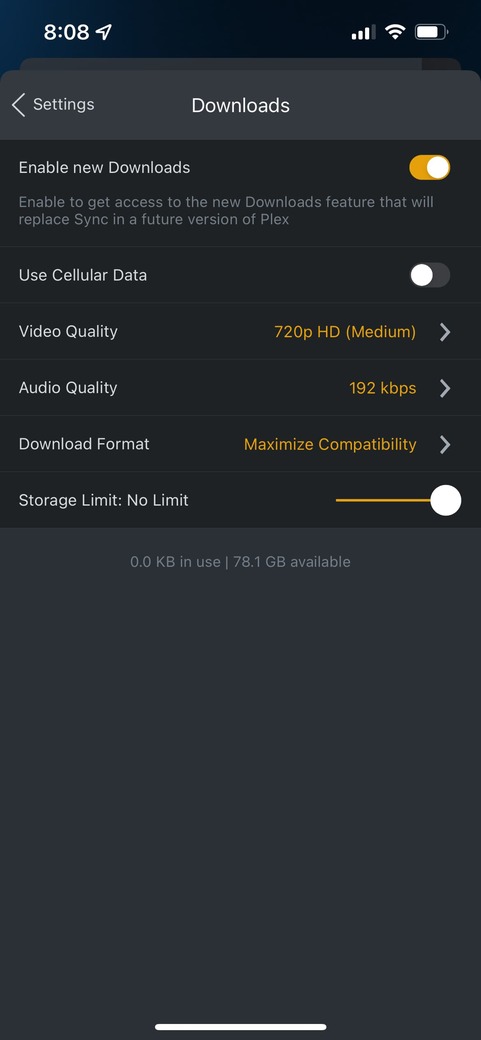

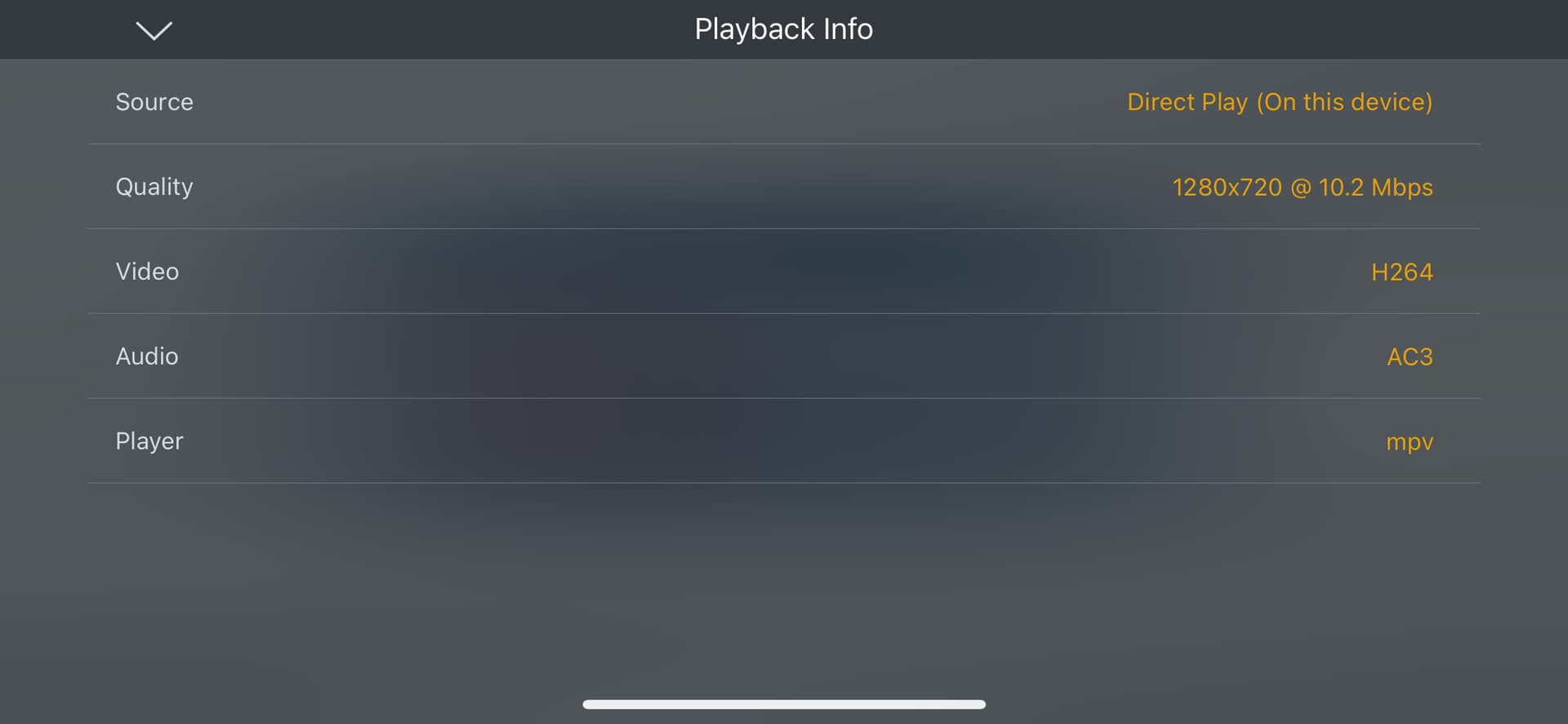
 . But in the ballpark at least.

