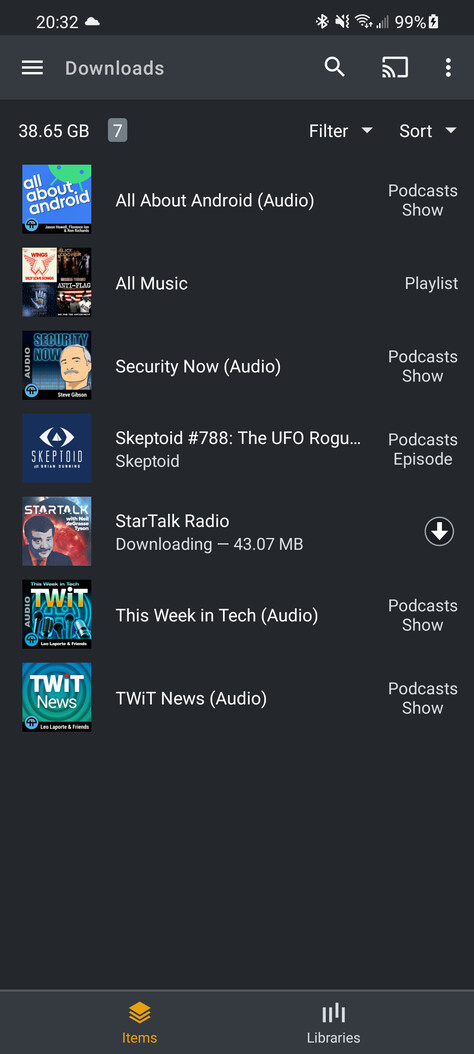
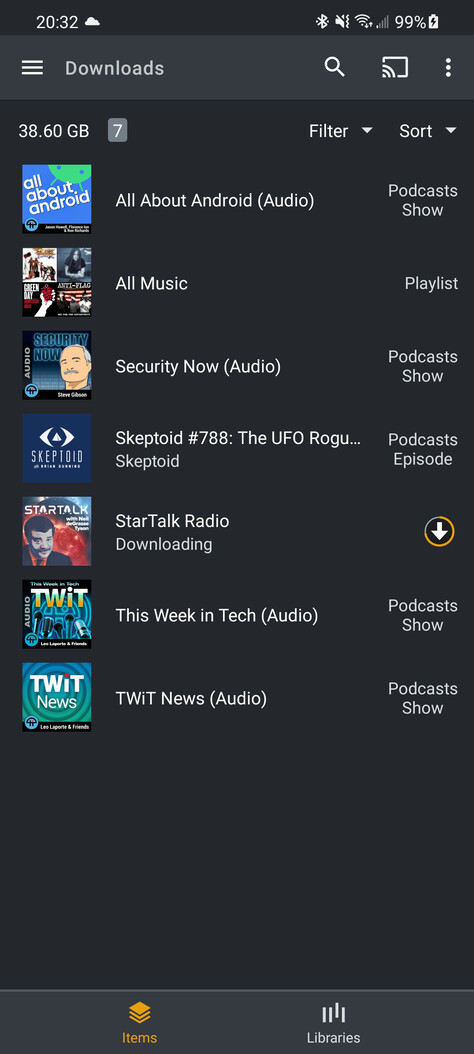
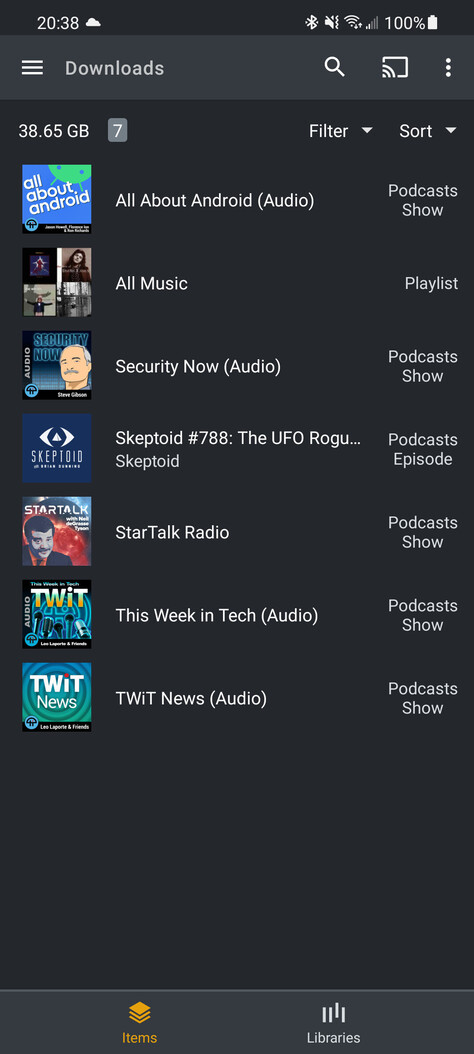
Downloads in general don't work

Server Version#: 1.23.4.4805
Player Version#:8.20.0.26605

The new downloads don’t seem to be working at all really or at least very unreliable. Case in point. I go to my Podcasts and long press a podcast to select Download. It says, “Your download will begin soon”. Soon? Why not right now? Anyway, I then go to Downloads, select Podcasts and I see two podcast episodes (out of the 7 new episodes) are downloaded. The one I requested hasn’t been. I got back to Podcasts that is pinned to my main menu. It says “No Items”. WTF! I select Home on the main menu then Podcasts again; my 7 podcast episodes appear again? Again WTF?

If I wait a while little circles with arrows pointing down appear on 6 of the 7 episodes. BTW, the one episode that does not get a little download arrow is not one of the episodes that I see under Downloads/Podcast. Strange. I’ve seen that little download arrow’s circle slowly turn orange as if to indicate how much has been downloaded. I saw this on some of my music Playlists that I’ve also been trying to download. More on that later.

I long tap that one stubborn podcast episode that refuses to get the download arrow icon and select Download as I had done on the others. Instead of “Your download will begin soon” I get Download options. Hmmm… I already set those. Select download show and I get a download arrow. What I don’t get is that download arrow turning orange nor do I see this episode in the Downloads/Podcasts section. How the hell do you download things?!?

In general, there is no indication that a download is happening and downloads fail most times.

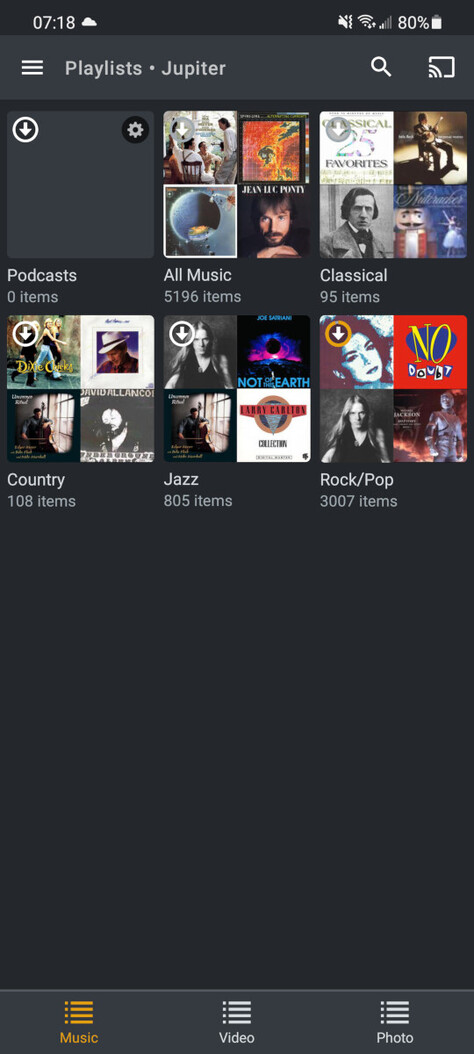
Moving on to music and playlists. On the Podcasts screen, there’s a selection in the filter section for Save as Smart Playlist. Now I have Unplayed and Shows selected. When I select Save as Smart Playlist I get the option of giving it a name. So I call it Podcasts. Going over to the Playlist section I see a tile that says Podcasts. It has that familiar Download arrow circle thing as well as a strange gear icon. The tile face is blank, unlike my other playlists which are music playlists and have little pictures of the album covers. Long tap it and select Download and I see the familiar “Your download will begin soon”. Does anything get downloaded? Nope. A single tap on the Podcasts playlist and it says “This directory appears to be empty”. Really? So there is nothing here eh? Brilliant.

I want to keep all of my music library on the device - download it all! There is no easy way to do this so I created a playlist with All Music. I have a few other, more selected playlists like “Rock”, “Country”, “Jazz”, etc. It even shows me how many items are in the Playlist. Great.

Let’s take the Country playlist as an example. There are 108 songs in Country. I long tap and select Download. A download arrow icon appears quickly. Never cycles through going orange. Another long tap reveals delete download?!? Have 108 songs downloaded that quickly? Or is it because I already have all music downloaded? It’s hard to tell.

Finally, I see the download circle as orange on only one of my playlists Rock/Pop.
All of the above is my actual experience. Later I found that if you go to the Downloads selection but before you select Music or Podcasts you switch to the Items view then suddenly I see a screen with lots of items there, many spinning orange circles and most saying “Waiting to download”. It seems some things got stuck somewhere along the way. Removing them (swiping from right to left) seems to have ungummed up some of the things and some of these podcasts and music playlists seem to be proceeding now.

Things are really weird here where it goes from Waiting to download to downloading, a download circle starts to grow orange then, before finishing, it changes to say Podcast Episode, then spinning orange circle. Several podcast episodes appear to be downloading at the same time, then they aren’t. The podcast tiles incorrectly show the picture of a different podcast, etc.

What a mess!

The app or your server might be busy so it’s not guaranteed to be immediate. However, if nothing is going on, soon should just be a few seconds.

What do you see on the “Items” tab? It should show you the download progress there?

I can reproduce this, seems like a bug when switching from the Downloaded podcast library back to the original podcast library. I will let the team know. Switching to something else in between avoids this bug.

That is a bug. We don’t support playlists (smart or dumb) for Podcasts. That option should be hidden.

Downloads is smart enough that it won’t download the same thing twice. It will keep them listed separately so you can delete the job that created the download without affecting the other job.

Instead of watching the icon, it’s more informative to watch the “Items” page. There it will actually tell you “Downloading x of y” so you know exactly how far it’s gotten. If you don’t see a message like that, then it is done.

I can assure you that the server is NOT busy. It’s 10 feet from me. I have a performance monitor on it. It’s not busy. The code should send the request to the server, wait for the response, and then indicate to the user that the download has started. Additionally, there should be some way to monitor the progress of the download. The “download will start soon” is not an acceptable message as it leaves the user with the inevitable question of “Really? When exactly will it start?!?” Proper UI design never leaves the user wondering. This message leaves the user wondering. It’s wrong.

Regarding the Items tab - first off, it’s difficult to find in that it makes no sense. The user selects Downloads and initially sees two selections - Music and Podcasts. The user is tasked with deciding. The last thing they think is to look at the bottom of the screen to see Items and Libraries. So it is Items and Libraries or Music and Podcasts? If one selects Music or Podcasts, anxiously trying to see if their requested Music or Podcast has been downloaded they are now stuck! There is no easy way back to select Items. If one selects Music they are presented with some page that displays somethings with no indication whether these things have been downloaded. Remember I have some 5000 Music items supposedly downloaded from my All Music playlist. Yet this screen doesn’t easily show me 5000 songs. IOW is poorly presented.

If instead, I selected Podcasts I see the two that downloaded. If, after selected either Music or Podcasts there is no back button. If I select the back button the Plex App goes away. Great.

I described what the Items screen looks like to me. Many downloads, none of them completing. I removed all downloads that weren’t working until the situation stabilised. Then I went to a podcast, long tapped, and selected Download. It appears on the Items screen. It goes from a download arrow, starts downloading, maybe gets 75% done then changes to say “Podcast Episode”. Does that mean downloaded now? Who knows. Then, suddenly, it goes back to that download arrow/circle and starts downloading again! Really, F! Gets about 75% completed, says “Podcast Episode” again, and repeats. Never seems to download. Doesn’t appear in the Downloads area when you tap Podcasts. WTF? IOW it never seems to finish.

I thought it might not re-download things it downloaded in the past but in general, the UI and interface of this whole downloads thing leave a lot to be desired. It’s hard to determine simply things like - what’s left to be downloaded, what has been downloaded and how do I restart a download that seems to be stuck.

But I’d love to ask you, seeing as you seem to be involved with the Plex people about the Plex Android app, could you please, please, please, please, please, please, please, make it such that, at least for podcasts (or configurable) such that the default action when double tapping on my Galaxy Buds or saying FF on my Android Auto in my car on the steering wheel to only advance (or REW) seconds instead of going to the next podcast episode?!? I know the app can do it because it can do it from the phone screen but not from the Galaxy Buds or my steering wheel. I will listen to a 2-hour podcast and say 30 minutes in a stupid ad comes up and I want to skip it. I hit FF and the next podcast episode starts playing. Have to go back to the previous podcast episode and then scrub forward 30 minutes, WHILE DRIVING, is DANGEROUS at best!

Also, I’ve noticed that if I drive somewhere listening to a podcast, then stop and return to my car trying to continue playback from that podcast it starts back at the beginning. DEFINITELY, THE WRONG THING TO DO! Totally loses track of where it was in the podcast!

It does. Once it starts you’ll see the progress in your device’s notification window. You can also watch the progress of the Items tab in your Downloads section.

Can you provide a screenshot? That’s not right. When you go to downloads, you should see Items and Library as the options on the bottom, with Items as the default. Click on the notification also brings you to the Downloads page to the Items tab.

Again, please provide a screenshot. What you are describing is not right. The Items page should show how you downloaded your content. If you downloaded a Playlist, it will list the playlist. If you downloaded an Artist, it shows that artist, etc. Clicking on Library should show you your downloaded content organized in the same way as the original library it came from.

It doesn’t. I see no progress in my “devices notification window” whatever that is. Where is this device’s notification window you speak of and how do I get there? I don’t see it in the app nor in the status bar at the top nor in the notifications shade. Where should I be looking?

I did not say that Items and Library are not at the bottom of the screen. I said that Music and Podcasts are at the top of the screen and that they pique the user’s interest because after all he just selected a podcast and told the app to download it. He then selection the Downloads link and viola, right there on the top it says “Podcasts”. Now, why would he think “Oh yeah, it’s not podcasts that I’m interested in… it must be this Items thing way down here”. I’m just saying that it’d natural for the user, in this case, to see “Podcasts” know he’s been dealing with a podcast and to tap on that before looking for something slightly disconnected like the generic term “Items”. Not meaning to disrespect but just trying to give a user’s perspective on the UI.

Regarding “this screen does not show me 5000 songs”… Specifically, if I go into Playlists for All Music and swipe up only a few songs show up. Then I’ve now noticed that if I swipe up more I get more. There is some sort of lag in the swipe up that causes it to take time and several swipe ups to realize that all of those 5000 songs may be there. Sorry, I thought it just didn’t download all the songs because of this delayed update.

I see you decided not to address my issue with FF/REW and the keeping of where you are in a podcast. That’s a shame.

Here’s an example. I’m downloading 5 episodes of the Podcast Tested. It quickly flashes the “Your Download will start soon” message, but within a few seconds actually starts downloading. See the “Downloading” icon in the status bar at the top.

image

If you bring down the status page, you can see the full notification.

image

If I go to the Downloads page, you can see it selects “Items” at the bottom and shows what I downloaded. In this case it was a Podcast at the Show level and not an individual episode.

image

If you pick Libraries, it shows you all the available libraries for anything you’ve downloaded. You can then pick the library in the same way you pick the library from your server. This should match the names of actual libraries from the server. Podcasts don’t come from a server but still appear the same way. If the Podcasts haven’t finished downloading, then you won’t see anything, because it’s not done. If you have Podcasts you previously downloaded, then those will be shown, but not the new ones until it’s done.

image

Here’s an example for music. I have a Smart Playlist I’m going to Download.

image

Here’s the notification. It tells you exactly where along the number of items it is downloading. I’ve tried >2000 tracks and it should show the same way.

image

Also shows the status on the Downloads page.

image

Here is what things look like after Downloading a few more things. Hope you see how the Items tab and Library tabs are related but show the content is different ways.

image

1 Like

This thread is about Downloads. If you want to discuss other things, please make a new thread and I’d be happy to discuss there.

I’ve made threads about that issue at least twice if not 3 times before. Nobody ever addresses the issue. Excuse me for thinking I might have the ear of a developer and as such have a chance to influence them to fix this obvious problem.

Nice images there. Let’s start with the first one. It shows a download notification in the status bar. That’s great. The only problem is that I don’t get that download indication at all. If it did get that download indication I would not have posted here. Nor do I get that download indication in the notification tray. Sorry. I just don’t see that. Not sure how I can provide you with a screenshot to prove that.

I long tapped on Startalk Radio and selected download. Then I went to downloads. At first, I see

which seems like it’s about to download. Indeed I then see:

Which seems like it’s downloading. Then I see a:

And I’m thinking “All right, it downloaded” but then it goes back to:

And it cycles back and forth never-ending. That’s the problem!

And if I go to Downloads and select Library > Podcasts I do not see that Star Talk is downloaded!

I’m sorry, I’m not trying to be a dick here. I’m just reporting what I see.

And I’m sorry but without the FF/REW problem being fixed as well as remembering where you left off in a podcast the concept of podcasting using Plex is horribly, horribly broken. Believe me, if it honestly worked at 90% of the level of other media/podcast apps I’d say nothing. But as far as it exists right now it’s essentially not ready for prime time. I say this with a 100% offer of my time and money to get it up to snuff. I announce now I will pay $100 to a developer to fix the current problems and implement the kind of podcast player that I’ve seen man other podcast apps achieved.

No problem. Get me the Android logs, I’ll take a look.

I’m not a dev, just a go between to help the identify problems. If you can point me to those threads, I’ll take a look. I just don’t want to get off topic in this thread for Downloads.

Manufacturer: samsung
Device: o1q
Model: SM-G991U1
Product: o1quew
Version: 11
plex-log-adefaria.zip (13.7 MB)

Note that today, just before generating the debug logs, I manually selected Marketplace Morning Report and a Freakonomics podcast. Those downloaded successfully but the Startalk Radio podcast still will not download, going through endless cycles or downloading, almost making it then downloading again. I have other podcasts that fail to download too.

BTW, isn’t this downloading supposed to happen automatically? I mean the download settings say to download the latest episode and to delete the downloaded episodes after a week. Regarding the delete the episodes after a week, how about a setting for delete the episode after I’ve listened to the whole episode?

Finally, how about generating a playlist (maybe this is what smart playlists is supposed to be) of all unlistened to podcast episodes. I see podcasts as a queue of new shows I’m constantly trying to listen through and empty. It’d be nice if Plex provided at least this playlist automatically.

I wonder why the devs never seem to be present. I sent you a message pointing to 3 other threads about FF/REW. It is the main stumbling block for me not switching to use Plex for my podcasts and thus being 100% on Plex (TV/Movies/Documentaries/Music/Photos and I’d like to add Podcasts to that list).

Your logs do show it is downloading individual podcasts from that show. However, the display doesn’t look right. When I try it looks like this.

image

It tells me how many episodes are going to download and the size of the current episode.

Can you check web and see how many episodes it should be downloading? I’m wondering if somehow the number of episodes is unknown and the app is showing the wrong info. From the logs it looks like it is Downloading correctly, maybe just not showing the info correctly.

It looks like it’s saying that it is attempting download 5 of 689! Looking at the Plex web page (all previous stuff was done on my cell phone) and I see that StarTalk does indeed have 689 episodes.

Canceling the download and then attempting to download again (the only way I know to get to the Download Options page) and I see that I had set Download to Next unplayed episode and Delete downloaded episodes to After a week. Also, both the web page and my cell phone indicate only 1 unplayed episode.

Accepting these options and tapping Download Show puts me right back into that loop of downloading, Podcast Episode, then downloading again.

Going to try reproducing that scenario. Which episode is unplayed?

Edit - No need for answer. I’m able to reproduce. The episode listed as unplayed is the one that keeps looping. Thanks for the info, I’ll report this back to the team to find a solution.

Cool! In a way, glad to find a bug.

I seriously would like to work with either you and/or the devs to address my other issues. I really would like to use Plex for my podcast needs.

This topic was automatically closed 90 days after the last reply. New replies are no longer allowed.