We are still going on over a year of watched content on your Android devices being marked as not completed (90% finished) on the server, here is the evidence…courtesy of this LIAR.
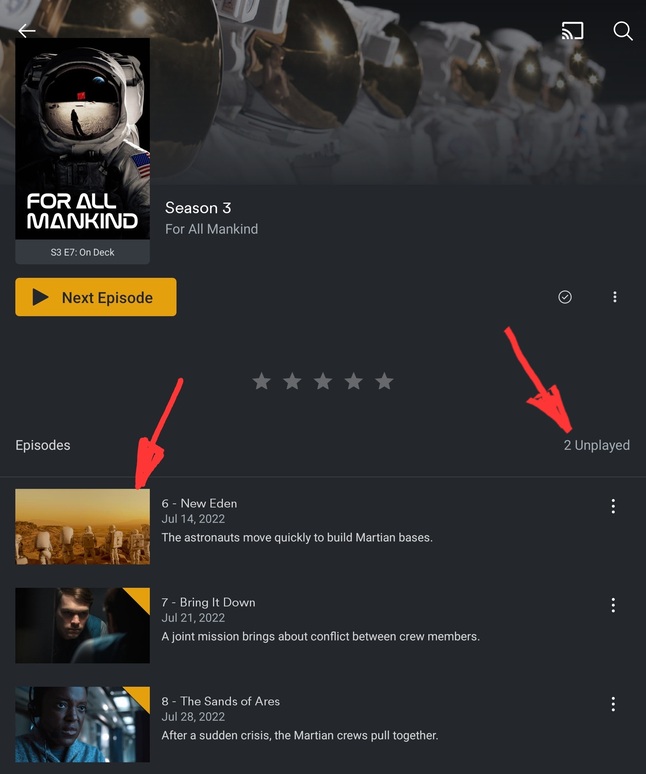
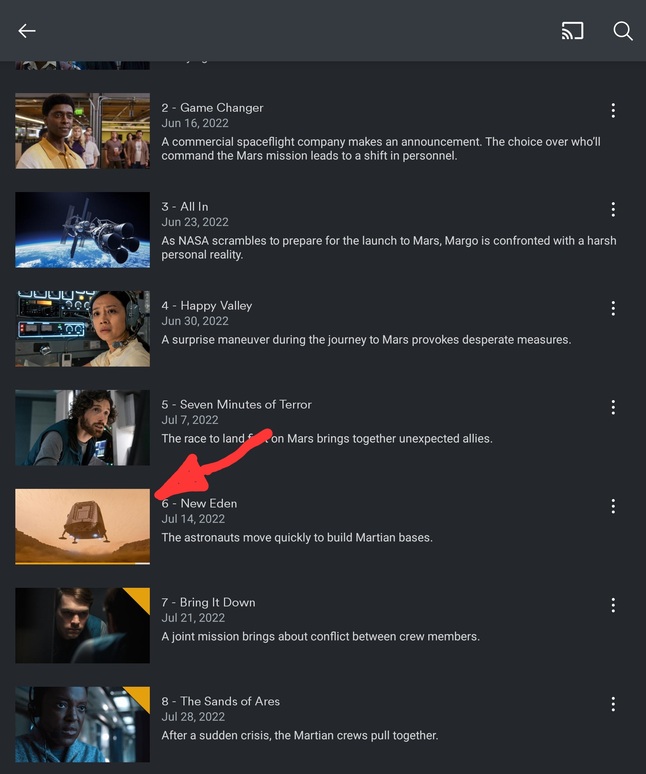
I don’t know the details of why you were banned. I was not involved in that, but the issue of watched status not being marked between 90-100% is a known issue. Unfortunately, it’s an odd issue that can’t be reliably reproduced, it just sort of happens randomly.
Although in that image, I’m not quite sure it’s hit 90%. What does it say as the time remaining for that episode?
I b already have marked that item as watched on the server so i cant really tell you on that. I just finished another show’s episode thst was 32 minutes in length. I let the episode finish until it cloaed on its own. The download section shows the episode finished and 100% completed. The server is continuing to show it at 27 minutes finished which comes out to about 89%. I have been doing the math and it always gets stuck between 88%-93%. I have submitted many logs in the past, not sure if you want more. There are so many more issues with app that have also been going on for over a year. The slide to quick swipe through the menu still smaps back to the top. If there is a pause in the downloads and then it finishes, the download will be unplayable. The app still will fight you on watching downloaded items if you dont have a data signal. The app still often hangsnon splash screen. The app still loses subtitles if you leave it temporarly for a other app and then come back. The library screens (posters amd list of shows/movies) will often have the posters flickering. Many more items and i have asked others to check these on other devices and have had other people reporduce them all. I have also tracked these things through multiple new phones.
Thanks for listening
I know I was looking into an issue for you where the watched status was not syncing up between your server and Downloads, still can’t figure that one out. There is an issue of it not getting marked as watched and being like 98-98% done. Having it stop earlier than that is new, I have not seen that before.
The slide to quick swipe through the menu still smaps back to the top.
Huh. That was an old issue and fixed a long time ago. Remind me again what type of device you have? Is it running some modified form of Android and not AOSP?
The app still will fight you on watching downloaded items if you dont have a data signal. The app still often hangsnon splash screen.
These are likely related where we look for servers and stall if the connection is flacky. We are looking into addressing this.
If there is a pause in the downloads and then it finishes, the download will be unplayable.
The app still loses subtitles if you leave it temporarly for a other app and then come back. The library screens (posters amd list of shows/movies) will often have the posters flickering.
Have you reported this before? I’ve never heard of these issues.
Im using a Samsung Fold 3, no modded OS (using the basic samsung One UI), device not rooted. Plex Android Ckient 9.6.2.34353.
The video and log is of the scroll issue. Everytime i pull down, when i release, it will snap all the way back to the top of the list. At the same time of as this issue, i have where items on the bottom of the screen (movies or shows) will become unselectable. If i rotate to landscape and the back to portrait, they become selectable again.
I have submitted some logs for the issue with progress to being translated to the server after about the 88-94% mark. If you would like more logs on this, i will reporduce it and post them here.
I have reported the download issue and was doing it through slack. It was happening in the download beta and has continued in the playstore version. It seems if there is a stop in the download for whatever reason, it corrupts the file when it is finished and always gives you an error referencing the inability to reach the server. On this account, id like to also point out that even eith the settings set to use download files over streaming, the app still streams if you select something from the Home screen (continue watching section as an example) even if that exact item is downloaded to the device.
You also cant leave the app while watching a video with the subtitles (say to check an incoming text or email) then return to the video and use the subtitles. Subtitles become unusable after you do this.
Again, if you want any other logs, videos or screenshots for any of these issues, please let me know
Scroll Issue.zip (2.9 MB)
This is s screen shot for the episode of Westworld S04E05. The bottom shows the Android client finishing the downloaded version of the episode. The top shows the server and where it stopped tracking its progress. The log is from the Android client. Would a log from the server during this issue be of help?

Played Issue.zip (2.8 MB)
Can you get me the xml for that from PMS?
Ok, I 'm seeing something odd in your logs. Let me discuss this with the devs and see what I can find.
Appreciate the help. Any other info you need, let me know. I owe you a beer if this finally gets fixed.
Here is a screen shot and log of the other major issue i run into. Downloads that fail to play because of a connection error. I believe it may be caused by the download having a pause and then restarting during the process but arent 100% sure on it. In this example, the episode The Bear S01E07 finished downloading but it keeps giving me the same error. If i delete the download and redownload, it will work.

Play Download Fail.zip (3.0 MB)
Can you try playing the file while in airplane mode?
Same result. This is the log with same episode played in airplane.
Download play in Airplane.zip (2.8 MB)
Here is a video of the issue where items become unselectable until i flip to landscape mode and then back. This is in “mobile layout”.
Items unselectable.zip (2.9 MB)
Here is another log for another downloaded file not playing with network error. For All Mankind - S03E10. Again, thanks for the help.
Download Unplayable 2.zip (2.9 MB)
So i deleted the download profile for that episode/show and reset it up. After the download, the video fails again, but this time saying the external storage is not foubd. This is a Z Fold 3 device and there is no SD card slot…no external storage.

So removing the download and re-adding it a third time and it works. This is just a reference log for the same failing video now working after three different times being downloaded.
Playing Download Fail - External Storage.zip (3.1 MB)
I had a dev look at this issue and your logs show that it did fail to update the playback status back to your PMS after you watched that episode, but that it did update shortly afterwards. Do you still see the partial status in PMS or has it updated now?
Honestly i marked it played manually…so that may have been me. I am watching an episode as we speak. I will let it go for 24 hours and im oretty confident it wont be marked played. When im done wirh it, wouls you like the logs for it again, and then again in 24 hours? Is thwre anyrhing wlse you suggest i do to help with the troubleshooting?
If you can get me the server and app logs after you watch, but before you watch something else. We’d like to see if there is some sort of delay causing the update between the app and server. Your earlier logs showed the app trying to update the server, but the server didn’t respond right away. It did eventually respond.
Ok. This is for Westworld S04E06. Finished on the Android Client and showing as 13 minutes left on both tbe actual server and if you view the server from the Android Client.
Played not marked Server.zip (3.7 MB)
Plex Media Server Logs_2022-08-15_15-31-14.zip (4.6 MB)
