Same issue on iOS/iPad. The app showed no items, but 18GB used as well. Deleted the app to clear that and tried again. No dice.
I see several posts about this issue and replies from Plex. What the heck??
Same issue on iOS/iPad. The app showed no items, but 18GB used as well. Deleted the app to clear that and tried again. No dice.
I see several posts about this issue and replies from Plex. What the heck??
Yep, same here on an android tablet. “there was an error downloading this file”. just a simple download, no transcode or anything complicated.
WHAT error?!
I had to stay in hospital for some days now. So I ordered plex pass in order to download some tv-shows and movies to watch in that time.
But it did not download any of the files. All I got was the known error message. 
Btw. my device is a Fire HD 10 (gen 9). Both server and client (from google playstore) where up to date.
Same here for me on iOS iPad app today. Again, “there was an error downloading this file”. just a simple download, no transcode or anything complicated.
Having the same issue here 
How is this still an issue when Sync worked fine and no support or comments from Plex? I had this issue probably a year ago and haven’t tried it until now. I’m shocked it still hasn’t been resolved. Plex support? Where are you?
I have the same problem with the Android Plex App.
Downloading was possible in November 2021.
Now it is not possible any more.
But I cannot tell you at what exact date the problem occurred.
These are the version numbers of client and server:
Server Version 1.25.3.5409
Android Client Version 8.28.0.30077 (241173d0)
I attached some log files (excerpts only).
com.plexapp.android 2022-03-05 11-17.log (131.8 KB)
logging.txt (161.9 KB)
Plex Media Server.log (268.3 KB)
This seems to be a relevant part from the logs for me:
03-05 11:16:53.072  i: [HttpServer] /127.0.0.1:36356 - GET /media/subscriptions
03-05 11:16:53.102  e: [DefaultDownloader] Exception downloading /data/user/0/com.plexapp.android/Plex Media Server/Sync/1/6/.grab/5bbb410c49cde7ff3f10a2f045134816da7c5c26-local/03 - Title of the song changed.mp3
03-05 11:16:53.103  i: [DownloadQueueManager] Download failed: 5bbb410c49cde7ff3f10a2f045134816da7c5c26
03-05 11:16:53.104  e: An exception occurred: java.io.IOException: Unsuccessful response: 0
03-05 11:16:53.106  e: Stacktrace: java.io.IOException: Unsuccessful response: 0
	at com.plexapp.plex.mediaprovider.podcasts.offline.l.f(SourceFile:27)
	at com.plexapp.plex.mediaprovider.podcasts.offline.l.e(SourceFile:1)
	at com.plexapp.plex.mediaprovider.podcasts.offline.l$a.invokeSuspend(SourceFile:2)
	at kotlin.g0.k.a.a.resumeWith(SourceFile:3)
	at kotlinx.coroutines.f1.run(SourceFile:22)
	at kotlinx.coroutines.r3.a.m(SourceFile:1)
	at kotlinx.coroutines.r3.a$c.c(SourceFile:4)
	at kotlinx.coroutines.r3.a$c.m(SourceFile:4)
	at kotlinx.coroutines.r3.a$c.run(SourceFile:1)
I would be happy if the download issues can be fixed.
I’m having the same issues, it looks like going into my download settings and changing Download Format from Maximize compatibility to original fixed my issue. Give that a try and see if this resolves the issue.
Thank you for this idea.
But on my Android App I do not have this setting.
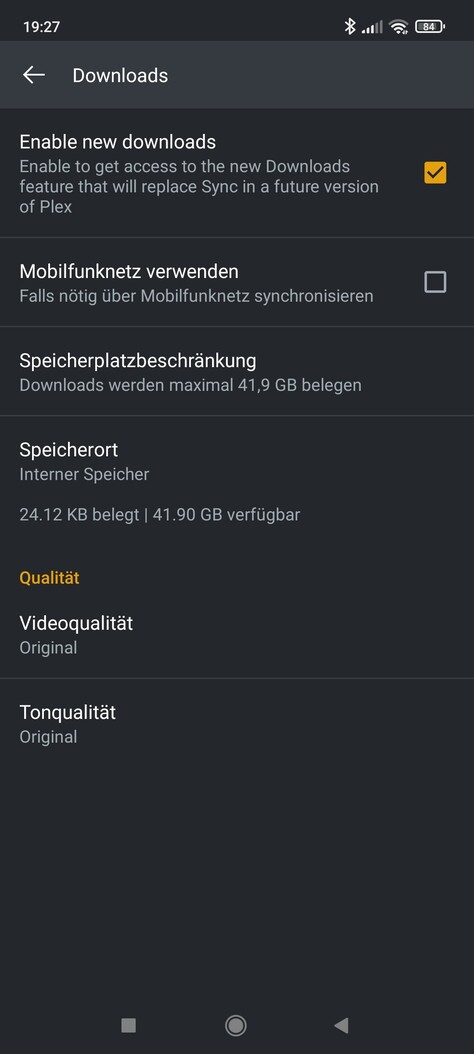
This is the menu Settings - Downloads (sorry, screenshots are in German):
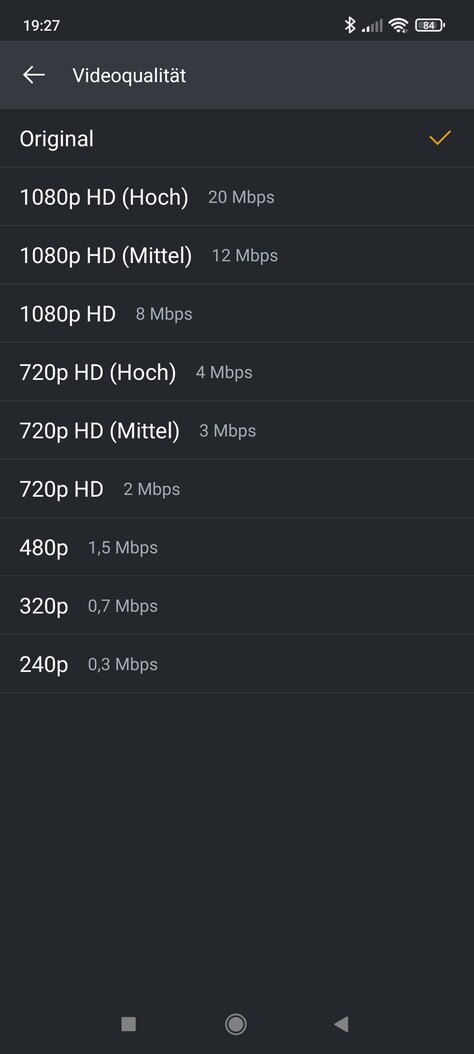
This the sub-menu for video quality:
And this for audio quality:
I tried some of the other settings for audio quality, but still no success in downloading.
That setting only applies to iOS so you won’t see that for Android. The error you posted above is already something I’m looking into. No update so far.
I fixed my non-descript download error.
it was caused by DNS rebind protection.
i cant disable it on my router, had to manually change the DNS settings on the server (and tablet).
What did you change exactly?
Same issue here. Screenshot above are exactly the same i have here:
Pixel 5
Android 12
Latest updates
A bad workaround is to download the files and use plex Client to watch the mkv files…
Of course no sync, no play count, no comfort…
Seriously, what is going on here? Download does not work on IOS or android. I have deleted both apps and reloaded, same issue on IOS and Android “Some items could not be downloaded”.
No items can download. This is why i paid for Plex, has never worked on any device at any point for years, always had issues but now it doesn’t even download anything so worse ever.
The post on DNS rebinding helped me a lot.
In my situation, after looking at my Android client logs I found that it was trying to access the media via an odd looking link. Something like https://192-168-0-21.random_string_of_characters.plex.app/path_to_media which in my mind doesn’t really resolve to anything in DNS (I pasted that into a web browser). I had to add a manual DNS entry to resolve that to the internal IP 192.168.0.21 and now I find it syncs well. The ability to do that really depends on your home network configuration specifically around the DNS/Firewall that you use.
Hope this helps.
Just a note that I too suffered from the out of the blue “some items could not be downloaded” error when downloading episodes to my phone. As suggested above, disabling DNS rebinding protection on my pfsense firewall seemed to fix it immediately. This is of course not an ideal long term solution.
what did you change it too? just use google dns? 8.8.8.8
yep, that is precisely what i used
Thanks, can confirm this worked for me. First time ive ever had a success with downloads. I have tested on my android phone and ios tablet.
Hopefully Plex now know the issue, they can put something into sort this problem
Great to hear it worked!