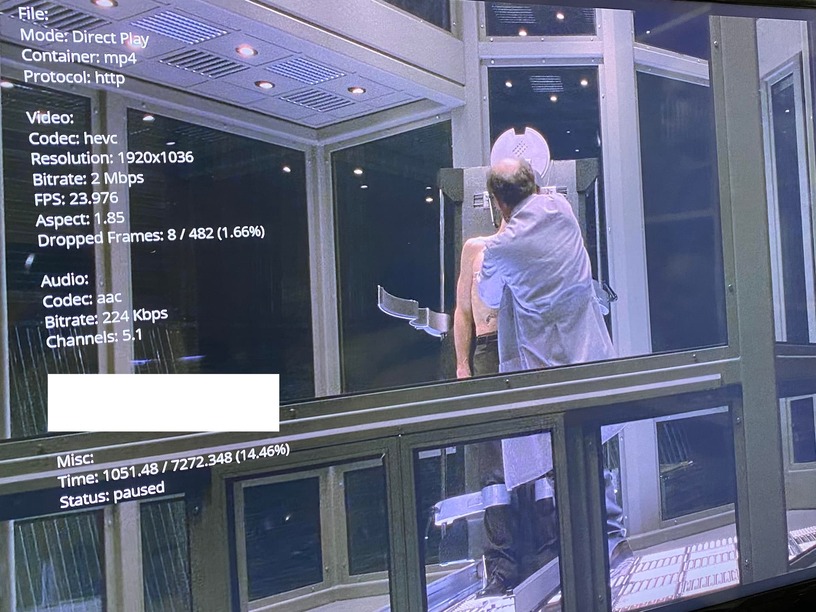
Trying to play Spider-Man (2002) on my Xbox One X and it’s giving me minor stutters randomly. Not really too sure what’s causing it. Sometimes it runs just fine and sometimes it loses frames. However, it runs smooth using VLC and Plex’s Web Player.
I try to keep all my movies from transcoding as I use my PC for games, etc. and don’t want any heavy load on my CPU/GPU. However, I noticed when switching to transcoding the stutters cease to exist on any affected movies I’ve noticed so far.
I’m stumped.  The picture shows what it says when enabling playback info under the Xbox app. Any help is appreciated.
Yes I’m also experiencing this problem or one similar to it. I’m experiencing it both on One X and Series X consoles.
I can’t seem to work out what kind of files or what conditions result in it. I would say maybe 3/4 of things I play experience the issue. Many stutters or judders occurring at irregular intervals resulting in a non-smooth experience.
I’ll test your “transcode to get smooth playback” fix but that’s really irritating if that’s what’s going to be required as a workaround .
Edit:
I’ve just tested my end - I get no dropped frames, so it must be a separate issue. In my case, despite reporting no dropped frames, the playback is not smooth, it’s perceptibly juddery. If I pause/play a few times, it will become smooth. I’ve had numerous people comment on how choppy it looks during playback, especially camera pans.
I’ve found making sure the movie files are .mp4/.mpeg4 or SOMETIMES .mkv alongside an AVC format seems to fix the stuttering/dropped frames. I also try to keep my sound format as AAC. I use a program called MediaInfo that should help you out with finding that information.
Not the best solution if you like running 4K or HDR but that’s the best solution I’ve found so far until they take a look at the Xbox app.
Edit: The transcoding only helped on my end with certain movies. (file formats?) I’m assuming the Xbox’s themselves don’t like certain formats if you plan on using direct play. Ever since I fixed the formatting on certain movies i.e. Spider-Man, I haven’t had any issues so far.
I still can’t understand why HEVC and possibly more codecs are causing such a fuss as they seem to run fine on any other device, including the occasional 4K/HDR content.
If you’re able to upload a screenshot like mine, it might lead us or the team somewhere.
It seems like I’m having the same or similar issue. However, I’m not using Xbox to play the videos.
I hope that this might be helpful to developers in the case that it’s the same issue, my intention is not to highjack the thread.
I am getting stuttering (appearance of FPS drops without any accompanying audio issues). The videos will play without issue for usually around 10-20 minutes, and then there will be a noticeable drop in fps with choppy movement that can last from 10-60 seconds and then will resume playing without issues until it happens again later. Usually pausing and playing will temporarily fix the issue until another 10-20 minutes goes by and it will happen again. Through the course of a 2 hour film, it happens routinely enough that it’s quite annoying.
I have been focusing on 24p (23.976fps) videos in trying to fix this since it’s particularly noticeable due to the already low frame rate. However, I have a sense that it may be impacting beyond 24p.
Windows 10 64bit fully updated
Intel I7 7700k
RTX 2070super fully updated drivers
Plex for Windows latest 1.40.1.2823-6f60f3a7 (Direct Play)
CPU/GPU is nowhere near 100% during playback
In the past I’d been using Smooth Video Project with Plex until recently when I stopped so I am not exactly sure when the issue might have shown up since SVP possibly hid this issue.
Plex Web in Chromium might be unaffected after some testing.
The following I have tried without success:
- Plex video processing set to low or maximum quality
- Matching monitor refresh rate to video (23.976hz exactly)
- Two different displays present the same issue (monitor/projector)
- Windows Variable Refresh Rate (VRR) turned on/off
- Windows Hardware GPU Scheduling turned on/off
- NVIDIA profile for plex set up with low latency off, vsync on, power adaptive, gsync off
- G-sync fully turned on/off
- Different configurations of mpv.conf including (video-sync-display-resample and interpolation=yes)
- Software and hardware decoding
- still happens when transcoding
Thanks for more info, I’m hoping someone sees this eventually to try to rectify the issue. I recently swapped aforementioned Xbox One X for a Series S. I’m going to try to replicate what I had shown above and see if my results are the same, I plan on trying to see how the same type of file runs through the PS4 app as well.
Experiencing this as well, however today not as much. Also made a thread and nobody (at least plex employees) seem willing to help troubleshoot, or say if they experience similar issues on setups they have. @Moussa what’s the deal with this issue? Is it not something you guys observe on your setups during direct play?
I’m running into issues with TV shows, regardless of series, media type, storage location, etc. Frames will start to drop, video jumps forward. Sound goes out of sync. Then it just buffers into oblivion.
This happened on an Xbox Series X, but it’s also happening on my Xbox 1 S and my PS5. It’s wildly frustrating.