DS720 - Plugins

I’m on Plex version - 1.28.2.6106 - which I know needs updating (I’m updating to version 7 probably tomorrow which is why I was doing this playlist import today, just to make sure that was still working).

I have not imported playlists into Plex for quite a while but I did solve how to do this a couple of years ago and it included the important element of the Plugins screen where I can modify things. My question is twofold:

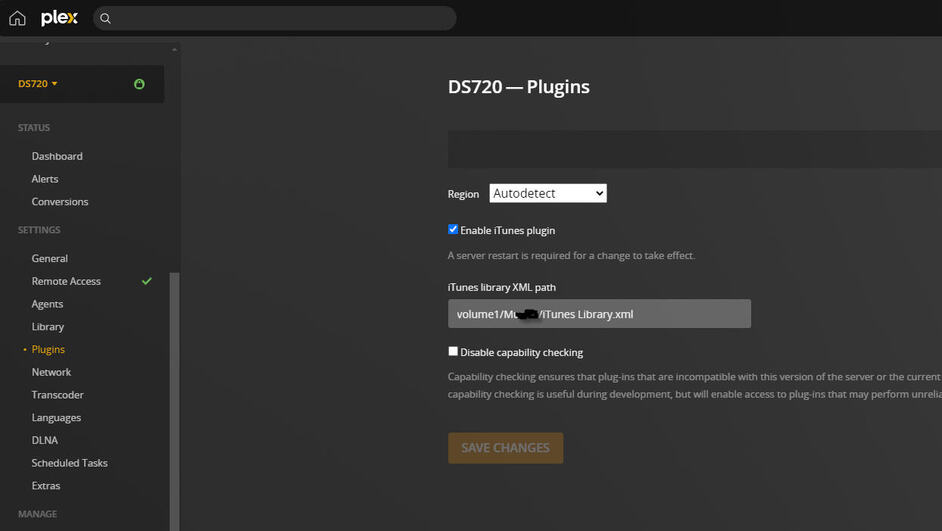
  1. Where is the DS-720 Plugins located? I have it here in a capture from before that I had archived as I shared with others how to get playlists from iTunes into Plex:

Here is an earlier capture where it shows Plugins on the left navigation panel.

It is not showing now in my Plex. Has this been removed? (If so, why?) Is there no way to get this back? This was a critical component in getting things to work for importing playlists. Is there a way to get this somehow as I need to get to the enable plugins checkbox and the XML path?

  1. I had made an error in doing my updated iTunes playlists a short time ago and the instructions that I followed were on a document that was missing a key component (per #1 above) and it took my playlists down from 934 to 82. I actually closed Plex as I feared it would delete them all and then I’d never get them back. I did more investigation on my archives of documents related to this and noticed that the steps I follow to make this work included modifying the XML path and disabling the itunes plugin (which I then enabled after doing a couple of steps - this is all necessary in getting playlists to import).

My iTunes Music and Video Plugins are still listed from the left navigation pane under “Manage”.

I have backup up my Plex on my Synology NAS, including my Music and Photos folders which backup daily.
I noticed in the preferences.xml file that the XML path shows there. I have archived this as well and wonder if I do one of the following, if the playlists would come back?

a) Copy the preferences file from yesterday over the one from today in the Plex/Library/Application Support/Plex Media Server.

b) Copy the previous iTunes Library.xml file from about 18 months over the new xml file I updated today which is located in my Music folder.

Should I do one, or both of these, or won’t that bring the playlists back?

c) Take the backup from last night - DS720_1.hbk - and copy it over the Plex folder (which the backup is taken from)?

If there is a way to backup Plex other than in my Synology NAS software itself please let me know.

(I don’t use Plex on my Windows 10 really so backing it up via the HKEY_CURRENT_USER\Software\Plex, Inc.\Plex Media Server wouldn’t work as I haven’t backed that up in quite a long time and too much has changed in my Plex library anyway)

Thanks.

The settings for iTunes are located in Settings → Library + Show Advanced

Read this, twice: FAQ 27 - Migrating an existing PMS from DSM 6 to DSM 7

Synology forced several changes on Plex for DSM 6 vs DSM 7. The two major changes are that Plex runs under a different username, PlexMediaServer instead of Plex, and the Plex Data Folder is in /PlexMediaServer instead of /Plex.

Due to Synology restrictions, updating Plex to run under DSM 7 is not straightforward.

Read the FAQ before proceeding.

Before updating to DSM 7:

  1. Stop Plex Media Server
  2. Make a backup of the /Plex shared folder. Using Hyper Backup is OK.
  3. Uninstall Plex Media Server
  4. DO NOT remove the /Plex shared folder (you’ll just have to restore it later).

If the migration does not work, do not panic and start deleting things. Write back and someone will be able to assist.

In Plex under the Library on the left nav pane, and making sure I have “show advanced” instead of “hide advanced”, I am not seeing any “iTunes” settings. There should be (or was) a box per my captures that showed a checkbox for “enable iTunes plugins” with another box for “iTunes Library XML path.”. Neither those, nor the actual “Plugins” that used to be on the left navigation - between Library and Network - is showing. I am able to click the three dots on Playlists and click the “Import from iTunes”.

You said: Synology forced several changes on Plex for DSM 6 vs DSM 7.

Would you suggest not even moving to the new DSM 7? I fear it’s a matter of time before I will have to do so. Synology says no more support, updates, security etc., will be given on versions older than DSM 7 after October of this year. That doesn’t mean my NAS will stop working.

Synology support says that if I migrate to the new unit, it will automatically update to the latest Plex as well as DSM 7.

You said:
Before updating to DSM 7:

Stop Plex Media Server
Make a backup of the /Plex shared folder. Using Hyper Backup is OK.
Uninstall Plex Media Server
DO NOT remove the /Plex shared folder (you’ll just have to restore it later).

I have backups of the /Plex shared folder using Hyper Backup. Are you aware of the other questions I posed:

  1. If I copy the /Plex shared folder backup that I have BEFORE I made the goof with my playlists imports, can I copy it over the Plex folder on my Synology and get those playlists back, meaning it will put things back to where there were from my nighttime backup from last night?

  2. Or would pasting the other preferences.xml file I backed up before importing playlists bring them back in Plex?

  3. And/or, would pasting the iTunes library.xml I backed up before importing playlists today bring them back in Plex?

And aside from my reply above, where is the actual “enable iTunes plugin” and iTunes XML path located? They’re not on the Settings/Library / Show Advanced.

Thank you so much for your reply, and the caution on Plex DSM 6 to 7. I will absolutely review - and read at least twice.

Finally, is there a way in my version of Plex to import the playlists from my iTunes into Plex that I’m missing? There wasn’t one there when I did all my work to get them in. It took a monumental amount of effort to figure out how to get the .XML file from iTunes into where Plex loaded them in finally.

THANKS SO MUCH!

I have read over the document quickly (I will read more times and will have questions), but one area caught my attention. I had asked this of someone at Synology today and they didn’t have an answer for me because it was Plex related.

On my Synology now under the shared folder for Plex / permissions, I have:

admin
My username
guest
Plex

For Plex - there is a checkbox for Custom already. I can’t recall why, but I do remember I needed to do it for some reason. It’s been 2 1/2 years ago now.

If I click the Advanced Permissions tab, for Plex it has three checkboxes checked but Advanced Share permissions is not being used.
Will this have anything to do with the notes contained in the FAQ 27 you shared?

Related to the above, you said:

Change the shared folder permissions using
a. Open Control Panel
b. Shared Folders
c. EDIT the Plex share
d. Permissions tab
e. Click Customize
f. Check all Administration

Since I already clicked “custom” box, there’s nothing I can do so I can’t see how to click or check all Administration.

Please let me know. I am out of space on my NAS so I need to do something as I’m only on a 2-bay NAS. I could add another unit as an expansion but likely will force me to newest version of Plex and my NAS software. The drives I have now are pretty much as big as allowed right now so I can’t replace for larger ones. I already did that a couple of months ago.

THANKS

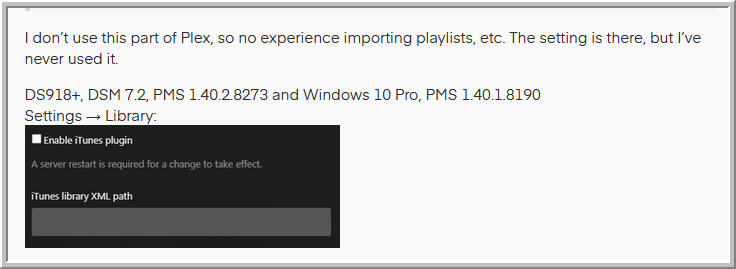
I don’t use this part of Plex, so no experience importing playlists, etc. The setting is there, but I’ve never used it.

DS918+, DSM 7.2, PMS 1.40.2.8273 and Windows 10 Pro, PMS 1.40.1.8190
Settings → Library:
itunes

Also mentioned in Plex Docs: Library

I updated my DS918+ to DSM 7 long ago, over two years. It is now on DSM 7.2. The NAS holds my media and other files, shares them via SMB & NFS, and runs Plex & Tautulli. For what little I do with the NAS, DSM 7 does it very well (as did DSM 6).

I waited until DSM 7 was well out of beta before updating. The DSM update process was painless, just download and install the update.

It will not update Plex Media Server. After DSM 7 installs, there is an option to “repair” the Plex Media Server installation. Don’t. It mucks things up. It doesn’t delete anything. Just a lot of extra steps to recover things.

I would try loading a backup of the database, not the entire Plex folder.

You can restore via HyperBackup or restore from a backup made by Plex.

See Restore a Database Backed Up via ‘Scheduled Tasks’

No need to use the Advanced Permissions tab.

The screenshots in the FAQ are from DSM 7. Some of that may look different than DSM 6 (I haven’t seen DSM 6 in 2+ years, so don’t remember how it looks).

At a very high level, here’s what happens when you first install Plex after updating to DSM 7.

You will most likely be using Scenario 2.

When installing PMS, it will create a new shared folder, /PlexMediaServer, and a new username, PlexMediaServer. Also, user PlexMediaServer is a “system internal user” which is new in DSM 7.

You will have to grant user PlexMediaServer access to the /Plex shared folder so it can migrate the files to their new location. The installer cannot grant permissions because of Synology restrictions. This is mentioned in step 3.

You will also have to grant user PlexMediaServer read only or read-write access to the folders holding your media files.

The installer will then move the files from /Plex to their new location in /PlexMediaServer and set the correct permissions.

The migration may take some time - minutes to hours depending on the amount of data. Let it run. A rough estimate is two minutes for every 1000 media items (movie/episode/song/etc) in the system.

Once complete, you can login to PMS using the local IP address of the NAS and claim the server. For example, if the NAS IP address is 10.1.2.3, use http://10.1.2.3:32400/web.


Regarding Scenario 2, Step 4.

Looks like you found a typo and some missing info (the screenshots are correct, just some navigation info missing).

Here’s the steps. #4 and #5 are the missing steps. #6 has the typo.

Change the Plex shared folder permissions:

  1. Control Panel → Shared Folders
  2. Edit the Plex shared folder.
  3. Select Permissions tab
  4. Change Local Users to System Internal User
  5. Select user PlexMediaServer
  6. Click Custom ← not Customize
  7. Choose all boxes in Administration, Read, and Write. Click Done.
  8. IMPORTANT: You will be back at the Edit Shared Folder window. Check the box to “Apply to this folder, sub-folders and files.” Save.
  9. Wait for DSM to make the changes.
  10. Click Save again to return to Shared Folders app.

You will need to repeat the steps above for the folders holding your media files. For the media folders, grant read or read/write. Administration is not needed.

On the "Plex Docs: Library, it references Related Page: Plex web app. Does this mean having Plex in a browser? I mean, of course it’s in a browser, but in Plex, the DS720 has all my media as well as playlists. I don’t use the Plex Web really, though maybe I don’t understand the difference between the two on the left nav pane. It’s only reading the Synology NAS.

You said the setting for importing playlists is there and say DS918+, DSM 7.2, PMS (version) and Windows 10 Pro, PMS (version). The capture you show directly below this is NOT anywhere I can find in my settings under the DS720 (my NAS) on the left nav pane, with Status, Settings and Manage underneath. Sorry but I’m awfully confused as I’m not finding it. I’d appreciate it if you could help me clarify or find this. It’s critically important in getting my playlists back (especially if I want to do more in the future). Hopefully your other suggestions will bring them back regardless. Let me carry on with a few more questions.

I have done backups of my NAS so I went to the most recent one I had saved to my W10 computer. Here is the capture of the folder you pointed me to and are saying I should load a backup of the database per the instructions - “See - Restore a database”. Here is the location and files referenced I believe. Can you confirm?

So when you say:
I would try loading a backup of the database, not the entire Plex folder.

You can restore via HyperBackup or restore from a backup made by Plex.

Are you referencing ONLY the files shown on the instructions (steps 1-5) - Restoring a Backup?

So that’s ALL I should do? Not replace the iTunes library XML and/or preferences XML that I had only copied over the ones that were there (and are on the Plex and Music shared folder backups)? Nor back up the whole Plex folder as I had queried, right?

You said:

It will not update Plex Media Server. After DSM 7 installs, there is an option to “repair” the Plex Media Server installation. Don’t. It mucks things up. It doesn’t delete anything. Just a lot of extra steps to recover things.

So when I migrate, I would basically say “don’t, or NO” to the new NAS unit asking me to repair?

You guys are great. Thank you SO much for your patience and help!

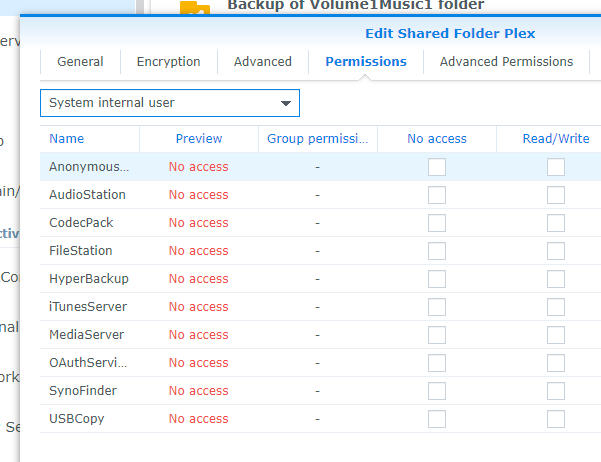
On your last reply above, this has to do with “IF” I upgrade to DSM 7, right? Or am I misreading that? If I do, then I need to follow these recommendations. BTW, I went to Plex shared folder and edited it. Here’s what I see when I switch to System Internal User. There is no listing for Plex, though I’ve edited the Plex shared folder:

Shared folder for Plex - system internal user

So I don’t see how I can select PlexMediaServer - though I’m guessing this has to do with DSM 7?

So at the end of a very long day, may I recap?

  1. Most pressing issue is to get my playlists back by doing what we’ve exchanged on the directions/instructions you’ve given.
  2. Decide whether to upgrade to DSM 7 now or later. You’ve suggested not doing that right now I believe?

Thank you once again!

Correct.

The PlexMediaServer user and PlexMediaServer shared folder are only on DSM 7 based systems. You will not seem them on a DSM 6 based system.

DSM 6 based systems still use the Plex shared folder and Plex user.

Make sure Plex is working the way you want, with playlists, etc., then move to DSM 7.

Unless I missed something, there is no compelling reason to move to DSM 7 today. Later in the year, yes, but it does not have to be right now.

Before migrating to DSM 7:

  1. Stop Plex Media Server.
  2. Using HyperBackup, make a backup of the /Plex shared folder.
    HyperBackup keeps permissions intact, which makes restores easy.
  3. Uninstall Plex Media Server.
  4. Do not remove the /Plex shared folder.

Now you don’t have to worry about DSM prompting you to repair anything. Also, you would have to uninstall Plex Media Server anyway after updating to DSM 7.

Regarding iTunes playlists…

Do you have a backup of the Plex shared folder made with Hyper Backup that pre-dates the problems?

The reason I ask is that Hyper Backup preserves file ownership & permissions. Copying the Plex folder back & forth to a Windows 10 PC may not do so. They can be reset, just need to know one way or the other.

I need to step away for the evening. Also need to do a bit of research on this, just to make sure of a couple of things.

FYI, as long as you have a copy of the databases that pre-dates the trouble (which you do), then things should be OK. Just need to check on some things.

Sorry to ask again, but could you, or someone on the Plex team get me to where I can…

  1. Enable or disable iTunes plugins and see the iTunes XML path?

If I can get that to show up in my Plex version for my DS720, I could most likely avoid doing many of the steps provided (though very helpful to have and know).

Truly, the only thing that got mucked up was me going to a wrong document I had archived and following instructions that weren’t the most recent. Then in an effort to fix, and after finding the right document, I am stunted by not being able to find the Plugins - which used to be on the left navigation pane and therefore can’t do what I did always before.

If someone could help me find, I can quickly fix my playlists and then decide about upgrading to DSM 7. I’ll remind that my NAS server is NOT using any W10, meaning the only database of my music, media and photos is residing on my DS720 NAS.

If it’s only available on W10, then that’s changed because I imported playlists using just my NAS Plex.

Would it help if I updated my Plex? Does that have the plugins on the left nav pane as before, or shows somewhere else?

I provided archived captures of how it showed up for me before. I just need to get that back somehow.

Thank you!

As I stated before, if it’s possible to get the screen I’m needing in Plex that shows the “enable iTunes plugin” and “iTunes XML path” box, I can likely import the playlists again as I’ve done before and won’t have to use these backups.

I deeply appreciate your help!

Hi,
I’m hoping you have had a chance to do a bit of research on this. I really hope I can resolve this today so I don’t have it hanging over me through the weekend. I really appreciate the input and look forward to hearing from you, hopefully today.

Thanks.

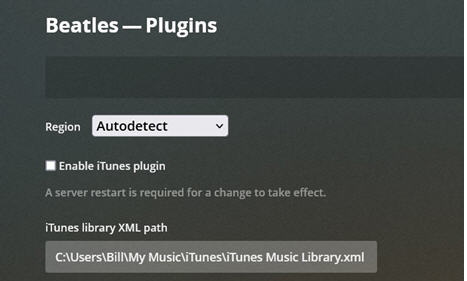
I went back over what you said and the capture below that showed the checkbox next to Enable iTunes plugin and the iTunes Library XML path.

When I go to the same Settings / Library: on my Plex, I don’t see this plugin and XML path as I used to. I used to go to the Settings / Plugins (on left nav pane) - but that Plugins is no longer there. (I showed a capture from my first post Thursday showing the Plugins option under Settings on the left nav pane. This was my DS720+). I went back and found the same capture, but specific to my C: drive on my Windows machine when I had that library along with my DS720. Beatles was the name of my computer (or was a few years ago anyway). But you can see the Enable iTunes plugin box and XML path here too.

As you do your research to make sure of a couple of things, I wonder if you could check whether this iTunes plugins/XML path shows only for “Web” and not the NAS? I reviewed the Library Plex Support link you provided and they clearly mention these two items:

Enable iTunes plugin

Enable local iTunes library path

iTunes library XML path

You can enter the full path to the main XML file for your iTunes library. This is typically only necessary if the iTunes library is in a non-standard location. This is for importing iTunes Playlists

I’m curious as to what they mean by “…typically only necessary if the iTunes library is in a non-standard location.” Do they mean the music library itself, or something else. My iTunes music library points to my NAS as shown here. And the iTunes program/library is on my desktop computer.

That matches with the iTunes library on my NAS (and which Plex plays off of).

This is probably overkill but I captured a song from the iTunes XML file from the iTunes program on my desktop and you can see it also points to the NAS.

iTunes XML shows song file location

If I delete a song from my Synology music folder and then try to play that song in iTunes on my desktop, iTunes can’t find the file. So this relates to playlists which are all part of the XML and importing to Plex.

The issue remains that I can’t get to this screen showing enable iTunes plugin and iTunes XML path. I did have some music that I added from my computer a couple of years ago so I had two Plex libraries in the sense that one was my computer and one was my DS720. I deleted my computer based library over a year ago or so as I never used it or needed it. It was only for testing as I was setting up Plex as I recall. The KEY for me is that I need these two things (plugin/XML path) to import the playlists as it was massively tricky to get Plex to import them. It required a lot of steps, in the exact order. Without these two items, playlist importing is not going to work. It seems unreal that it would work and show on your DS (likely with music you imported from your computer, and not the NAS)? It sure would be awesome if Plex provided a quick and easy way to import these playlists.

This all leads me to believe that the Library Support article you shared has to do with a computer based Plex library of music. I thought I read something where the Plex had to be on a computer running iTunes? I could be wrong. Seems odd.

What’s more confusing is that I do have the iTunes Plugins on my Plex (located at the bottom of the left nav pane, under Console, Troubleshooting, Live TV & DVR, etc..

I also have the Playlists on the left nav pane and can click the three dots and select “import from iTunes” (which is what I did Thursday, and caused the deletion of hundreds of playlists).

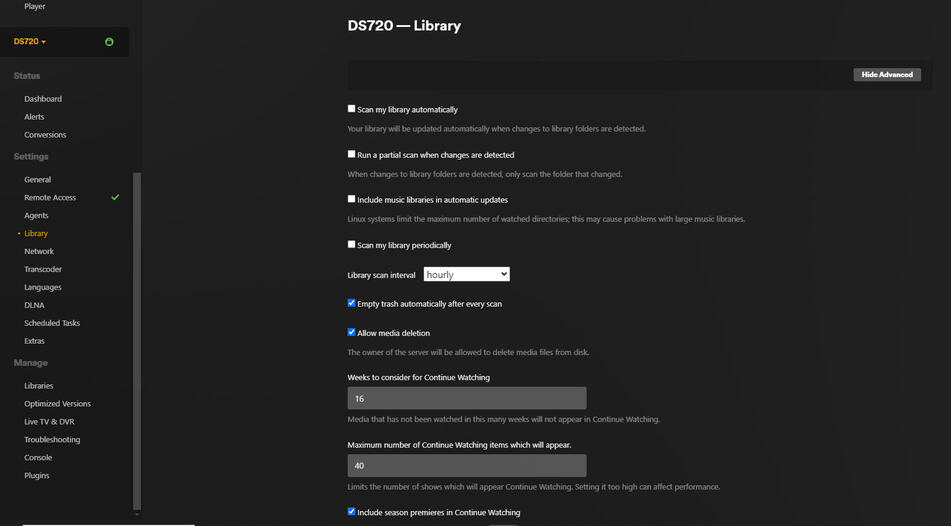
I am uploading the screen for my Library> Settings (it took two captures because of how much is there). I have “Show Advanced” chosen. I am NOT seeing enable iTunes plugin or the XML path. Where the heck is it? Do I need to add some music from my computer to be able to see this (thereby setting up a second Plex library) as I had before? I would only add a couple of small music folders.

A side note to say that my Movie playlists are all still there. None of those were deleted, which they shouldn’t have been when I did the import iTunes playlist.

I also have my computer I built before this latest from a bit over 2 years ago which has Synology and Plex on it - all with the same settings I believe. I’d have to get it out and turn it on to see if I still have the two libraries but I worry that could cause issues with Plex? I really don’t think that’s viable.

Sorry for the lengthy post but I thought/hope it might help in seeing what I have set up and what I am seeing (or not seeing) on my Plex.

I’m anxiously standing by. THANKS!


Hello,

I’m hoping you had time to research as you indicated and have steps I need to do to get back on track. I did send several captures Friday and Saturday as I thought it would help you see what I’m seeing on my end. I hope it wasn’t overkill. I was just trying to be helpful.

Please let me know as I really want to get things rolling once more. Everything else is fine. It’s just the playlists area as per our exchange that needs to get put back to how it was. As I said earlier, I think that if I could get to the screen that shows enable iTunes checkbox and the iTunes XML path, I can get things back. I just don’t have it anywhere that I can see, or as it was before. Those two items are the game, so to speak.

Thank you so much.

I’m hoping to hear from you soon. Do you have any update hopefully?

NEWS TO REPORT -

I went through all sorts of documents and tried several things today. I don’t know how I accomplished it, but I am now SEEING the “Plugins” on the left navigation pane between Library on top and Network underneath.

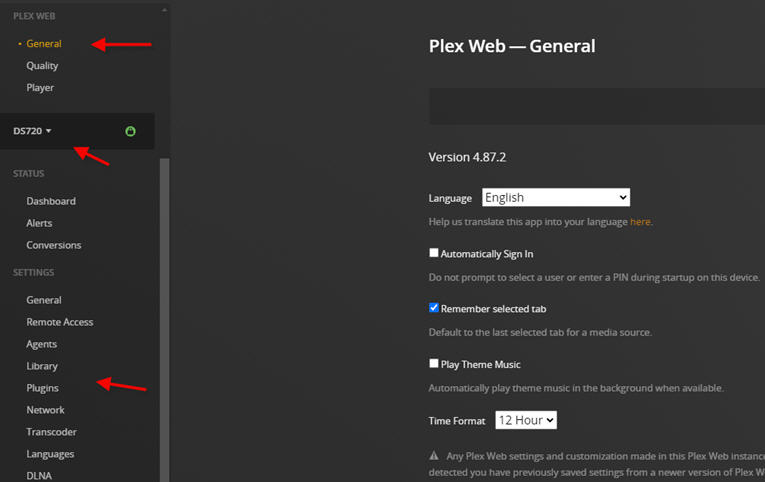
When I first got to the page, I noticed Plex was on “General” under Plex Web. And to the right it said “Plex Web - General”.

I scrolled down the page and the Plugins showed on the left navigation.
Underneath Plex Web and the four items on the left nav, is my DS720. When I go to Plugins, it now shows on the top right side - DS720 - Plugins. This is what I used to see!

I noticed that the “enable iTunes plugin” was checked and it’s saying a server restart is required. Does this just mean to restart Synology? I would close Plex first I assume?

Would this restart of the server do anything that would cause this screen of iTunes plugin and iTunes XML path to not show up? I assume it should come back.

I then clicked “Show Advanced” and the “iTunes Library XML path” is showing.
This “hopefully” is good news, short of other steps such as restoring one of my Plex Hyper Backups.

Instead of using the “bookmarked” Plex link - https://app.plex.tv/, I launched Plex from Synology and it brings it up as: https://myusername.synology.me:32400/web/index.html#!/. That seems to be the difference in getting the screens I needed.

I also confirmed that the Plugins down at the bottom under Manage are still showing for iTunes Music and iTunes Video.

To get playlists into Plex a couple of years ago, and when doing any update with new playlists, I would simply do a few key steps, in exact order, which required the use of the Plugins screen that is thankfully back.

I will await feedback for a little while before I do those steps to hopefully get the playlists back. If that doesn’t work, then I would need the things you wanted to look into and get back to me with.

THANK YOU!

I HAVE LIFTOFF!!!

Getting the screens back is what I needed. I’d still like to know why the playlists won’t import without the key steps I have to take, but as long as I got them back, that’s all I care about. I did not need to rely on a Hyper Backup either.

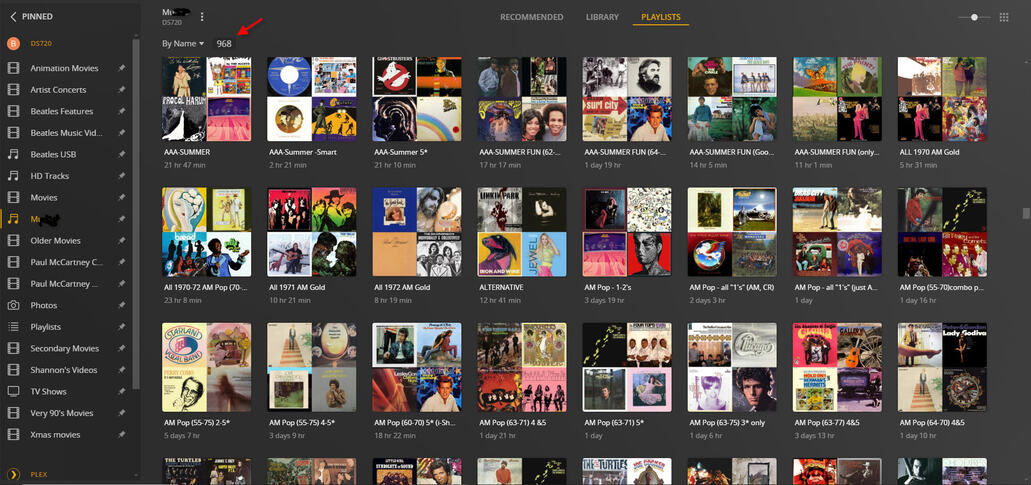
Here are the 968 playlists - back as they were before my misstep last Thursday. (Yes, I know it’s a lot of playlists but I’m a radio guy and it’s what I do…)

The key is having the Plugins on the left navigation and then the screen on the right so I can do the steps I need with the enable iTunes plugin and the iTunes Library XML path.

For someone such as me (and many, many like me), please make sure this stays.

Now that I have things back and working (I tested playback with Sonos speaker zones as well as PlexAmp and all is perfect). Before I move to my DS423+ - AND before I upgrade to 7.2 (at some point), can you confirm if Plex shows this on the Settings screen as on the capture below?

Thank you so much. BTW, I went back to archived forum posts and you and I had a lengthy exchange back then that was tremendously helpful for me. I might post a new item to get clarity on a couple areas you discussed now that I have a much better understanding on how this works.

I’m a HUGE Plex fan. It’s awesome. Just please, please make sure the screen I need is kept always.

THANKS!!! I’m SO happy!

Hi,

I hope you can give me a quick confirmation per our exchange that you gave me.

Briefly, here’s what the sequence has been, and then my question -

  1. When clicking the Plugins on the left navigation under Settings, it would show the “enable iTunes” and “iTunes library XML path”.

  2. That was missing when I first was going to import some new playlists a couple of weeks ago. Nonetheless, when using the “import iTunes playlists”, Plex somehow deleted hundreds of my playlists.

  3. After our exchanges, and in working as many ways as I could based on my archives and your excellent feedback, somehow this Plugins came back. This allowed me to do the steps I needed and got my playlists back to the 968 that I have. (I had not updated Plex yet)

  4. As I began to prepare for moving to my new NAS, I updated PLEX to the latest version this afternoon. The Plugins on the left navigation was missing again.

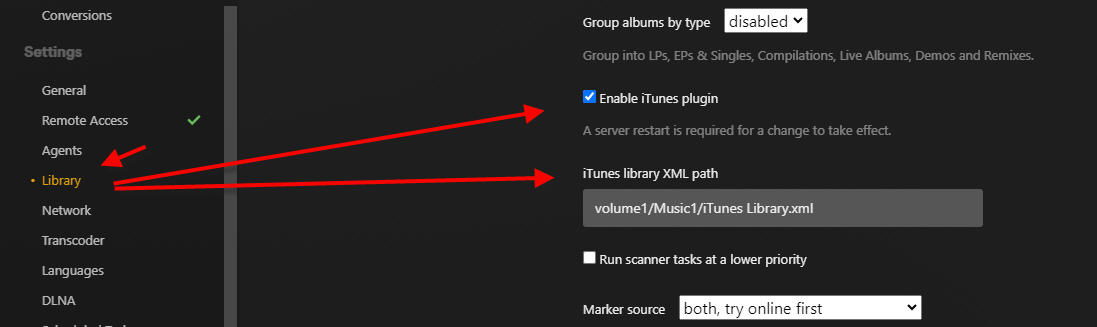
At first I was frustrated but then I remembered you saying the two areas mentioned in #1 had moved to be part of Library when you click that. (On my older version of Plex before I updated today, these two areas were not there). So I checked, and sure enough, those are there for me now.

Can I assume that what I did in Plugins for the two areas would work in the same way as they did when part of the (now missing) Plugins left navigation?

If so, then that’s great. And THANK YOU for sharing earlier on where the two areas were now located. I’m glad I remembered and checked it out.

From my Plex after the latest update:

PLEASE let me know the answer Thank you much!!