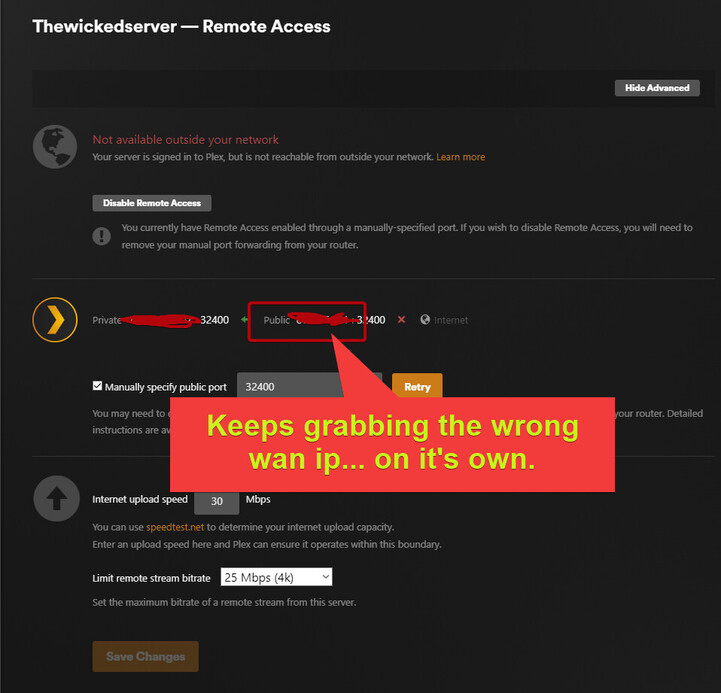
Server Version#: 1.41.2.9200
Player Version#: n/a
Platform: unraid (6.12.10) docker container (official)
I have a dual wan router configured in load-balanced mode. (i have my reasons, please dont ask)
wan/isp #1 allows me to do port forwarding.
wan/isp#2 falls under cgnat, so no port forwarding.
With jellyfin & emby, they always grab the route I tell them to. I se the wan IP /port they should direct their traffic through, and it just works.
Plex however, tries to be “smart” and automatically detect the “fastest route?” or soemthing, b/c it always automatically switch back to the wan ip address that does not allow port forwarding… for some weird & very annoying reason .
I need to tell plex which wan ip to use for remote access outside of the network.
There are several ways you can tackle this problem (custom server access URLs, modifying the interface priorities on your Docker host such that the ISP1 interface is the primary default route, configuring the container such that only the ISP1 interface is accessible to it, etc.).
I’m going to suggest a variant of that last choice. Create an IPvlan Docker network and assign that to your PMS container. On the command-line, that would be accomplished something like this: docker network create -d ipvlan --subnet=10.10.0.0/24 --gateway=10.10.0.1 -o ipvlan_mode=l2 -o parent=ens33 plex_net
(You’d need to modify --subnet, --gateway, and -o parent to values which make sense for your network.)
Then, when you (re)create your PMS container, you’d specify plex_net as the network. You’d also need to manually assign it an IP address to the container (--ip=x.x.x.x on the command-line) since otherwise it will be assigned one you almost certainly do not want.
The result should be a PMS container which can only access the network through the specified parent interface.
You can’t. When your PMS registers with Plex’s servers (and remote access is enabled) it does so with what it thinks is its public IP address. I’m grossly over-simplifying this, but it connects to this URL to determine what its WAN IP is: https://v4.plex.tv/pms/:/ip (there’s a v6 version as well). The IP address returned is used to build a connection URL that can be used to securely (TLS) connect to your server.
The upshot of this is that if your server’s connection to v4.plex.tv routes out of the wrong interface, its WAN IP address will be returned and will be used for purposes of remote access. So the goal is to ensure that that outbound connection routes out of the desired interface.
Since you’re using Docker you have more options to make this happen, one of which I described above. If you weren’t using Docker however, you’d need to manipulate your interface priorities.