IF it were simply a matter of pixel count, I’d agree that 4K is useless, especially “for your old eyes” as you would put it. As a 4K SDR vs 1080p picture is, apparently according to science, indistinguishable by the masses. Where 4K really shines is in HDR, and that is something you can tell pretty instantly between its SDR counterpart. But, that in turn means you need something that has a good peak brightness and black level, to really take advantage of it, you should be on an OLED in a dark room, or wait till MicroLED is mass produced and becomes cheaper, cause even with a high zone level, you lose some of the visual information on the current LED LCD technologies… That’s my 2 cents
1 Like
For the old folk, Nano or QLED are a good pick, OLED at present are the masters. The prince in waiting is MicroLED, it’s going have to be spectacular to be better than OLED.
well, the one benefit MicroLED will bring is a higher brightness output that’s the LED/LCDTV’s big benefit over OLED. The brightness is fantastic…
1 Like
Yea HDR is something I’m actually very interested in exploring once I have the ecosystem in place to take advantage of it. I just wish there was a reliable way to encode HDR into MKV or MP4s. IIRC, Handbrake still doesn’t have true HDR support and their developers don’t seem very forthcoming over when those capabilities will actually be implemented.
And I really want OLED, but I just don’t want to pay for it. Having true black and wide color gamut would be amazing. I just don’t want to pay 3-4x as much as a high quality LCD simply for that.
You can use StaxRip, it has true 10bit pipe for HDR. You can also tonemap HDR content back into SDR with it pretty reliably. That’s what I use to transcode my 4K HDR content… I’ve even toyed with making 1080p HDR content and it works flawlessly.
Unfortunately, StaxRip, being Windows only, doesn’t fit into my workflow since I run everything on a FreeBSD-based FreeNAS server using the command line and SSH. I do have a Windows box, but I don’t want to use it for encode duty as its not really suited for that at all (its a MiniITX, SFF Gaming PC, and thats pretty much all its for). Currently I rip a disc on my laptop MakeMKV with the destination being my NAS, then run HandbrakeCLI in an iocage jail via SSH on the resulting .mkv file.
I realize its sorta moot at the moment, since I don’t have any HDR content anyway, but at some point I’ll be wanting to incorporate HDR into my workflow. I might just hold tight until Handbrake gets a proper encoding pipeline sorted out…
Well, not sure the specs of your FreeNAS box are, but HEVC, especially when HDR, needs some serious horsepower behind it to not take forever and a day. Even using NVENC (on a GTX 1070Ti) I only encode 4K HDR between 50 and 70fps. Without the GPU it’s more like 2.5fps on an AMD Ryzen 7 2700x. So… You may want to re-think whether you use your gaming PC or not to transcode…
Maybe LUMAH DRV, just throwing a possible forward
That uses VP9, I wonder if Plex can decode it, or any clients can play it back without transcoding… I’m gonna grab a few of their sample files and see what’s what 
Edit: Well, it says it’s direct playing, but all I get is a green blocky screen. Unfortunately this also happens on my PC… So gonna require some further investigating… will have to wait for tomorrow.

Its running on fairly old hardware, and Intel i5 3450 and no GPU (headless). I have plans to rebuild it with a Ryzen 3600 sometime in the next couple years. At the moment, I’m lucky to hit 0.5fps encoding 4K HEVC. It would bother me more if I were encoding more 4K stuff, but even 1080p HEVC stuff barely hits 2-3 fps.
GPU encoding really is faster, and its possible I could get that functioning under FreeBSD, but I’d rather spend that money building a newer, better, more power efficient system, than add a GPU for Nvenc. Who knows, maybe I’ll do both?
So essentially, with current hardware, it takes about 3 days to process 1 HEVC HDR movie >.< that’s painful. Thank goodness for NVENC
Or longer. the Star Wars 4k77 re-encode I did took like 6 days… 
At least a Ryzen 3600 would probably kick that down to under two days.
Which is still a REALLY long time…
Yeh, I was basing it on a runtime of 1.5 hours. As for the Ryzen 3600, that’s 6 cores at 3.6GHz. I have 8 cores at 4.1GHz and only do 2.5fps when CPU only. I’d definitely rethink my strategy if it were me, a 1070Ti is only ~$400… You’d be better served getting one of those, than trying to sink more money into a processor, ram, and motherboard… Just my thoughts… But if 4K Is on your menu, a GPU will serve you better than any processor ever will.
gtx 1650, or 1660 best bet. 1660 has the turing encoder (theoretically better quality)
plex does not use the actual 3d functions of GPU, but the nvdec/nvenc chips (video processing is completely different than 3d rasterizing)
for plex on linux, GPU ram is the most important thing. More ram = more simultaneous transcodes.
nVidia Hardware Transcoding Calculator for Plex Estimates
but if you are just using gpu for non-plex transcoding, then all that may not apply or be as important.
Yea its a tradeoff between faster/effortless encodes and idle power usage. My FreeNAS is on 24/7, so idle power consumption can be a large difference in power bills when its all said and done. Having a power hungry GPU sucking power doing nothing 99% of the time is not ideal. More threads and more/faster memory will help everything (Plex isn’t the only thing running on this box). The GPU will definitely crush the workloads I’d ask of it but its single-use nature doesn’t lend itself well to the point of my FreeNAS box.
Besides, I’m interested in moving to ECC RAM (definitely recommended for FreeNAS) and Ryzen is the cheapest/easiest route right now for that. I could cobble together used hardware but server grade stuff is expensive, and older parts can’t compete on performace and power consumption.
Besides I like building new machines.
Wait, can Plex Media Server leverage the GPU for transcodes? I had no idea…That actually changes my math a bit now…
Uh, yeah for long time now, but only recently has nvidia linux hw decode support been available.
see the 2 (hw)
hw decode
hw encode

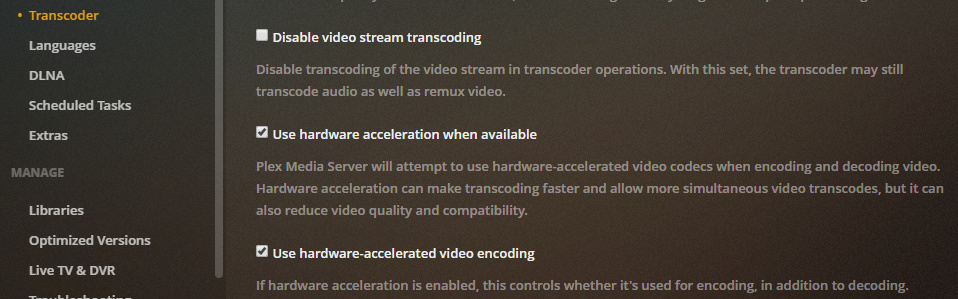
I don’t know if freenas is supported though.
and of course whatever gpu your using must support the codecs you want to transcode.
also, you may want to read the entire thread @ Plex, 4k, transcoding, and you
Quick research shows that only Intel Quicksync is supported by Plex in FreeBSD (what FreeNAS is built on). No NVENC so Nvidia GPU is a non starter unfortunately. Quicksync COULD be useful, but its not really supported officially until the next major FreeNAS release and if I move to AMD its sort of irrelevant anyway. CPU seems to be the only simple solution when it comes to FreeNAS, sadly.
I’ll give it a read, time permitting. 
well you could also consider any 7xxx series intel cpu, that has a 600 series igpu.
that would get you quicksync capable of 4k/hevc transcoding.
since 7000 gen intel cpus are a couple generations older now, they should be fairly competitive with a new amd system.
not to mention saving the power use and money from needing a separate GPU.
