Another issue, there is the option to select that the machine can’t do HEVC in plex for Kodi libreelec. Where is it in Plex embedded?
I see there is a new nightly, is there a change log somewhere? I’ve searched and can’t find it!
Cheers,
Tim
I read your post and requested a test build.
Disclaimer: This is unsupported build but the notes from the latest macOS and Windows will be close to this build.
https://nightlies.plex.tv/public-test/plexmediaplayer/embedded-testing/2.35.1.987-efdb9c3c/
1 Like
Ok thanks for that! I like the new interface! 
Over the next few days, I’ll check if any of the problems I’ve reported have been fixed!
It seems none of the issues that I have with the system have been fixed!  New interface is a step forward, only thing missing for me is the ability to have only unwatched showing when browsing movies.
Could I add a line to the config file that says the player doesn’t support HEVC?
Still no answer!!! A couple of months now! Thinking of cancelling me Plex pass and giving Emby a try, perhaps they’ve heard of customer service!
An updated image, with Wifi Gui support would be amazing now that the Pi 4 is out…
1 Like
Don’t hold your breath!! Plex never comment, so obviously don’t care!
Is there any way we can update the kernels on an already built image?
Or build a new image with new kernels?
I like the lastest Nightly, and I really like the new “Info Screen”
does anyone know the LIRC command to make that work? “Host:ToggleInfo” or anything
@Achilles do you know?
"KEY_INFO": "host:toggleDebug",
cat .local/share/plexmediaplayer/inputmaps/LIRC.json*
{
 "name": "LIRC IR",
 "idmatcher": "LIRC*",
 "mapping":
 {
     "KEY_SLEEP": "host:suspend",
     "KEY_DVD": "enter",
     "KEY_LEFT": "left",
     "KEY_RIGHT": "right",
     "KEY_UP": "up",
     "KEY_DOWN": "down",
     "KEY_MENU": "unknown",
     "KEY_SELECT": "enter",
     "KEY_OK": "enter",
     "KEY_BACK": "back",
     "KEY_EXIT": "back",
     "KEY_RED": "cycle_audio_back",
     "KEY_GREEN": "cycle_audio",
     "KEY_YELLOW": "cycle_subtitles_back",
     "KEY_BLUE": "cycle_subtitles",
     "KEY_PLAY": "play",
     "KEY_STOP": "stop",
     "KEY_PAUSE": "pause",
     "KEY_SEEKFWD": "seek_forward",
     "KEY_FASTFORWARD" : "seek_forward",
     "KEY_SEEKBCK": "seek_backward",
     "KEY_REWIND": "seek_backward",
     "KEY_SUBTITLES": "cycle_subtitles",
     "KEY_INFO": "host:toggleDebug",
     "KEY_NEXT": "step_forward",
     "KEY_PREVIOUS": "step_backward",
     "KEY_CHANNELUP": "unknown",
     "KEY_HOME": "home",
     "KEY_EPG": "home",
     "KEY_NUMERIC_([0-9])": "%1",
     "KEY_DELETE": "toggle_watched",
     "KEY_ENTER": "host:cycle_setting video.aspect"
 }
}
@Achilles I do like the debug key, it can be helpful at times
"KEY_INFO": "host:toggleDebug",
but I hoping to find the Info key. see image below, does LIRC have a command for that?
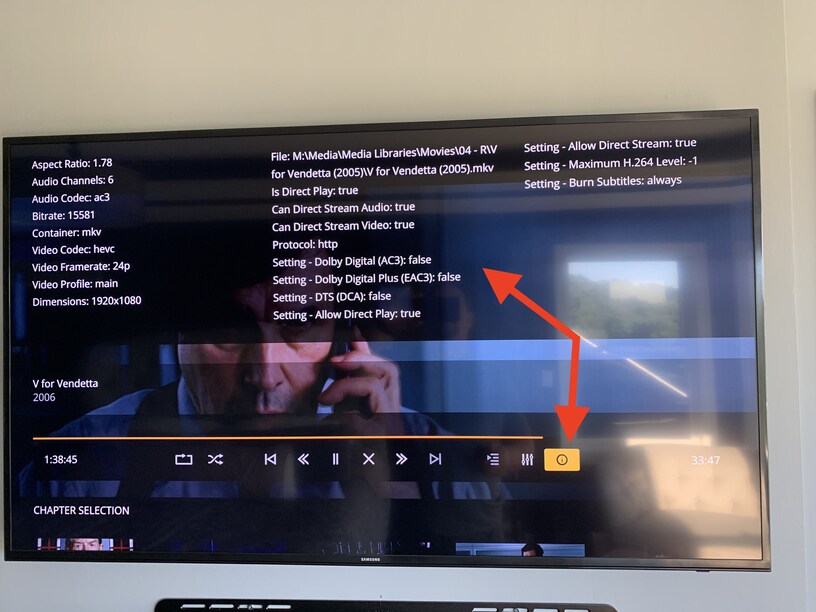
Inquiring for you? Will let you know what I find out.
@wesman Try the command info
@Achilles that was it, I tried that but used Upper Case Info and it didnt work. thanks for the assist
1 Like
