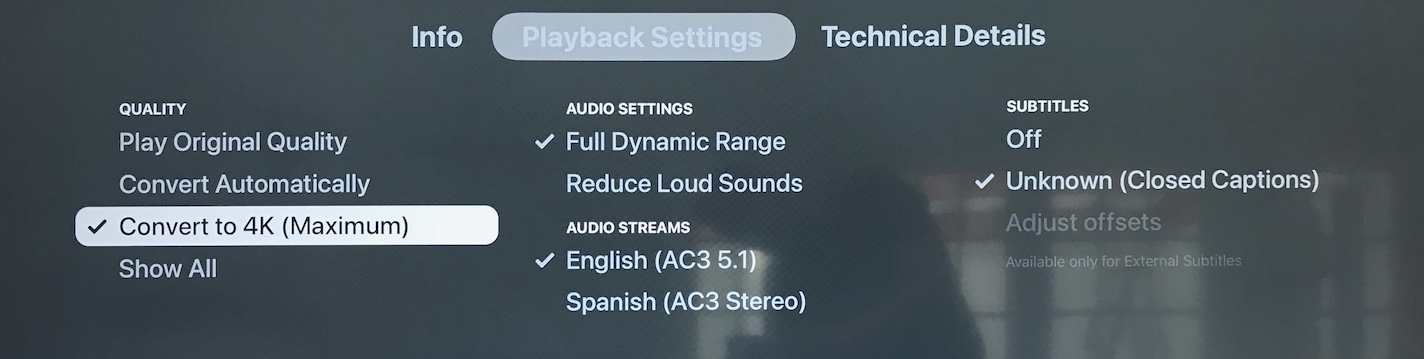
FRUSTRATING issue - it’s been happening for months through several server and client upgrades - and I don’t see others posting about this specific issue. [Edited to add: Issue appears ONLY on Apple TV’s, not on computers or iOS devices]
Have two (2) Apple TV 4K, HDHomeRun DVR, and Plex Server running on Synology DS218+. Whenever I am watching a recorded OTA program, when I try to turn on closed captioning, the Player on AppleTV switches to “Convert to 4K (Maximum)” and program pauses and stutters, indicating transcoding - even though the original file is 1080i MPEG2VIDEO, which will play just fine on my network (ATV’s are wired, 1GB Ethernet over Cat6). If I turn CC’s off, the setting remains transcoded to 4K, until I choose “Play Original Quality” again:
NO MATTER WHAT, whenever I choose CC’s on an OTA recording, It transcodes at Maximum, even if I try switch back to “Play Original” (won’t let me switch back until CC’s are off).
I actually WANT the closed captions - I have hearing loss. Funny thing is that everything worked fine before on earlier versions of Plex, so I know they are not “burned in” - and also the CC’s work fine on iOS and on PC Laptop, iMac - so they’re available separately, the ATV app seems to be the problem.
There are two streaming settings available on the ATV app; for “Home Streaming” the choices are “Maximum” and a dozen or so of lesser quality, starting with 40Mbps 4K, and lower. For “Internet Streaming,” I have 15Mbps, 1080p HD, but unless I misunderstand, that one is intended to limit remote clients from taking up too much uplink bandwidth (my ISP has an upload connection of only ~10Mbps).
There is a third setting called “Play Smaller Videos at Original Quality” and that is set to “ON.”
As for the file - you want me to send you the file that is stored on the Synology NAS? I believe it’s raw MPEG 2 format, not .MKV. Let me know if you want it emailed somewhere, or if I can upload it here.
[Edited to attach the “Media Info” file info from Plex app on my computer] Media-Info.txt (1.6 KB)
It’s not just the one file, by the way - it’s everything recorded. Other files play fine.
[And—edited again to add: I just played the raw file with VLC (it is an MPEG .TS file - and there are normal captions in the file; they show up as expected in VLC Player - not burned in]
I always play local at “Original Quality”. There is nothing gained by attempting to upscale to a higher bit rate or resolution because the information needed has already been lost.
Remote makes sense according to your internet service speed.
Did you try local playback at Original quality – knowing the ATV itself will do the work to resize to 4K? (no sense making the transcoder do the work when the ATV will)
This sounds like EIA-608 subtitles (Wikipedia). They’re unique to the US, Canada & Mexico (who use the NTSC broadcast standard)…
They’re part of the video stream, not a separate track like PGS, SRT, etc.
Support varies across Plex clients. I don’t have an ATV with which to test. Enabling them in Plex for Android/Android TV and Plex Web results in a video transcode. They direct play when using Plex for Windows.
I’ve never tried it, but here’s a thread about converting them to SRT format:
Here’s the output from MediaInfo for a file with EIA-608 subtitles.
Summary
General
ID                                       : 1 (0x1)
Complete name                            : Have Gun -- Will Travel (1957) - S01E01 - Three Bells to Perdido.ts
Format                                   : MPEG-TS
File size                                : 228 MiB
Duration                                 : 29 min 58 s
Overall bit rate mode                    : Variable
Overall bit rate                         : 1 065 kb/s
Maximum Overall bit rate                 : 35.5 Mb/s

Video
ID                                       : 4113 (0x1011)
Menu ID                                  : 1 (0x1)
Format                                   : AVC
Format/Info                              : Advanced Video Codec
Format profile                           : High@L3.1
Format settings                          : CABAC / 4 Ref Frames
Format settings, CABAC                   : Yes
Format settings, Reference frames        : 4 frames
Codec ID                                 : 27
Duration                                 : 29 min 58 s
Bit rate mode                            : Variable
Maximum bit rate                         : 40.0 Mb/s
Width                                    : 854 pixels
Height                                   : 480 pixels
Display aspect ratio                     : 16:9
Frame rate                               : 30.000 FPS
Color space                              : YUV
Chroma subsampling                       : 4:2:0
Bit depth                                : 8 bits
Scan type                                : Progressive

Audio
ID                                       : 4352 (0x1100)
Menu ID                                  : 1 (0x1)
Format                                   : AAC LC
Format/Info                              : Advanced Audio Codec Low Complexity
Format version                           : Version 2
Muxing mode                              : ADTS
Codec ID                                 : 15-2
Duration                                 : 29 min 58 s
Bit rate mode                            : Variable
Channel(s)                               : 2 channels
Channel layout                           : L R
Sampling rate                            : 48.0 kHz
Frame rate                               : 46.875 FPS (1024 SPF)
Compression mode                         : Lossy
Language                                 : English

Text #1
ID                                       : 4113 (0x1011)-CC1
Menu ID                                  : 1 (0x1)
Format                                   : EIA-608
Muxing mode                              : SCTE 128 / DTVCC Transport
Muxing mode, more info                   : Muxed in Video #1
Duration                                 : 29 min 58 s
Bit rate mode                            : Constant
Stream size                              : 0.00 Byte (0%)
CaptionServiceName                       : CC1

Text #2
ID                                       : 4113 (0x1011)-1
Menu ID                                  : 1 (0x1)
Format                                   : EIA-708
Muxing mode                              : SCTE 128 / DTVCC Transport
Muxing mode, more info                   : Muxed in Video #1
Duration                                 : 29 min 58 s
Bit rate mode                            : Constant
Stream size                              : 0.00 Byte (0%)

Report created by                        : MediaInfoLib - v21.03
Report created on                        : UTC 2021-09-06 01:02:18
There is no setting on ATV called “Original Quality” for home streaming (LAN). I tried most all of the other settings at 8Mbps or higher, and every one of them triggers a transcode whenever CC’s are ON (yes, the lower resolutions are usable, but look much worse than the original stream).
Converting to SRT format for every recording is immensely impractical, especially when it’s a bug in Apple TV player only. My Plex app for Mac plays subtitles fine, as did the same AppleTV devices before the last few “upgrades.”