Ah that’s a shame, he is obviously a very clever guy! I Wonder what he is up to now? Well I am very grateful as I now have 2 ZGEMMA’s working perfectly using his plugin! 
Dunno if he is doing any development at all. I remember that he said that he moved all his media stuff to non-server-based setup, like kodi or whatever. Don’t remember it in detail.
Happy for you that your devices work.
1 Like
Is it possible to change the “friendly name” of the ZGEMMA?
I have an issue where I had some channels configured on the ZGEMMA but I added a HDHOMERUN Quatro and removed the channels from the ZGEMMA and am using the ones on the HDHOMERUN instead but Plex keeps selecting the ZGEMMA instead of the HDHOMERUN for those channels. It results in a locked tuner and I have to restart Plex. I have changed the hostname, IP & even deleted the Plex DRV and started over but Plex will always try to tune the ZGEMMA for those once configured channels on the ZGEMMA unless I delete it from the DVR then it will use the HDHOMERUN.
Maybe a way of deleting the DVR History in Plex somehow would also work?
Anyone Got Any Idea?
just a bump for this issue
Hi Sven,
I would love to know if your HR<Homerun proxy still disappears or I you found an solution for it? I have the same problem Thanks Martin
Anyone have any recent issues tuning into the sports channels? They did previously tune ok, but now I get ‘cannot tune channel’ message. All the other subs channels are still fine.
More active discussion on HRTunerProxy here
Not really more active as it seems, is it your forum?
Anybody else having problems with recordings not stopping in Plex and saying “Recording 100% complete” until you restart Plex?
I’m not sure if this is a HRTunerProxy or a Plex problem.
I had the same problem so I developed a script to extract the EPG data from the Enigma2 box using the OpenWebif interface (you need to have the OpenWebif plugin installed in the box) and turn it into a XMLTV format that Plex read.
This way you get 100% of the channel mappings. Is not perfect because of the Episode info & the categories in OpenWebif depend on the service provider and the quality changes from channel to channel, but I found it more better than Plex Gracenotes’ services which only maps about a 1/3rd of my channels.
@praze You are using the HRTunerProxy aswell correct?
Regarding your script how/where do we place the xml file then so plex can get/read it.
Could you write a quick guide on what to do with the xml file and how to map the channels accordingly to it.
Also do you know if there is the possiblity to sort the channels in the same order as on the Enigma2 box?
regards
@salexes, yes that’s correct I’m using HRTunerProxy + OpenWebif in my OpenVix box.
The easiest is to run the script in the same box where Plex runs and output the file into a folder in it (ie. /tmp/plex/epg.xml or C:\tmp\plex\epg.xml in Windows) You then need to create (or re-create the DVR in plex) and point at the xml file instead of using a Provider for your country/region
.
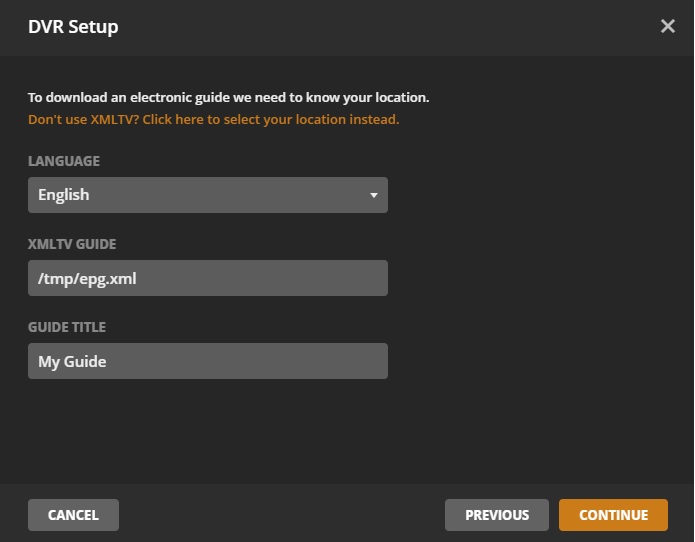
Now, if your HRTunerProxy is configured to share a specific Bouquet (ie. “My Favourite TV Channels”) and you run the script with the -b “My Favourite TV Channels” option, the mapping should happen automagically and matching 100% of the channels as its based on channel name.
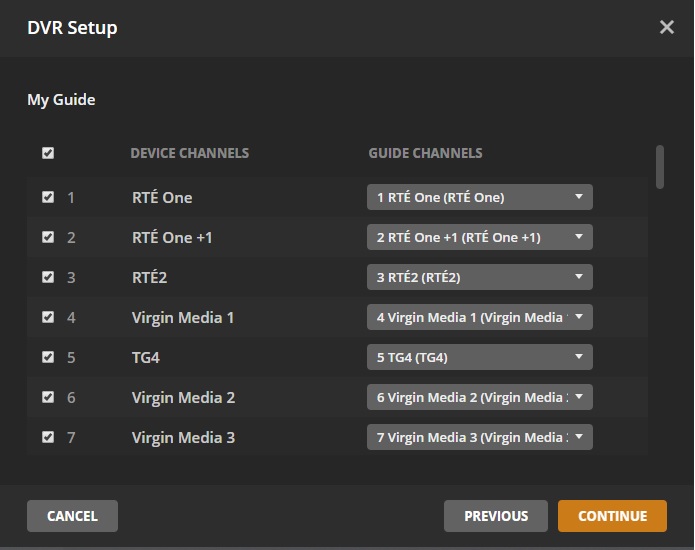
That also applies to the sorting as the script uses the channel number of the bouquet, so the sort is exactly the same as in the Enigma box.
I’ll write a quick guide at some point and put it in the Wiki of the github page with a step by step.
Hope this helps
2 Likes
Thanks a lot for this explanation. Is there anyway this will work with python 2.7.5 ?
I am using my QNAP as my Plex Server and it hast Python 2.7.5 preinstalled (and I am not sure if I can just update it or if that would mess with the QNAP system.
it would be great if the script was integrated into the plugin! and it would drop the XML on the server or STB
@praze I hope that is not to much to ask but would it be possible that you could make an docker image of this script. So I can just start it from the container station on my NAS?
https://hub.docker.com/
Because it seems that installing python 3.7 on qnap nas directly is not the best idea/solution
In theory there’s nothing preventing you to run it in 2.7 - I just haven’t tested it.
Download the tar.gz from https://github.com/cvarelaruiz/owi2plex/releases/download/v0.1-alpha/OWi2Plex-0.1a0.tar.gz, extract it and install the requirements using `pip install -r requirements.txt’
If that works i’d say you should be ok running it in 2.7 - Although there might be some issues with the Unicode encoding of the parameters.
I’m having issues installing 2.7 on my machine so can’t test it easily at the moment, but if you have a go, let me know and if there’s any issues with the script code I can have a look at it.
Edit:
Re the docker image, I guess you could do so but is a bit more complex because you need to:
A. Pass parameter to the script (like the host & port of OpenWebif and the name of the bouquet to parse).
B. You need to set up either a web end-point to get the XML (perhaps using Flask) or mount a volume locally.
Seems a bit overkill. I’ll try to get Python 2.7 sorted and I’ll test it.
2 Likes
right @salexes,
I’ve published a new version that works on Python 2.7 so you can run pip install owi2plex in your NAS and run it like owi2plex -b "My Bouquet name" -h "192.1680.100" -o "/somedir/epg.xml".
Just change the IP address to wherever your OpenWebif plugin is available and optionally use the parameters -u & -p to specify username and password if you use one.
Let me know how you get on
PS: You owe me a beer 
1 Like
Thanks alot. I really want to try it but it seems something went wrong.
I just tried to install it and got this error, how do I fix that.
[...]
Collecting html==1.16 (from owi2plex)
  Using cached https://files.pythonhosted.org/packages/4a/df/0e3d22d50ee43274eb5116f49972a164d853bb3ab305a69a0540b6292252/html-1.16.tar.gz
    Complete output from command python setup.py egg_info:
    Traceback (most recent call last):
      File "<string>", line 1, in <module>
      File "/usr/local/lib/pyenv/versions/3.7.2/lib/python3.7/site-packages/setuptools/__init__.py", line 20, in <module>
        from setuptools.dist import Distribution, Feature
      File "/usr/local/lib/pyenv/versions/3.7.2/lib/python3.7/site-packages/setuptools/dist.py", line 35, in <module>
        from setuptools.depends import Require
      File "/usr/local/lib/pyenv/versions/3.7.2/lib/python3.7/site-packages/setuptools/depends.py", line 7, in <module>
        from .py33compat import Bytecode
      File "/usr/local/lib/pyenv/versions/3.7.2/lib/python3.7/site-packages/setuptools/py33compat.py", line 11, in <module>
        from setuptools.extern.six.moves import html_parser
      File "/usr/local/lib/pyenv/versions/3.7.2/lib/python3.7/site-packages/setuptools/_vendor/six.py", line 92, in __get__
        result = self._resolve()
      File "/usr/local/lib/pyenv/versions/3.7.2/lib/python3.7/site-packages/setuptools/_vendor/six.py", line 115, in _resolve
        return _import_module(self.mod)
      File "/usr/local/lib/pyenv/versions/3.7.2/lib/python3.7/site-packages/setuptools/_vendor/six.py", line 82, in _import_module
        __import__(name)
    ModuleNotFoundError: No module named 'html.parser'; 'html' is not a package

    ----------------------------------------
Command "python setup.py egg_info" failed with error code 1 in /tmp/pip-install-14zlowqu/html/
If I am not mistaken, new python versions do not overwrite the older ones but all versions coexist. At least this is the case for my linux boxes and probably the way python is design for compatibility reasons.
So you should be able to install a newer version of python side-by-side your current one on your QNAP if this is needed.
