Hi, I’m interested to hear more about how you got your enigma/zgemma and xTeVE to work with your NAS.
I’ve got a Synology NAS, I’ve got as far as installing docker, and installed the latest xTeVe docker image.
I’m into the web config of xTeVe and am at the part where you have to give it the location of the m3u file. I exported a bouquet file from the OpenWebif of my Zgemma…
What next steps did you take to make the downloaded bouquet file into a m3u file? And what directory path did you use so that xTeVe could find it?
I just found a handy webapp for making the m3u file.
So I downloaded my bouquet file which was a .tar file, untar’ed it and then re-zipped it and uploaded it to the webapp above, inputted the local IP of my zgemma and the port number, then clicked convert (don’t forget the captcha), then click Get m3u.
So I have the m3u file, I just need to know what path to use to store it locally on my NAS?
In your docker file you possibly map two volumes to the container, one of them being /root/.xteve. In this corresponding folder on your system you can put the m3u files.
In the offical docker example (https://hub.docker.com/r/bl0m1/xtevedocker) the pair is ~/xteve_home:/root/.xteve
In the xteve web interface you then use /root/.xteve/file.m3u or whatever the name of your file is.
Be sure to save the docker volume in a path that is persistent upon reboot of the NAS. Dunno about synology, but for my QNAP I have to put the folders to the HDD. So you might need to change the first part of that volume argument first.
Hi there, I’ve been trying unsuccessfully to set up my Enigma2 with Plex. I have a Tiviar Alpha+ on OpenATV 6.4. I’ve HRTunerProxy installed and set up already.
In Plex whenever I click the button to setup Live TV I sometimes see my Aplha+ in the list of devices. It appears briefly for a second or two and then vanishes. I’ve managed to click Continue before it disappears but I get an error on a later screen, after which when I retry the device isnt seen at all anymore.
I’ve also tried xteve as suggested above, I have it installed on my Plex computer and it is configured and seems to be working correctly. When I go to add it to Plex the same behaviour is seen too, the tuner appears briefly in the list and then vanishes, so I’m unable to use it.
Any suggestions on how to get this working? I recently signed up for a Plex pass solely for the Live TV functionality but if I cant get it to work I’ll be dropping my subscription.
Tried that and it doesnt work. The icon spins for a minute and then nothing happens. I’ve no problem connecting to OpenWebif and viewing streams through that or through VLC or otherwise so dont think its a network issue (everything is on the same LAN). Its just Plex that doesnt see it. Same thing happens with connecting manually to xteve.
I have experienced the same issue with HRTunerProxy too, if your Enigma2 device disappears from the plex detected devices list, I found that I had to restart both the Enigma2 device and Synology NAS so that it would appear in the list again so you have another chance to click it.
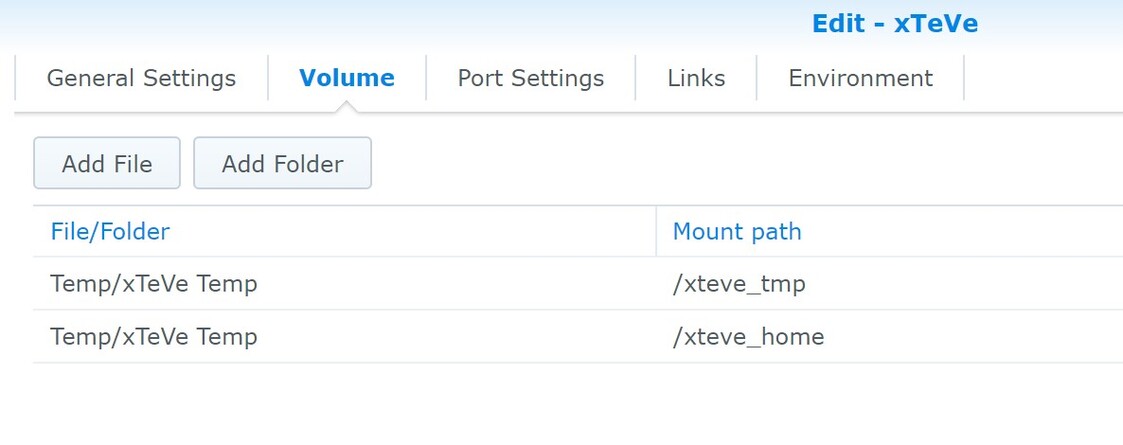
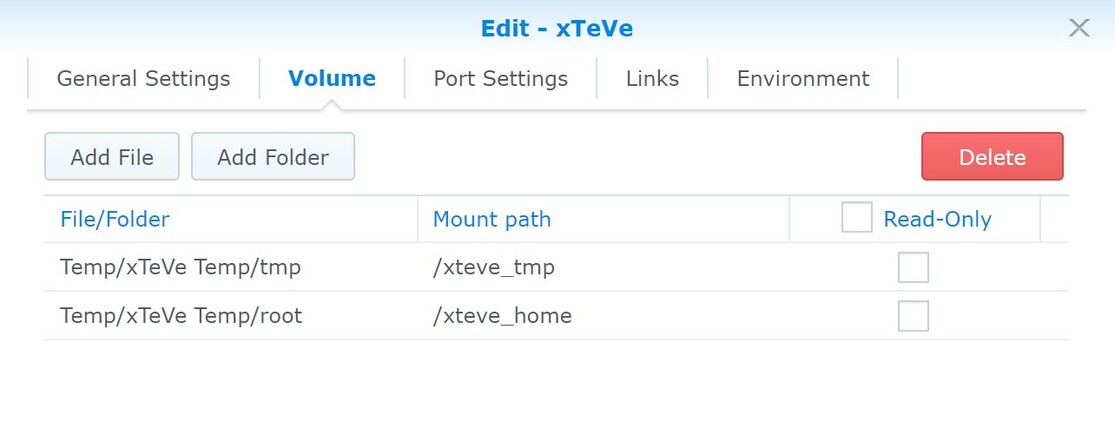
I added the two directories mentioned in the docker xTeVe container notes, but I don’t see them in the location on my NAS, even after restarting my Synology?
I don’t know if you can map the same volume twice, as you did. And maybe the space in the folder name creates problems.
How about
Temp/xteve/home and Temp/xteve/home?
So, I put the m3u in tmp folder and successfully linked to it.
The next step was to link to XMLTV file, I tried a UK one from here, I checked the mapping tab in xTeVe but it seems I need to map every channel manually? Is this the same as what you experienced?
The setup guide in the beginning asks you whether to use xmltv or PMS guide as EPG source. I checked the latter. This can also be changed in the settings (EPG source). So I don’t even see the option you are taking about.
The port is and stays what you specify for your container. One of the beauties of docker is, that you can map the port to your likings for any container.
Trying to connect my VU Solol 4K with HRTunerProxy, it appears for a split second - I can connect manually but after configuring Plex states that the device is not reachable…
After reboot it worked, the device is recognized - but I cannot tune any channel - always unreachable…
Again, I believe this is a dead horse. We maybe should stop riding it…
And again I recommend using xteve with exported m3u lists of the Enigma2 bouquets.