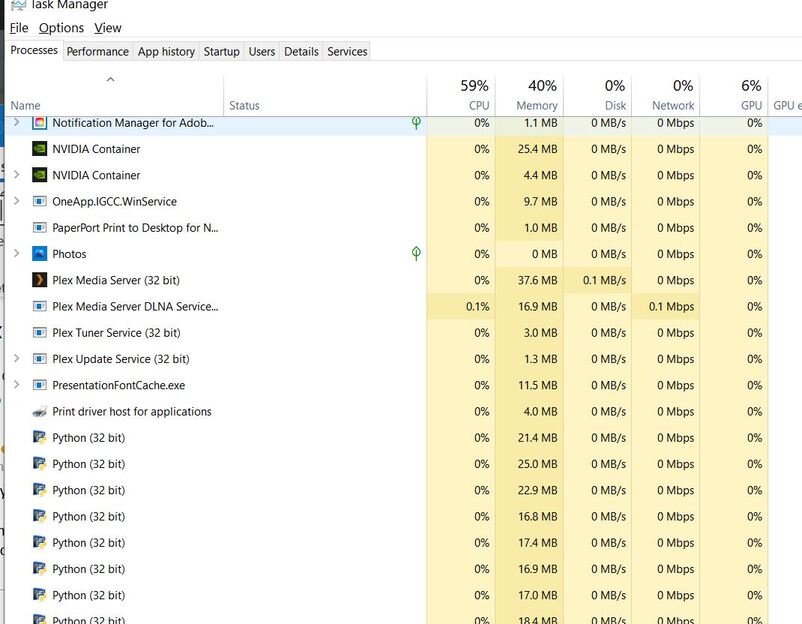
Hi again Moviefan Plex. Just checking you received my last post as you normally respond fairly quickly??
So something odd is going on and it’s either not trying to install or it might be installing to another location. So PMS installed under the “mike_” user. Do you have other Windows users on the machine? You must be signed in as the “mike_” user to update.
Ok this might be the issue. My belief would be I am signed in with my email address which is mike_power01@outlook.com. I can’t recall ever signing in with the other userid you mention. My computer is with my tech support for the next couple of days so I won’t be able to check this for a little while. I’ll get back to you as soon as I am up and running again. Thanks again for your help. Regards, Michael.
Windows allows you to sign in with either a Microsoft (MS) account or a basic local account. I only ever use a local account so I’m not sure how PMS reacts when using a MS account. I’ll ask around and see if I can find an answer before you get your computer back.
Great MovieFan Plex. Please let me know anything you learn. I am working on my backup laptop now so have visibility of your emails and posts although I don’t have Plex or the associated library on this machine. Regards, Michael.
Looks like depending on how you set up the user, it may be using the same user folder or a different one. Check “C:\Users” and see if you have anything beside the “mike_”, “default” and “public” folders. If not, then Windows is using the “mike_” folder regardless how you sign in. However, when you use the MS account, settings are saved into “AppData\Roaming” instead of “Appdata\Local”. So PMS might have been installed using the local user but now that you are singed in with the MS user, the PMS update is looking in “Roaming” so it isn’t updating properly. Switch to the local user and try updating that way.
Hi again MovieFan Plex, my computer is now back from the techs. I signed out of windows and signed back in without changing the user and the non responsive files are now playing in Plex. FYI I checked my windows login using the “cmd” command and it showed the user as mike_
If I go to the accounts menu in windows it shows the account as mike_power01@outlook.com. Meanwhile, the account in Plex is mike_power@bigpond.com. I have tried again to install the Plex update and it continues to fail so hopefully the fix lies in changing logins or userids soemwhere. I do not understand your instructions above “switch to the local user and try updating that way” and hope you can be more specific about what and where I need to do? In another matter I am preparing to increase disc capacity and was wondering if you had any suggestions about a storage solution that works well with Plex incl. 4K movie files. It needs to be very user friendly as I am not technical. I have been exploring the WD My Cloud products but am concerned they my not have enough grunt to handle larger movie files. Thanks for your insights. Kind Regards, Michael Power.
Dear Movie FanPlex, Further to my message of a few minute ago i received this email below notifying me a new device was used to sign in to my Plex account so I presume this action has somehow fixed the non playing file. [Please make sure and read the full email I sent you a few minutes ago and respond]. Many thanks, Michael Power.

Sounds more like the techs fixed something.
I mean this. Since I use a local account, I see the option to switch to Microsoft. You are using a MS account so you should see the option to switch to the local user.

If you are still going to have your Windows computer run PMS, the storage makes no difference. If you are not very savvy with computers, I would just get an external harddrive and connect it to your computer. It will show up as a new drive and there is nothing extra you need to do. With a NAS device like the WD My Cloud, there is some setup and configurations you will need to do before they work.
Thanks for your reply.
The techs just did a physical inspection of my expansion cards. They didn’t login or engage in any way with the computer’s software so it seems the remedy for the non playing file is a mystery.
Re the software update problem I created a local user called mike_ and logged in to windows using this. I then tried the update again and again experienced the same stalemate per the attached image:-

I believe I really need to get these updates working and if you are plex technical support can you remote dial in to try and fix this? Kind Regards, Michael Power.
Note Plex settings are saying I am signed in as mike_power@bigpond.com. Do I need to create a new Plex account which is mike_power01@outlook.com which is the account my windows computer is normally signed into?? Please see following Plex screen grab:-
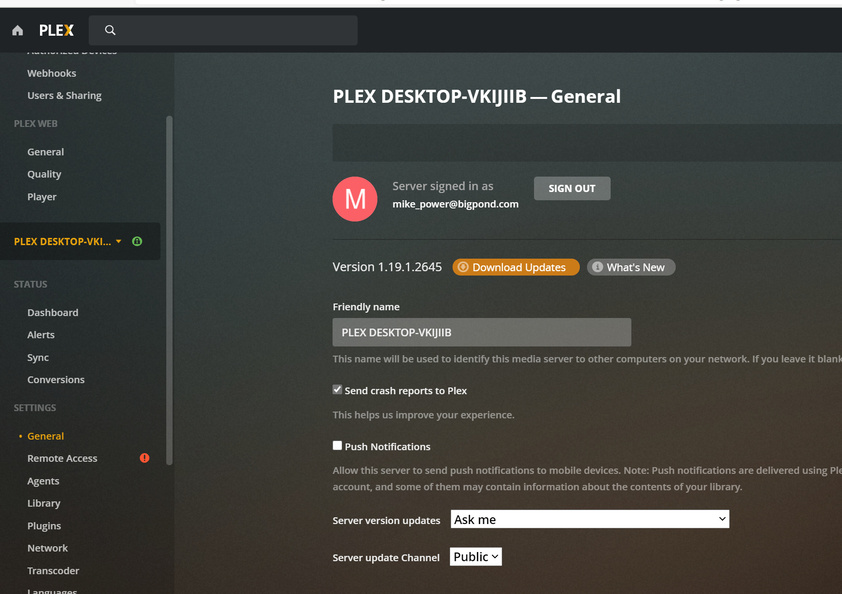
We don’t offer remote access as a way to fix problems, sorry.
No, your Plex account and the Windows account don’t have to match.
Can you show me what your task manager shows? You should see 4 Plex related items and only 1 should say system. The other 3 should show your Windows user.

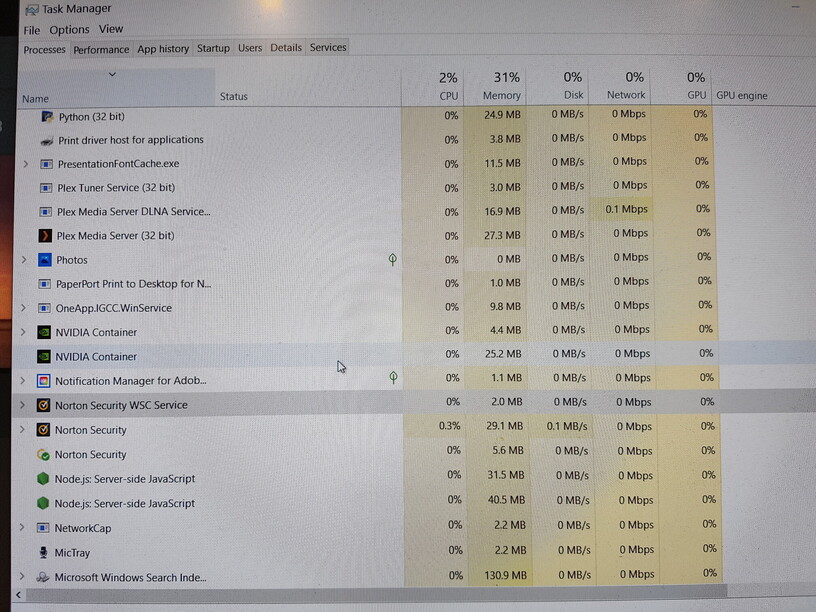
Hmm. Can you click on the details tab and look at the user like in my picture above.
From this one I see that the update server isn’t running. That’s needed to update PMS automatically. So you can try shutting down PMS. Double check the task manager to make sure all Plex programs have shut down. If not, then manually shut them down from the task manager. Then d/l and install the latest PMS installer manually. Restart PMS and see if that works.

If i understand you correctly you want me to “end task” in Task Manager for each of the listed Plex processes?? Then you have asked me to “d/l”. I am sorry i do not understand what that means? Then you direct that I install the latest PMS installer manually. Is this just the update link from the Plex web-site?? Can you send me a link to this installer so I can be sure to have the correct thing?? Many thanks, Michael Power.
Only if they don’t close by themselves when you shut down PMS. To shut down PMS → Right Click on the Plex icon in the taskbar, select exit.
d/l = Download. Get the latest version from our website, https://www.plex.tv/media-server-downloads/.
After making sure Plex is not running already, run the file you just downloaded.
Great news. Your latest steps appear to have worked and I believe I now have the latest version of Plex installed. Please see this image with version details:-
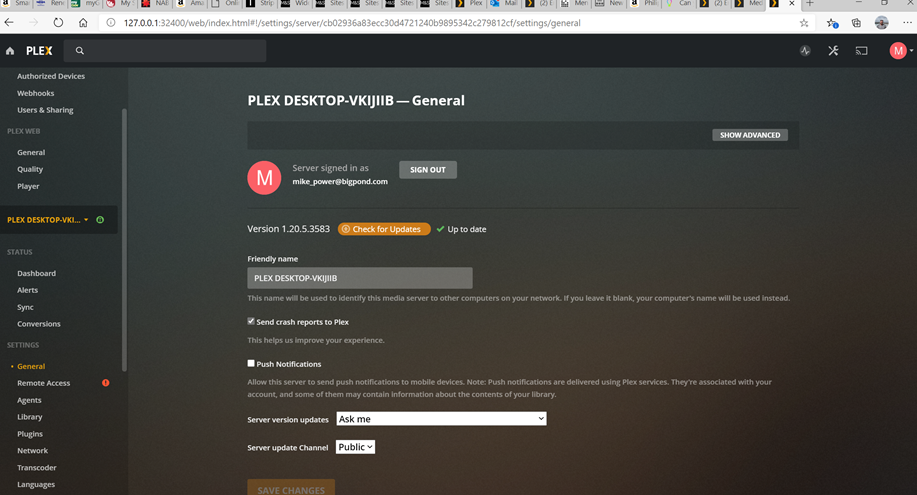
I will keep a note of these steps in case the problem occurs the next time I try to do an update.
Thank you for your patience and persistence throughout. One more query you may help with. Over time, the Plex app on my UHD TV has become slower and slower to launch. Although I can live with it the way it is is there any plausible explanation & fix for which might be causing this to happen?? Many thanks, Michael Power.
Awesome. Do you see the Plex Updater Service running too? If so, then you might be ok to update from Plex Web.
For your TV, I’m not aware of any specific issues like that. Start a new thread and provide details on the app version, TV model, and log. There is an option in the Smart TV app to send the log information to your server. You can then provide the PMS logs.