Failed to update server shares

Server Version#: Version 1.26.0.5715
Player Version#: Version 4.79.4

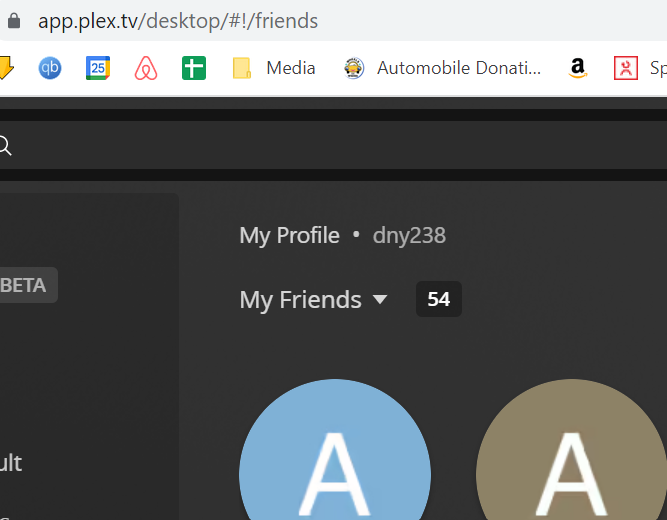
My web client shows I have 53 friends, but it’s not letting me add more unless I delete someone like I hit a limit. Can you check? I’ve had to rebuild my server over the years and I’m wondering if the ‘counter’ is off. Is that a thing?
Rob
PS. Be nice if I could see the last time someone used my server, if ever…

My Friends → 53

@dny238

Your account shows 73 active devices.

You can look at that list – Settings → Authorized Devices (Upper left corner) in Plex/web.

(The “Chrome” browser references tend to accumulate… Just delete them if they’re a problem)

From there, you can also see the last time they were active and , if desired, remove them.

Some of us use Tautulli to log activity. Tautulli is a 3rd party app but it provides a very nice tracking which keeps all the data right there on your machine (hence private).

Between the two, you can monitor which content is being watched and by whom.
You can then remove those inactive users from Plex/web as I detailed above

Should it be blockign me from adding new users then? I had to delete a few people to add a few.

I think I wasn’t clear.

You’re talking about devices which is different and here
https://app.plex.tv/desktop/#!/settings/devices/all

I’m trying to share my library with new people here
https://app.plex.tv/desktop/#!/settings/manage-library-access
Is there a limit of 100?

The limit is 50 (AFAIK) but let me verify that.

Your account can share up to 100 users (for all servers on the account)

A Plex Home can have up to 15 members, including yourself.
Are you including people in your Plex home and hitting that limit?

So I’m gettting the error like I’m hitting 100 people but I only have 54, see the screenshot.
How do I audit why I’m getting the error?

image

I don’t use the Plex Home users, it’s just me
image

I’m working with the Plex.tv team.

All the counters and info is showing as you see it.
It should ‘just work’.

They are digging deeper to find out why it’s not.

Thanks! I tried to review the logs to find an error, upgraded them to ‘Verbose’ and didn’t see any of the files in that directory updated as the error happens…
Let me know if I can troubleshoot further.

Also worth noting that I only have one active server, but due to issues in the past have had to rebuild it, so if they’re keeping track of older servers, they can remove them from my ‘account’ (if that’s a thing)
Thx!
I can see your account.

There is only 1 server owned.
There are a couple shared with you (those don’t count against you)

If/when you rebuild a server, you can always delete the old server from Authorized Devices - Server (dropdown)

Hi there @dny238! I’m investigating, and I’ve DM’d you for some more information about your server.

This topic was automatically closed 90 days after the last reply. New replies are no longer allowed.
