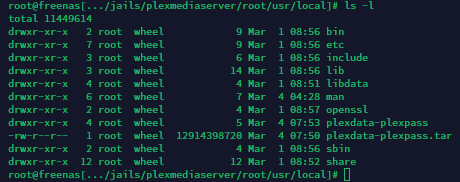
It’s worth noting you’re looking at the directory contents of /local right now.
I’m talking specifically about plexdata-plexpass and its contents.
The files are the Plex server data, and therefore include the database files and metadata for the server content. Plex would need to be able to update these files as you gain more server content, download posters, and edit tags on stuff, etc. Plex Media Server runs as the user “plex” and would need the ability to write to those files. Besides the normal full access to the file’s owner, your permissions right now include read and execute access for Group and Everyone (755 is that mask I believe). So Plex can read the files as they are when they were copied but cannot modify them.
TAR is supposed to maintain ACL’s I believe, so I don’t know if the applying of the chown here is absolutely necessary, I just see it as a Good Idea™ to avoid issues later if something got created by the untarring that has the wrong owner/group.
As far as the old server, if all the files in the plexdata-plexpass folder are root/wheel, it’s possible whoever made the plugin has Plex running as root (really not a good idea security-wise). But the pkg install runs as the user “plex” is the point here. If you were reading the messages when pkg installed it, it told you it was creating the user “plex” and group “plex” on the jail as part of the process. That’s why you’re having this issue trying to run chown command from the TrueNAS system’s jail, which is a whole different user and group database.
It’s the same issue people have when they are setting up a new server and for some reason PMS is not seeing the movies and TV shows they have on their storage pools. The files were uploaded via SMB or FTP and have the owner as the name of the user. I get around this by having an auxiliary ACL for the group “plex” added to my Windows file shares so files I upload get access to the group plex added, and therefore Plex Media Server can access them even though the files are still owned by me.
Edit: You’re fine to use Termius, btw. It’s what I use on my Macbook when doing stuff on the the TrueNAS system. You just have to be in the shell specific to the jail. When you connect over SSH you’re working in the TrueNAS system when you first log in. You can access the shell for the jails from it the same way you would if you were typing away on the shell on the TrueNAS GUI.
jls
Find your new Plex jail on the list and note the jail ID number (first column).
jexec JAILIDNUMBER tcsh
The ID numbers are assigned incrementally in the order the jails are launched. So if you stop and relaunch a jail the ID number will change, and if you reboot the entire TrueNAS system the numbering will reset.
That also means when you are using Termius (or any SSH client) you need to exit twice to leave the shell gracefully. Once to exit the jail shell you were in and return to the TrueNAS shell, and again to leave TrueNAS.