Server Version#: Current
Player Version#:All Platforms
Hi,
I would like to know which would benifit the Plex server greater?
Core i7 3.6 Ghz 4 core with 8 threads or
Xeon 2.7 Ghz with 8 core @ 16 Threads…
TIA
Server Version#: Current
Player Version#:All Platforms
Hi,
I would like to know which would benifit the Plex server greater?
Core i7 3.6 Ghz 4 core with 8 threads or
Xeon 2.7 Ghz with 8 core @ 16 Threads…
TIA
You have plex pass so you can use hardware acceleration.
If you are not using a separate GPU, do the I7 for Quicksync.
I assume you are looking at this CPU:
If using another GPU, meh? Doesn’t much matter then 
Actually, I am going to retask an old HP Z230 with a Core i7-4790 , 32GB DDR3 1600 and put a RX 570 in it. I’m going to use 16GB for a ram drive for transcoding. I don’t usually have for than 2-3 streams going at once, and one of these is a direct play. I’m not familiar with Quicksync, but will look into it.
The 4790 will transcode H.264 using the onboard GPU/ASIC (Quick Sync). You won’t need to add the RX570 for that.
The 4790 will not decode H.265 in hardware. However, unless you’re transcoding 4K, the CPU should be able to handle it w/o having to add the RX570.
I will be removing an AMD Firepro W4300 to give the Quick Sync a go. Is the any quick way of benchmarking a particular configuration to see which setup will give optimal performance for plex?
Well that’s a bust, I can’t enable Quick Sync in the Z230 bios… So Radeon RX 570 or Firepro W4300 ?
I see the Firepro is going on ebay for around $400 aud. I could swap it for an Elgato 4k60
You can’t enable the on-board graphics, even with the GPU card removed?
Here’s the BIOS settings for my Gigabyte motherboard:
I can enable the onboard HD4600 , and was following this tut:
I’ve no idea what that video is talking about.
If you enable the HD4600 graphics you’ve enabled Quick Sync. There is no separate BIOS setting (that I’ve seen, anyway).
Make sure you’ve the latest drivers, reboot your system if you update anything, then you can enable hardware transcoding in Plex.
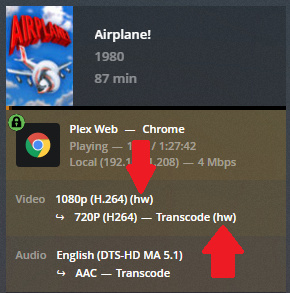
Play a H.264 video and force a transcode. You should see (hw) when looking at the status on the Dashboard (Plex Web -> Activity -> Dashboard). See example pic below.
Much appreciated FordGuy61,Thanks for your help.
This topic was automatically closed 90 days after the last reply. New replies are no longer allowed.
