That’s a pretty bad generalisation even with the “a lot” proviso.
They are actually smart but only as smart as the coders who create the app. So yeah In Plex case smart tv’s are extremely dumb.
In others examples, with better coding they will happily direct play any file that even a Shield will play… obviously with the current HD audio limitations until e-arc becomes more mainstream.
The problem is probably the MPEG4 video. You would have to check your TV specs and Plex logs to make sure.
That said, as @mwe21975 mentions in the OP, the most compatible format is:
MP4 container
H.264 video, High@4.0 or lower
AAC 2.0 audio (suggest 320kbps or lower)
AC3 audio (optional, 1.0 to 5.1 channels, 640kbps max)
SRT subtitles
The above will play on a Gen 1 Amazon Fire TV Stick from 2014 (tech specs). Broadcast TV in the US uses AC3 audio, so any US TV with a digital tuner should be able to handle AC3 audio (640kbps is the max Blu-ray rate for AC3 audio). Enabling image subtitles - PGS & VOBSUB - can cause a video transcode on some clients (ex: LG WebOS). SRT subtitles are well behaved on most clients.
WRT your problematic video, suggest you run it through Handbrake to match above format. Be sure and check the Web Optimized box on the Summary tab. This is the same as MP4 Fast Start. It reorders some bits for better streaming.
Yes. That’s correct. These are the stats I have found to be most compatible with the most devices.
Mp4, Aac as primary for remote and ac3, e-ac3 as secondary for you at home if you have or plan to get a surround system @ 1080p or 720p w/ your remote viewer’s settings on the same resolution as your video (either 720p or 1080p)
Mkv is a nice container but it will transcode remotely. Stay away from avi etc.
Anything other than aac will transcode remotely and even at home if you’re watching on iPhone, iPad etc. only used the secondary ac3, e-ac3 if you have a surround system at home that supports it
Def encode DTS audio to aac, ac3 or e-ac3. I haven’t found many devices compatible with dts audio.
I have 90TB of media and 89.95TB of that is .mkv and it direct plays remotely just fine.
I agree about .avi though. I put all those in a .mkv container too.
I just tried it again. My mkv file will not direct play here at home on iPhone or iPad but I will direct stream. My initial post was just about direct plays… which no load at all on your cpu. Although direct stream isn’t too much of a burden either
I am direct PLAYING right now on my iphone 7 over cellular, from my home server.
just because it does not direct play on YOUR client and settings, does not mean it won’t direct play on others with a compatible client and sufficient bandwidth and the correct quality settings.
My original post was how to get MOST remote Viewers to direct play. My remote viewers CAN NOT direct play MKV files and most clients can’t.
If you have any remote viewers watching on iPhones, iPads, most smart TVs etc they will not direct play mkv files. Mp4 is much more widely accepted then mkv as far as clients direct playing.
I’ve tested it out but do what you want brother. Just trying to pass along what works for me.
it is not that your post isn’t helpful (it is), however your suggestion that most clients can’t direct play mkv is false.
as has been explained multiple times, what direct play is dependent on the CLIENT;
client must be compatible with the container (mkv vs mp4), the video codec (mpeg 4 vs x264 vs x265 etc), the audio codec (atmos/truehd vs ac3 vs eac3 vs aac vs mp3).
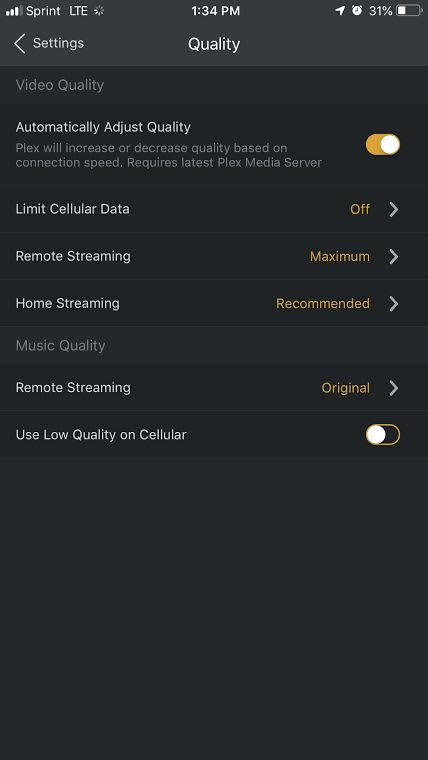
then there is also the client and server (plex pass) bandwidth settings
and then there is the client and server (plex pass) quality settings
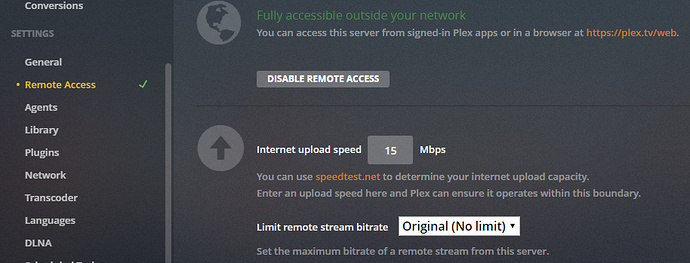
well that depends, the plex pass server settings can allow you to restrict your server.
Without the plex pass server settings, the server is basically wide open, to whatever the limit of your internet upload speed is.
SO if you have 100 meg upload, then you could potentially direct PLAY 1080 and possibly even 4k. (if your client is compatible, has sufficient bandwidth, and the quality is set to original/max).
Then the client also has the quality/bandwidth settings, which by default are 720p - 4meg (I think, if I remember correctly).
Well then prove it’s false by telling me how to direct play a mkv file with ac3 audio to my iPhone 8+ like you showed and that most remote viewers could do the same thing.
I have my iPhone ready with plex app up and the movie waiting
I’d imagine @TeknoJunky is using the enhanced player on iOS, which is a Plex Pass preview, and adds support for many new codecs and containers to direct play.
And that’s what I’m trying to say. My method is for MOST ppl. Not everybody with plex passes etc. my viewers are not tech savvy. My method takes out the guesswork for them