Server Version#: 4.69.1
Player Version#: n.n.
Tuner Make/Model: Fritz.Box 6590
Guide/Lineup name:
Using XMLTV?: no
Channel number/Name:
I only see a few channels in my channel list, only five can be mapped to EPG.
There is no way to force a new channel search to update the channel list!
Is there a way to completely delete all remaining “old” setting/configuration to enable a completely new tuner setup and channel search?
As it is running in a Docker environment within a Portainer, I have no idea what and how I shall edit or delete.
Any hint is really appreciated!
Many thanks and best regards
Dietmar / Frankfurt, Germany
Try this:
To force the channel search: In Plex Web go to Settings → Live TV & DVR. In the screen that comes up, on the left under “Channel Sources” your tuner should be listed. Under your tuner should be a line that says “Channels”, then the number of channels available and then the number of channels enabled. Click on the link for the number of channels enabled, and then next to “Tuner Channels” click “Rescan”.
To delete your DVR and set up again, go to Settings → Live TV & DVR, then on the right there should be a link for “Delete DVR”. You can then set up your DVR using the same process you previously used.
Thanks hokierulz,
that is the way I tried a couple of times.
However, it is about the legacy of earlier attempts with live TV. Plex still “knows” the old configuration - and apparently also the old channel list. That’s why it refuses a new channel scan or even a completely new setup of Live TV.
Deleting the DVR does not seem to completely remove the configuration and setting for the DVR. This leads to my problem of not being able to completely restart the setup from scratch.

.

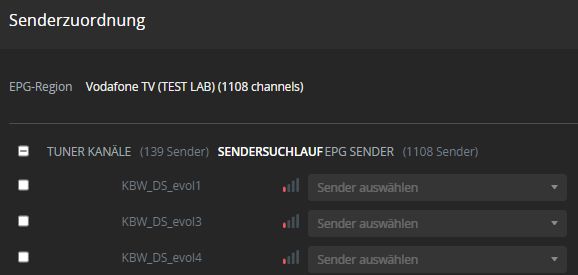
Clicking on Channel Search (in German: Sendersuchlauf) - nothing happens.
Ugh. The official Plex way is to stop the Plex Server process, delete all libraries and data, and start Plex server process again. This will essentially make your Plex Server instance a new install requiring setup. How to do this is described here. This is pretty extreme and you will lose all customizations you have done in Plex (e.g. playlists, manual matching, any custom settings you have put in, info on items partially watched or already watched, etc), but it should give you a fully fresh start with your DVR. Alternately since you are running in docker you could remove your Plex docker instance, remove any Plex docker volumes, and rebuild Plex.
I’d suggest first trying the following:
- Delete DVR
- Remove the Plex web cache
- Optimize the database and then clean bundles
- Find your Plex data directory, then go into folder “Plug-in Support”, then “Databases”. In that directory delete tv.plex*.* (if any exist. Of course making a backup of these to someplace else before deleting is a good idea.)
- Start Plex server
- Add a new DVR
I don’t know that this will fix your issue, but it is worth a shot. I hope this helps.
Perhaps someone else that has experienced this specific issue can chip in?
I have the same problem. Is it possible to reset the DVR settings without deleting the Plex installation? your guide didn’t work, there must be some additional DVR setup file to delete.
