Server Version#: 1.19.4.2935
Player Version#: 8.2 (Shield pro ), Plex Web 4.30.2
I was working on getting sample files for another issue along with testing for a fix and now for whatever reason Plex is no longer recognizing and selecting the forced subtitles flag. I don’t know if the problem started with the last server update or what. I’m assuming so since it’s happening in multiple clients. The files in question are known to have worked before without intervention and all show the forced subtitles in the selection menu.
I don’t have a solution yet, but it does look like it’s something odd on my end. I had asked about this while working on a different issue and it was confirmed at least that my files are fine.
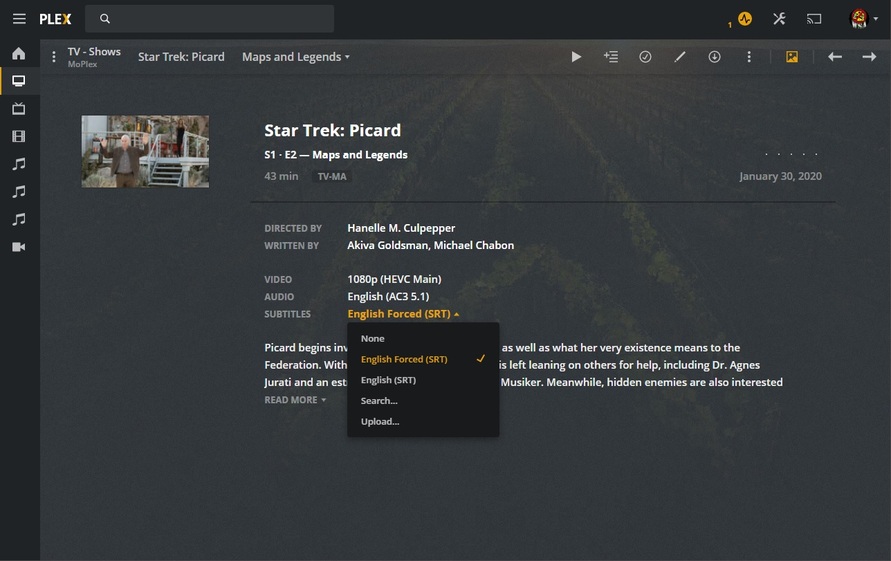
Near the bottom are screenshots from my side.
Honestly have no idea how the subs got unflagged, but I’d really like to get it back to automatic again. If anyone has suggestions let me know.
Well, I’ve been manually going through my library and some have the sub selected and some don’t. I don’t understand how they changed, but in the grand scheme of things it certainly isn’t a huge deal. At least not as much of a problem as I initially thought. Moving on…
Yeah. I understand. I honestly think I somehow screwed things up troubleshooting the other issues and throwing Kodi and MrMC in the mix. Doing way too many things at the same time!
To be clear, Plex does not automatically select “forced” subtitles. It will auto-select a subtitle based on your language settings, but there is no preference for “forced” versus full subtitles.
When Plex has a choice - it prefers a properly tagged Forced Sub, over a full one - with Always On, or any other selection made.
If that’s a bug - don’t fix it - it’s working exactly as a ‘User’ would expect.
Right now, my Selection is Always Enabled.
Still, and for Decades (at least one) My Forced Subs are always auto-selected, if present. Exactly as I or any other ‘User’ would expect. It follows simple User Logic.
I’d like a developer to explain it to a group of users.
Call the film at 11 guys 'cause there’s gonna be something interesting going on during that ‘tutorial’.
Looks like you put the Forced Sub First.
For my part that’s already happening.
For everybody else - it’s the work-around.
The only Caveat would be that there are no subs with movies that don’t have foreign Language then Always enabled would work as expected for Forced subs
In that case you wouldn’t have a Forced Sub track.
Users do get confused with Forced. I get that. It’s confusing.
Parasite’s audio is Korean.
I’m sure there are plenty of Forced Subs out there in use for Parasite - and that is simply wrong. There is no use case for Forced Subs for Parasite. It’s ALL Korean. The full sub should be auto-selected, if present, and tagged properly, 'cause according to your language settings you can’t speak Korean. Without subs you’d better hope the person watching with you does - so they can tell you what it’s about.
If an English sub track is present - it’s probably going to be turned on. For Parasite. Otherwise you got nuthin’.
For Picard, there’s a Forced sub for the French Language bits. There’s also a Full Sub. If I do nothing, User Logic tells us the Forced sub should be on, so we can read the French. If I’m having trouble with the English dialog, I can switch to the full track - that at my house contains both the French and English lines. If I don’t need the English lines - the French lines in that FORCED SUB should be made the priority BECAUSE I CAN’T SPEAK FRENCH. Plex knows that 'cause I have a Forced Sub containing the lines of dialog I CAN’T SPEAK.
Now that’s User Logic.
User Logic plays no part in Plex Development… apparently.
Not everyone’s full sub track for Picard contains both French and English. Mine do. Through tedious effort, but when they rolled in here French was in the Forced Track and English was in the full track. A quick trip trough SE fixed that for me, but what about everybody else?
The way it is now, if your Forced sub isn’t first (what happens if it’s External?) you have to manually select a Forced Sub. I’m sorry. That does not compute to a user.
User logic dictates if there are subs containing lines of dialog in a language YOU CAN’T SPEAK - those should be activated - or you got nuthin’. Leaping to a full sub in a language you do speak, ignoring a Forced Sub that contains the lines YOU MUST HAVE - is dumb - users don’t get it - 'cause it’s dumb.
Ok… maybe “auto select” wasn’t the proper terminology to use. Based on language settings, if prefer audio in English, subtitle mode is “shown with foreign audio”, and the subtitle is flagged “forced” in the MKV, then Plex will “select” that track when the file is initially scanned in and use it unless it gets unselected on purpose or on accident.
That’s the rub. If you, for whatever reason, unselect the forced track, the only way to get it back is to select it on the web interface or in the player. Then it will stay selected until some idiot, like me, changes it in the midst of messing around.
As soon as it clicked in my head that Plex does this on import only, I recognized my mistake. However it happened, it happened by me and not automatically in Plex in error.
So now that I fully understand this, maybe there’s a need to have Plex server run through whatever it does on initial import of a file whenever it’s asked to re-analyze a file or library. Or maybe an option in settings to scan for “forced”? Maybe? This certainly would have prevented me from opening this can of worms.
Forgot to say that this only works if the track in question is flagged as forced in the MKV. I know it can do this if external and named prop, but I try to avoid that these days and remux when needed to set that flag. Ring around the rosey!