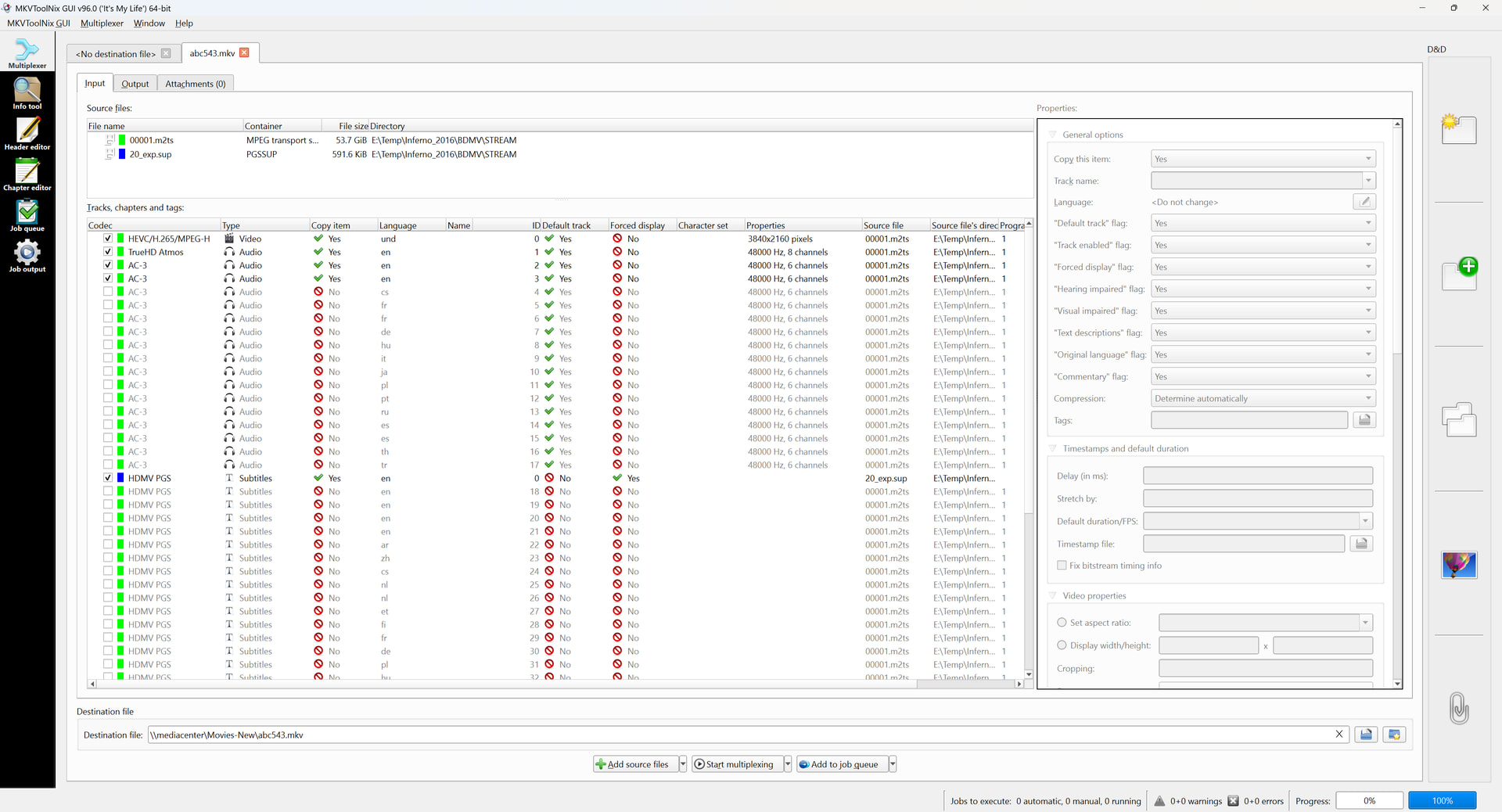
Server Version#:4.160.0
Player Version#:NVidia Shield Current Version
I know this is an old topic, but it is new to me. I searched old posts on this and it seems I have everything setup correctly, but still not working.
My understanding of the steps, which I have followed is:
Rip (MakeMKV)
Eac3to to find which track has forced subtitles
Extract forced subtitles (if not a dedicated track) and create new Sup (PGS)
Add M2TS (or playlist) to MakeMKV
Uncheck Default from all subtitles
Add the new subtitle and set language to English
Drage new subtitle to the top of subtitles so it is first and check the Forced checkbox
Mux to new MKV file
Test in VLC on Windows PC and forced subtitles show up automatically
Plex Server Subtitles settings: Preferred Audio/Subtitle (also English), Auto-Select mode (Shown with foreign audio)
Copy to Plex library: new movie never on plex (so no dance needed)
Result: No auto forced subtitles
What I did not try (and hoping to avoid), a side-care subtitle file sitting in the library with the video file.
I even removed all other subtitles on a subsequent attempt but that didn’t make a difference either. And each time I try, I produce a totally different bogus filename so that Plex isn’t remember my last tests.
Analyze file with MediaInfo.
The forced track is usually obvious. It is almost always the one with the fewest elements (usually less than 100, where full subtitles typically have 1000+).
Remux the file with MKVToolNix Multiplexer
Set desired flags for default/forced/commentary, etc.
Remove unnecessary audio and subtitle tracks.
Load file into Plex Media Server.
If you do not need to remux, then you can use MKVToolNix Header Editor to set default/forced/etc. flags.
Personally, I recommend remuxing video files, before placing them into a Plex library – particularly when these files are coming from Handbrake.
The main reason for this is that there can be two different types of tags for language etc. in there.
is the type you can see and change in mkvtoolnix
is some kind of XML attachment which can exist for each video, audio, and subtitles track, as well as for the mkv file as a whole. Their content is not obvious, but is (at least partially) read by Plex.
If you leave type 2) tags in your files, you can get into a situation where type 1) and type 2) have conflicting information in them.
I haven’t found any other way to remove this kind of XML tags than remuxing.
See the screenshot in this post of mine, to see what they look like: Plex Media Scanner crashes on tracks with FlagCommentary=1 - #3 by OttoKerner
Mkvtoolnix can be configured to automatically disable these XML tags on the remuxing screen.
Therefore: always remux your files. Mkv files to remove the type 2) (XML) tags.
(And MP4 files as well, to ensure they are properly interleaved.)
Thanks for optimization suggestions I will review and see what I can do more streamlined, But even if some of those steps are not all necessary, are any of my steps what causing a problem and/or am I missing steps?
My expectation is that the forced subtitles (in English) would play automatically during the foreign dialog without being manually selected (just as they would if I were playing from the disc). I realize this doesn’t come without doing the proper steps, just not sure if I am missing a step or if one of my steps is wrong and contributing to the failure.
Thanks. I am using MKVToolNix to take an MT2S file (not a playlist in this particular case), tagging a subtitle file as forced, and then remuxing into a new MKV file. There are no additional files after the subtitles like you showed in that other post.
And then for good measure I even tried removing all of the other subtitle files on an additional attempt to see if that helped, but same problem.
Each time I am testing I am coming up with a totally different new file name so that Plex is not picking up olde settings for the video.
I do not know if anything in your process would cause forced subtitles to not appear correctly. Everything seems OK, but I’ve never used such a process.
Suggest you double check the file with MKVToolNix Header Editor to make sure the forced flag is correctly set.
Regarding the process, use what works for you. However, if you rip the disc (not make a backup), then you already have the movie in a mkv file with the selected tracks. I don’t see a reason to extract subtitles only to remux them back, load MT2S files, etc. It is faster to rip, remux/tag, then load it on the server.
Regarding determining the forced track, here’s a sample output from MediaInfo. Notice the Count of Elements. It is easy to see which is the forced track (I added the title & set the default/forced flags with MKVToolNix).
MediaInfo Example
Text #1
ID                                       : 3
Format                                   : PGS
Codec ID                                 : S_HDMV/PGS
Codec ID/Info                            : Picture based subtitle format used on BDs/HD-DVDs
Duration                                 : 1 h 47 min
Bit rate                                 : 44.0 kb/s
Frame rate                               : 0.573 FPS
Count of elements                        : 3704
Stream size                              : 33.9 MiB (0%)
Title                                    : For the Deaf & Hard of Hearing
Language                                 : English
Service kind                             : Hearing Impaired
Default                                  : Yes
Forced                                   : No

Text #2
ID                                       : 4
Format                                   : PGS
Codec ID                                 : S_HDMV/PGS
Codec ID/Info                            : Picture based subtitle format used on BDs/HD-DVDs
Duration                                 : 1 s 919 ms
Bit rate                                 : 27.9 kb/s
Frame rate                               : 1.042 FPS
Count of elements                        : 2
Stream size                              : 6.53 KiB (0%)
Title                                    : Foreign Language Translation (forced)
Language                                 : English
Default                                  : Yes
Forced                                   : Yes
Since you have it set “with foreign audio”, it won’t turn on any subtitles automatically in this case. Change this to always or set the audio to some other language other than english.
This is incorrect.
Forced subtitles in the language of both the audio and subtitle preferences are enabled automatically if “with foreign audio” is selected. Because forced subtitles are the translation of foreign-language text on screen or dialog spoken in a foreign language.
To OP: the automatic subtitle activation only works as long as the Plex user has NOT manually selected a subtitle on that library item.
After a track has been explicitly selected by the user, this manual selection is retained (for that user account).
If you want to test the automatic selection, be sure not to change the audio/subtitle track selectors. If you did so, you will need to either pick a different video, or perform the full Plex Dance to reset (or maybe switch to a different managed user account).
Okay, latest findings. If the subtitle track is one that was included in the original video, the forced steps discussed here work and the forced subtitles show up.
But that only works as appropriately if the subtitle track only contains those forced subtitles (a dedicated subtitle track just for foreign dialog). But if the subtitle track is a mixture of normal subtitles and foreign subtitles, then all of the subtitles in that track show up (not just the ones flagged as forced).
Which is the original reason I was creating a subtitle track that is an export of only the forced subtitles for a track that has a mixture. Still not sure yet why the subtitle track I created doesn’t work where the built in ones do.
Not sure if there is a misunderstanding of terminology here, but subtitles don’t work that way. It’s not possible to flag individual lines in a script as forced or full. If you want a track of only the forced subs you have to make a track that only contains those lines. If you want a track that has all lines subbed that has to include all the lines.
This is true regardless of the subtitle format. On a Blu-ray disc or DVD there are two sets of subtitles the same way, one that has images for all spoken lines and another that only has subtitles for the on-screen text and other dialog that may be left in a foreign language on purpose. If you obtain a video that only has one subtitle track and is missing the other the reason is usually the person who made the release ****ed up.
Depends on how the movie gets authored. Some movies have forced subtitles embedded in the same subtitle track as all of the rest of the non-forced subtitles. And other movies have separate dedicated subtitle tracks for the foreign dialog. So maybe my terminology is off, but those two scenarios exist.
So in a mixed subtitle I opened the subtitle in BDSup2Sub and exported checking the Forced only checbox, which produces only the forced subtitles into a new subtitle file.
I believe this export exercise is incompatible with Plex and why it is not working. I am testing an SRT export version of this using Subtitle Edit to see if it also fails.
Okay, looking into this further here in a disc-based (VOB/PGS) setup it is possible to have the sub-picture frames flagged this way (which only makes it more puzzling when mediocre live-action pirates fail to rip and flag subtitle tracks properly). But that does not apply to text-based subtitle scripts (SRT/WebVTT/ASS). I guess all the discs I’ve ripped for my server just happen to make the distinction (I also wonder if maybe some ripping applications have gotten smart enough to list and extract the tracks separately from the disc).
“Default” is actually correct for all those subtitle tracks, if they are the full (non-SDH) subtitle track of the specific language for the movie/show.
SRT version of the forced subtitles export worked. From what I can tell the issue on the PGS exported subtitle is that if the first subtitle is too far into the movie, Plex won’t scan it. but if it is SRT it is lightweight and will read it.
So if you are using BDSup2Sub to export forced only subtitles from a mixed track, it won’t work unless you come up with some way to have a dummy subtitle in the file within the first min or so of the movie, otherwise Plex won’t scan farther than that to see if it has subtitles. This is not a problem with a dedicated foreign dialog track regardless of the placement, I think because the file is authored correctly but with BDSup2Sub it is not authoring the new subtitle correctly with the right placeholders.
Also as others have pointed out, the order of the sub-titles and turning default off don’t matter.
Plex reads the container flag and not any type of embedded flag within a track.
By that, I mean that if graphic based subs are flagging specific lines somehow and those appear correctly when played with other software, Plex is not going to pick that up.
The reason your “solution” works is because of the way Plex fundamentally works.
If a subtitle track is marked as forced within the container (whether text or graphic based) and all the proper settings apply, Plex will enable that track when appropriate when the file is initially scanned in (as was mentioned, once the track has been changed manually, that no longer applies to that specific media file, unless the audio track is changed I believe to a different language in which case I believe it will actually select the forced track again when the audio track is changed back to the correct language).
Additionally, if you have an external subtitle file and name it movie.eng.forced.srt for example, Plex will also properly select that track when everything is properly set, as that format causes Plex to flag the subtitle as a forced subtitle.
As far as I am aware, Plex does not “scan” the subtitle track to determine anything related to a subtitle being forced.
So if you want to continue your initial process as mentioned in the OP, you need to set the forced flag of that track to “yes” in order for Plex to properly use it.
If the subtitle does not show in Plex like this:
or this
or this
then Plex will not automatically select it when your audio and subtitle settings are set properly.
(Just to show a graphic subtitle and an internal and external text subtitle, but any valid format would work).
All that is basically to address your “solution” which has incorrect information regarding Plex “scanning” the subtitle file to determine if it is forced, which Plex does not do.