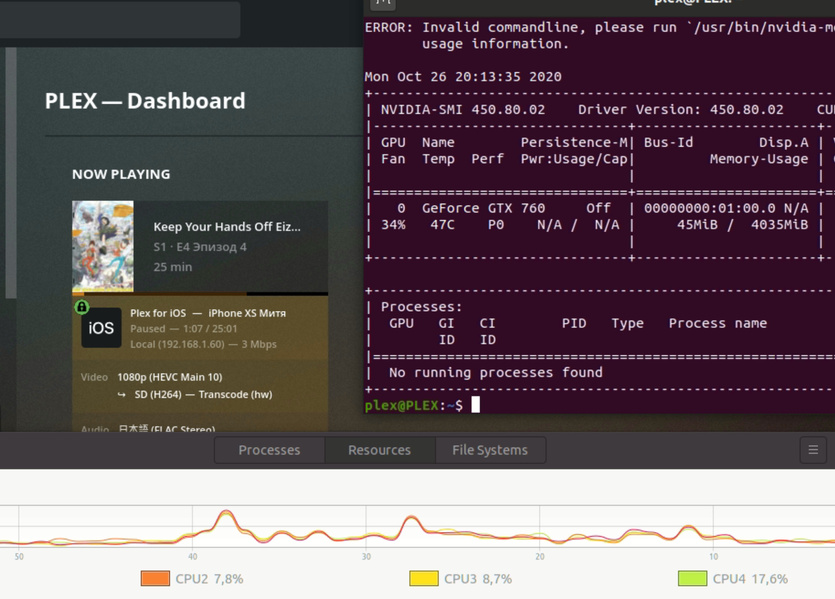
±----------------------------------------------------------------------------+
| Processes: |
| GPU GI CI PID Type Process name GPU Memory |
| ID ID Usage |
|=============================================================================|
| No running processes found |
±----------------------------------------------------------------------------+
What am i doing wrong, how to achieve hw on GPU?
“Use hardware acceleration when available” & “Use hardware-accelerated video encoding” are checked.
you need to check out the support matrix for decode and encode for nvidia GPU’s
i stated before that you Video Card is a non supported for HEVC h.265
in fact it might not even be able to HW trans code at all in the way you want to use it unless you say it work in a windows machine
do a test convert you HEVC file to a H.264 12 mbits file and see if the trans code work or you can download big bunny 4 k file off the internet and try that
put it to you this way get a new hard drive install proxmox 6.2-1
go to this website and run this script
it will download and install drivers and plexmediaserver, in a LXC CT vm machine it is like docker but is is not. it is fully automated and only askes up to 2 questions
there might be something installed that is borking your setup.
Do this download the BBB 4k file and remember you must have a plexpass account to use Hardware encoding if this works and you dont have any problems you know something installed that is missing up config
you will be installing Proxmox in a debian env you will be installing ubuntu 20.xx you will be installing nvidia 455.28 drivers and installing the very latest plex media server
please note you will be using shell prompt for most of everything you need to do in linux i am through out a wild guess check to make sure you dont have nouveau drivers installed they are not supported for transcoding.
or if you want to try and get you setup working uninstall any thing and everything Nvidia
using apt purge nvidia*
then proceed to install official nvidia driver from there website not the repo
make shure you have gcc installed and make
Can it be, that GPU is not used for transcode, because i have modified /etc/X11/xorg.conf? Maybe it prevents system to use GPU, because i always have " No running processes found".
My server is headless and i used video dummy driver to get VNC image.
That would have been really helpful information to know upfront.
If the processes aren’t running then the drivers don’t get loaded.
Nvidia’s default configuration assumes a graphics head or a dummy plug
i would say most likely but you have going over my head with with the xorg X11 issue i suggest start fresh install the minimal driver and minimal packages and find out which one breaks your install witch is why i suggested a fresh install with just drivers and plex then add one thing at a time to find out were the issue lies.
it will be a process to figure it out.
you most likely have a config issue / or a package installed that is conflicting with your nvidia drivers
i run my server headless and i dont have those issues dont know why you would need a video dummy driver for VNC when you have a GPU. but as i have said it has officially gone over my head.