I’ve been using Plex for many years successfully on my own with minimal problems. My setup is: Plex Media Server running on my Mac Mini at home; media lives on a NAS; clients are iOS, web, Apple TV, &c. both inside my home network and remotely over the internet.
Recently I’ve shared a few different libraries from my server with a friend who has never used Plex before. One library was videos and two were television shows. All the libraries work completely fine for me. I’ve helped her create a Plex account and sign into it. She can see the libraries that I’ve shared with her, but when she actually opens each library, it says: “There are no items in this library.”
I’ve tried everything I can think of to get the items to appear, but I’m completely at a loss. Right now she’s on the same wifi network and it still won’t work. Does anyone know what could be causing this?
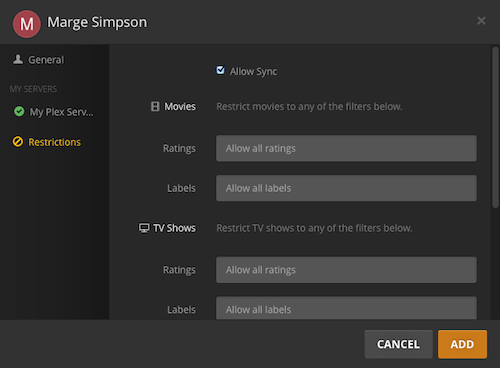
Thanks. I haven’t set any ratings or labels - but I also can’t seem to figure out where to find that Restrictions screen that you’ve got. Could I have turned it off somewhere in a deep setting?
Nevermind! @OttoKerner I found the Restrictions tab in the user settings, removed the nonsensical labels that were there for some reason, and now everything works as expected. Thank you very much!!!
I’m having a similar issue. I’ve sent my children invites, but they can see nothing. there are no restrictions, as I don’t have a plex pass, and can’t set any.