Are you able to check your radeontop to see what kind of GPU utilisation you’re seeing while it’s transcoding? I’m not seeing more than like 12% utilisation of GPU while it’s stuttering around.
As for running 2 instances at once, I had to keep them entirely separate as the appdata folder structure is different. The Linux server version uses a different structure to to the official docker, and the permissions within those folders are different too.
Once I was (mostly) happy with how the AMD HW transcoding version was working I migrated the Plex database etc over.
added the confs in the boot/go file (mobepro amdgpu)
changed the /transcode configuration to use RAM transcoding in a more “standard” fashion
added a new container based on linuxserver’s plex template rather than the official plex one
created a brand new plex config (rather than copying over my “normal” plex library)
None of it worked… I am still experiencing exactly the same issue.
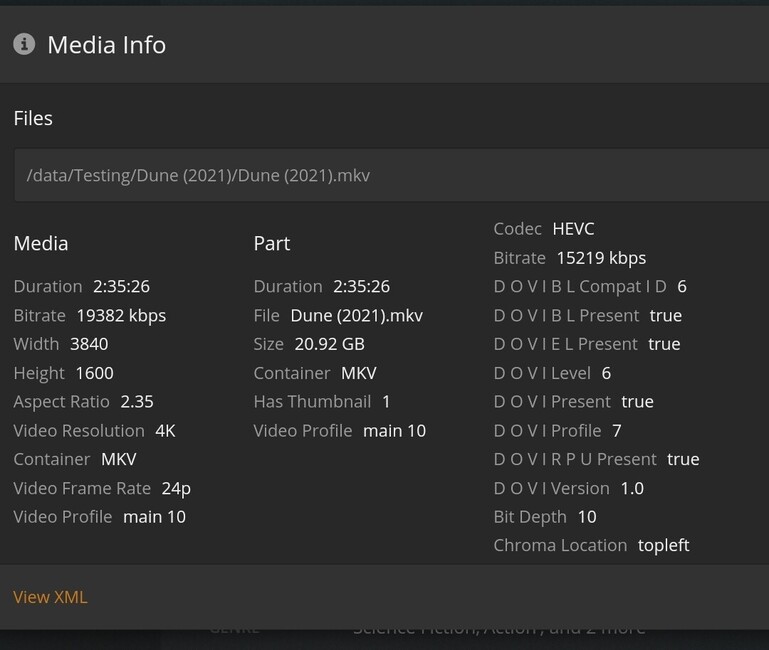
Conversion from a 4k HEVC 10 Bit file (50k+ kbps bitrate) down to a 1080p 20mbit is stuttering in a very predictable fashion: buffers for ~12-13s, then plays perfectly for ~40-45s and then buffers again. During all that time radeontop is showing gpu usage between ~6 to ~10% max, and CPU hovers around 20%. All of this with a 5600G.
So, I just went on a mission to see if it was actually hitting a hardware limit, or it it was due to constraints somewhere within the docker container provided, and it doesnt appear to be a HW limit.
I’m not throwing mud at mauimauer at all, thank you very much for the docker that can do HW transcoding, this was previously not an option for us AMD users.
I tried out Jellyfin, and used the same vaapi HW transcoding, and on the identical file i get smooth playback. It transcodes at 70+fps (file is 24fps video, so theoretically capable to doing 2-3 streams), and i see the GPU usage sitting at 20-25%. BUT, after a little bit of digging, this is with HDR tone mapping disabled. If i try enable it, playback fails, so i cant compare that unfortunately.
If i disable HDR tone mapping in Plex, i DO get smooth playback of my test file. and i see that GPU hit 25% on occasion, and tautulli tells me its transcoding at 2.5x… so maybe try switching off HDR tone mapping? See if that works?
The other check i did do in Jellyfin was to try the AMD-AMF transcoder, and that does work with tonemapping. it will transcode that same file at 48fps… so right ont he limit of two streams. but the GPU usage sits lower (around 10%) and CPU higher, so maybe its doing the tone mapping in CPU? I dont really know how this stuff works, hah.
EDIT: some further plex testing of HDR files, i get near enough to identical transcode speed of 0.8-0.9 (shown from tautillu) using CPU as i do using GPU
Using a 16mbps non-HDR 4k file, it transcodes fine in HW, at 3.4x shown in tautulli
Interesting findings. I had disabled hdr tone mapping at some point and did not see any differences… i’ll try again and see if I missed something on that front.
disabled HDR tonemapping (both on linuxserver’s template and official plex template - no difference, I will stop doing tests on both): some changes in GPU usages (1-4% instead of the 6-10%) but no changes on smoothness of playback. Somehow it seems that the stuttering are less regular, but still happening - always on a 50mbps HEVC 4k HDR file (=> 20mbps)
tried to play another file that is a smidge under 20mbps (~19.6mbps) and convert it to 1080p 20mbps. In this case I got smooth playback (with HDR tonemapping or without it - no differences).
So I decided to push it a bit:
With HDR tonemapping enabled: perfectly smooth playback with 2 stream (same file), mostly fine playback with 3 streams (occasional buffering on 1 stream). 4 streams will almost always have 2 streams buffering while 2 play… and sometime 3.
GPU is doing pretty jack-■■■■… hovering at a few %… and cpu too… ~12% average
And this is not an i/o bottle neck either… cabled cat7 1gbps ethernet, reading off an mvme drive (cache). Arriving data’s speed on the NIC of the playing computer peaks at ~5mb/s.
Now when doing to same test with HDR Tone mapping DISABLED, I can’t seem to be able to get 2 streams working at once… I am only getting perfectly smooth playback with only 1 stream… feels very counter intuitive… And weirdly enough most of the time, the 2 streams will buffer at the same time…
Basically I have no clue what is going on… what is killing me is why is that GPU basically doing jack-■■■■… it’s not even warm !!
I was originally using Emby but desired to try Hardware Acceleration.
There’s a 1 month free trial that opened today.
I’m using a 4750U.
As other reported, disabling HDR tone mapping also worked for me !
HW transcoding doesn’t with with tone mapping on.
Not paying for plex to watch flat-grey movie.
Big thumbs up for it to be implemented in later releases of plex.
If it was there by default, maybe I could consider paying for the pass.
I also edited my unraid’s go file like cybrnook recommended.
I managed to get smooth playback of my test file. Transcoding at anywhere from 0.9 to 1.7x
I upped my ram speed. The bios had defaulted to 2666mhz ram speed, so I upped it to 3200mhz. Ran 2 cycles of memtest before booting into unraid.
Smooth playback of my 20mbps 4K HDR test file. BUT my higher bitrate files still don’t get smooth playback. Looks like it’s a hardware limitation. Maybe the AMD hardware is at its limit.
I have found the radeontop to be missing some data. When transcoding with unmanic, it’s running the GPU flat out, but Radeon top shows:
Hello to all. Tried the docker thing but I’m new on it and had no luck (no hw transcoding, no access from external devices to the server).
BUT I would prefer to have a plain installation of plex mediaserver on my manjaro station, anyone knows if with 25.* version there is some chance to make the hw transcoding on a RX 570, the way it used to work with the first post patch in the 22.* verision? the old version looses the streaming every minute with new clients on devices so I had to update the server.
Hi, thanks for your work on this. Question: I need to install PMS on a Lenovo ThinkCentre M910x (i7-6700 with ambedded Intel HD 530 gpu, plus a PCIe AMD Radeon RX 560).
Would you recommend using Intel HD 530 or the Radeon for hw transcoding?
Stick with the Intel igpu if you can. That way you can use the official docker images, and not the work around that has been developed by mauiumer to help us out. If you use the Linux server images you can even get HW HDR transcoding too. Worked great on my Lenovo with 7700t