How do you guys get started on Unraid ?
I tried to add the docker image and all the parameters from the multiple screenshots shared, but it won’t ever start ?
Can I get a few pointers on how to setup the docker image on unraid ? Thx.
So, this is working, but transcoding a H.265 video to a web browser, the quality is terrible.
The quality is set to convert (maximum) in the browser player, but I’m seeing so much artifacting. If I switch to CPU transcoding it’s much better. Are there any other settings I can tweak?
I used the official Plex media server template, and just changed the image to the one here. Start it up. If it worked, then modify it with the additional parameters.


I think you have it mapped incorrectly for host path 2. IF youve got tmp setup for ram transcoding, get rid of that. i think you may have tried to map the appdata folder into the trancode path. hit the show more settings button at the bottom and then just make it look like mine 
Here is what i have in extra parameters: --device=/dev/dri --mount type=tmpfs,destination=/tmp,tmpfs-size=6000000000 --no-healthcheck

1.25.2.5319 is the latest image I deployed. It’s on docker hub and works fine for me so far.
I’ll try to restore previous version of the db, don’t know why it suddenly stopped working…sad life 
@eatoff thanks for trying to help ! But I think I had it correctly (from your config I was missing the --device=/dev/dri from the extra parameters which I added. But still no dice…
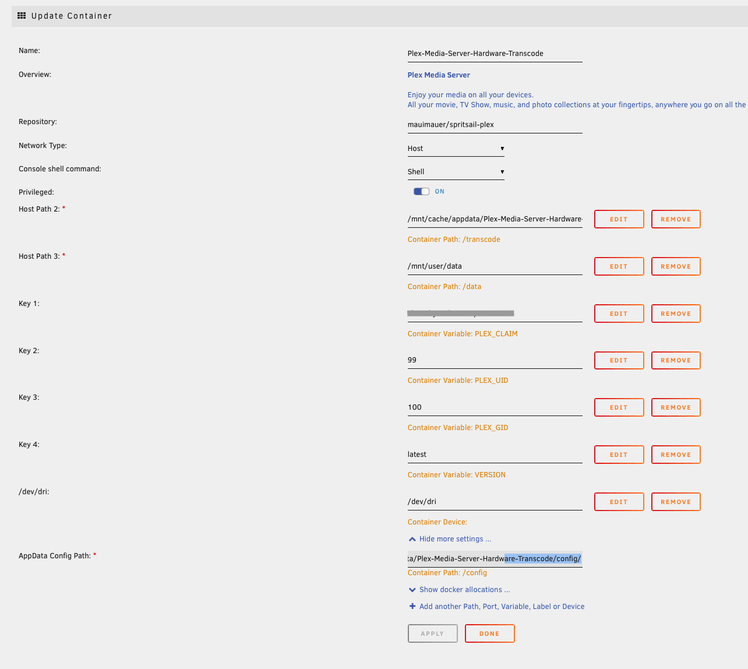
Also, what I don’t get, is if you are using the same template as me (official plex), why don’t you have Host Path 2 in your config like me ?
Also, I looked at the logs and they only say this:
chmod: /dev/dri/card0: No such file or directory
chmod: /dev/dri/card0: No such file or directory
Here are the exact values that I have in each field:
- Host Path 2: /mnt/cache/appdata/Plex-Media-Server-Hardware-Transcode/transcode/
- Host Path 3: /mnt/user/data
- AppData Config Path: /mnt/cache/appdata/Plex-Media-Server-Hardware-Transcode/config/
Also, point of note, I copied over all data from my “normal” Plex docker /mnt/cache/appdata/Plex-Media-Server into /mnt/cache/appdata/Plex-Media-Server-Hardware-Transcode/config/ so I would not start my library from scratch
Ok, I made some progress.
- the /dev/dri device did not exists, it only appeared after I ran the
modprobe amdgpucommand on the unraid terminal.
After that the container was able to start, and I was able to transcode with the (hw) tag on the Plex dashboard.
However, it was stuttering quite a bit and took about as long as the non hardware transcode in buffering… I was expecting better somehow.
So I wanted to know if it was really transcoding in hardward, so I installed the RadeaonTop CA app on my unread, and was able to compare HW encoding vs SW encoding, and indeed it seems to be making use of the hardware - about 10% utilization when transcoding 4k => 1080p (high). Cpu reports from plex goes from ~60% (in SW) to ~20% (in HW), still higher than I would have anticipated, but still 3 times less than with SW.
So all, seems to be in order, so why the relatively long buffering (~30s) and why the stuttering ?
I’m seeing the same thing - less than 15% utilisation of GPU yet stuttering playback of anything 4K. The delayed start is just Plex buffering ahead, it will want a certain amount transcoded ahead of playback to avoid stuttering at the start.
Running a 5600G
Yes, same here, also running a 5600G anyone else experiencing this ?
This took awhile, but I finally got hardware transcoding working in docker + AMD5700G with mauimauer docker (Thanks!)
My docker run
docker run -dt
–name=plex
–restart=unless-stopped
–hostname=my-plex-server
-e SUID=997
-e SGID=996
-p 32400:32400
–device=/dev/dri
-v /opt/plex/config:/config
-v /dev/shm:/transcode
-v /media:/media
mauimauer/spritsail-plex
997/996 is the plex user on the host system which is in the video group in /etc/group
–device is needed. I made a newbie mistake of running it with “-device” (single -)

e
For all the Unraid OS users: the issue was related to 6.10.0-rc2. Rollback to stable 6.9.2 solved it!
I’m running 6.10 RC2 and no issue. Strange… Just curiously, are you able to get smooth playback when transcoding 4K video?
I’m quite sure is my specific build, tonight I completely lost the user shares and having also authentication issue. The rollback solved everything (except APC driver not properly working).
My transcode is smooth, even with HDR enabled. 20% CPU load and a 10sec delay at the beginning of the stream. I’m running a 3400G
Mine seems to run fine with no stuttering on UnRAID 6.10.0-rc2 and Ryzen 5700g.
Are you transcoding any 4K HDR content? Some lower bitrate 4K works for me, but high bitrate I get stuttering. Using 6.10 RC2
Below is the info for the file being transcoded from 4k to 1080P without issues. Also tried Dolby vision content and seemed fine. Haven’t tested enough 4k content yet for conclusive results but so far no issues.

Do you have iommu enabled? I had to play with my iommu settings in syslinux config under “Unraid OS” section. I can’t find the thread on unraid forums that helped me solve my issue but try one of the following
amd_iommu=pt ← This actually did not work with my marvell sata controller, but works for some people.
iommu=pt ← this worked for me
Syslinux config is located in the boot device config page. My full Unraid OS section looks like this:

Just wanted to say thanks for this @mauimauer , working great on my unraid server (6.9.2) with a 5700G.
1 Like
