Hello,
I’m trying to run PMS in a LXC container with GPU passthrough. In order to do so I followed this guide: PMS installation guide when using a Proxmox 5.1 LXC container
I’m able to run nvidia-smi within the container; this makes me believe the passthrough is OK.
root@plex-ct:~# nvidia-smi
Sat Sep 14 10:32:59 2019
+-----------------------------------------------------------------------------+
| NVIDIA-SMI 430.50       Driver Version: 430.50       CUDA Version: 10.1     |
|-------------------------------+----------------------+----------------------+
| GPU  Name        Persistence-M| Bus-Id        Disp.A | Volatile Uncorr. ECC |
| Fan  Temp  Perf  Pwr:Usage/Cap|         Memory-Usage | GPU-Util  Compute M. |
|===============================+======================+======================|
|   0  Quadro P2000        Off  | 00000000:01:00.0 Off |                  N/A |
| 65%   36C    P0    18W /  75W |      0MiB /  5057MiB |      1%      Default |
+-------------------------------+----------------------+----------------------+

+-----------------------------------------------------------------------------+
| Processes:                                                       GPU Memory |
|  GPU       PID   Type   Process name                             Usage      |
|=============================================================================|
|  No running processes found                                                 |
+-----------------------------------------------------------------------------+
Here are some info my system:
MB: Asus P8H67-I
CPU: i7 3770
GPU: Quadro P2000
Host: Proxmox VE 6
Plex Container: Debian 10
Server Version#: 1.16.5.1554
The latest nvidia drivers are installed on the host.
My LXC config:
root@pve:~# cat /etc/pve/lxc/103.conf
arch: amd64
cores: 8
features: mount=cifs;cifs
hostname: plex-ct
memory: 8192
net0: name=eth0,bridge=vmbr0,firewall=1,gw=192.168.1.1,hwaddr=AE:D9:19:6A:20:52,ip=192.168.1.197/24,ip6=fe80::acd9:19ff:fe6a:2052/64,type=veth
onboot: 1
ostype: debian
rootfs: remote-lvm:vm-103-disk-0,size=60G
swap: 4016
lxc.cgroup.devices.allow: c 226:* rwm
lxc.cgroup.devices.allow: c 195:* rwm
lxc.cgroup.devices.allow: c 29:* rwm
lxc.autodev: 1
lxc.hook.autodev: /var/lib/lxc/103/mount_hook.sh
Content for mount_hook.sh:
root@pve:~# cat /var/lib/lxc/103/mount_hook.sh
mkdir -p ${LXC_ROOTFS_MOUNT}/dev/dri
mknod -m 666 ${LXC_ROOTFS_MOUNT}/dev/dri/card0 c 226 0
mknod -m 666 ${LXC_ROOTFS_MOUNT}/dev/dri/renderD128 c 226 128
mknod -m 666 ${LXC_ROOTFS_MOUNT}/dev/fb0 c 29 0
mknod -m 666 ${LXC_ROOTFS_MOUNT}/dev/nvidia0 c 195 0
mknod -m 666 ${LXC_ROOTFS_MOUNT}/dev/nvidiactl c 195 255
So when I transcode something I’m expecting to see some hardware acceleration but it appears not:
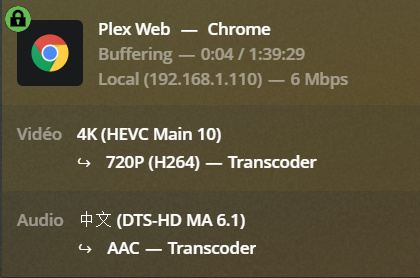
I checked a few things:
- card0 and renderD128 are used by my GPU:
root@pve:~# udevadm info -a -n /dev/dri/renderD128 | grep -i DRIVER
    DRIVER==""
    DRIVERS=="nvidia"
    ATTRS{driver_override}=="(null)"
    DRIVERS=="pcieport"
    ATTRS{driver_override}=="(null)"
    DRIVERS==""
root@pve:~# udevadm info -a -n /dev/dri/card0 | grep -i DRIVER
    DRIVER==""
    DRIVERS=="nvidia"
    ATTRS{driver_override}=="(null)"
    DRIVERS=="pcieport"
    ATTRS{driver_override}=="(null)"
    DRIVERS==""
- card0 and renderD128 are owned by the proper users/groups and have the proper permissions:
root@plex-ct:~# ls -l /dev/dri/
total 0
crw-rw-rw- 1 root video  226,   0 Sep 14 10:32 card0
crw-rw-rw- 1 root render 226, 128 Sep 14 10:32 renderD128
plex@plex-ct:~$ groups
plex video render postdrop
After looking at the logs I found:
Sep 14, 2019 12:58:09.329 [0x7f1e997fa700] ERROR - [FFMPEG] - Cannot init CUDA
Sep 14, 2019 12:58:09.329 [0x7f1e997fa700] WARN - avcodec_open2 returned -1313558101 for encoder 'h264_nvenc'
Sep 14, 2019 12:58:09.329 [0x7f1e997fa700] ERROR - [FFMPEG] - No VA display found for device: /dev/dri/renderD128.
This led me to this topic: https://devtalk.nvidia.com/default/topic/1052054/linux/ffmpeg-cannot-init-cuda-for-transcoding/
So I started nvidia-persistenced in the container:
root@plex-ct:~# systemctl status nvidia-persistenced
● nvidia-persistenced.service - LSB: Starts and stops the NVIDIA Persistence Daemon
   Loaded: loaded (/etc/init.d/nvidia-persistenced; generated)
   Active: active (running) since Sat 2019-09-14 11:52:55 UTC; 1 day 5h ago
     Docs: man:systemd-sysv-generator(8)
  Process: 2179 ExecStart=/etc/init.d/nvidia-persistenced start (code=exited, status=0/SUCCESS)
    Tasks: 1 (limit: 4915)
   Memory: 924.0K
   CGroup: /system.slice/nvidia-persistenced.service
           └─2181 /usr/bin/nvidia-persistenced --user nvpd

Sep 14 11:52:55 plex-ct systemd[1]: Starting LSB: Starts and stops the NVIDIA Persistence Daemon...
Sep 14 11:52:55 plex-ct nvidia-persistenced[2179]: Starting NVIDIA Persistence Daemon
Sep 14 11:52:55 plex-ct nvidia-persistenced[2181]: Started (2181)
Sep 14 11:52:55 plex-ct systemd[1]: Started LSB: Starts and stops the NVIDIA Persistence Daemon.
but it doesn’t change anything.
Any idea what I could be missing?
Please let me know if I can provide anything else to help.
Thanks
