HDR works on Plex using roku (with black bars) and can be confirmed with the picture adjustments. Kodi compared to it seems to be darker and not playing HDR.
maybe I found out what the problem is. But I am not sure if it is 100% correct.
If you have grey bars then you have to switch the HDR Mode in Picture Settings of the TV from “Automatic to HLG” The grey bars get black but i am not sure if the HDR Mode is also matching to the actual content. Check it out people and tell me if it is working on your TV also…
Sorry buddy, I like your optimism, but that’s not really a solution. Sure, turning to HLG makes the bars appear black, but so will turning HDR off. If you pause an image and bring up the action menu and cycle through the HDR options you’ll notice that turning to HLG and turning HDR off look the same. It’s also just clear by the picture that HDR isn’t on. Everything is very bright and you are missing the blacks that HDR is for…
I am really upset due to this issue. This is a problem caused by Plex, one that other companies managed to overcome on these Sony TVs (companies like Netflix and amazon, and Sony themselves), but it makes me wish I had a different TV. The fact that Plex is trying to put the blame on Sony and are just shrugging this off is really upsetting, to me at least.
2 Likes
okay…thanky for finding this out. And yes it would be really nice to have Plex (and Sony) people investiganting a little more on this problem…
1 Like
With quite a bit of caution it seems like a solution is finally coming -
Here’s a quote from @sixones on a reddit discussion regarding the AndroidTV client -
We have however spent a lot of time trying various hacks and workarounds for the Sony TV this week, and found a solution!!
If your curious, the “fix” was to set the background of the screen to transparent instead of black, there was nothing wrong with the HDR data or anything specific to playback of HDR content. It’s definitely a hardware issue or something in the Android OS provided by Sony as it should only be applying the HDR data to the video and has no reason to change the black bars to grey, but we will be rolling out this fix in the next release.
Finally!
thank you.
this is a great news 
OMG! Great!!!
Great to hear this! Looking forward to the next release.
I’ve tested the beta with 5 different 4K HDR files and we have black bars
2 Likes
Ok. found an odd bug. I tested playback as per above however when selecting the overlay play buttons it you can it brightens the screen, when this closes it turns the bars grey again but also leaves a shadow overlay for the play buttons.
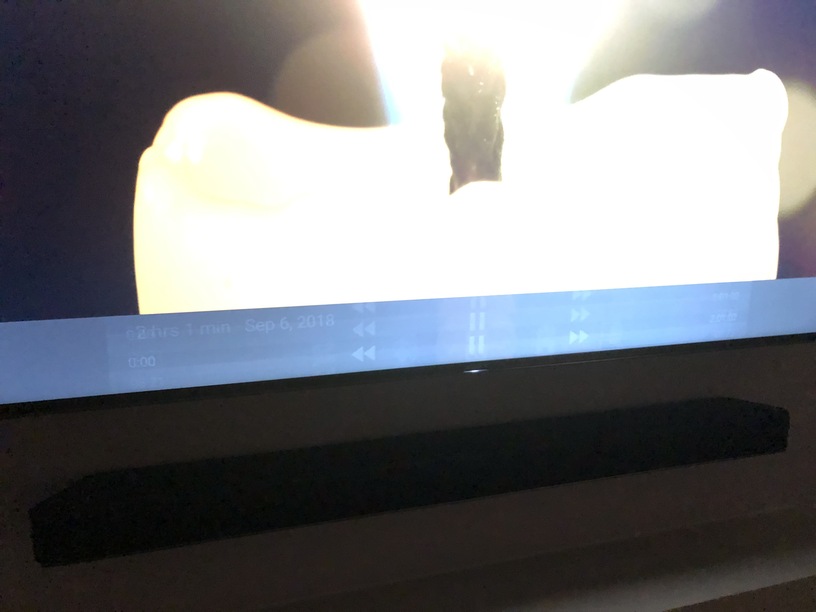
Yes, the dev who has a Sony TV and fixed the original problem has spent quite a bit of time trying to resolve this side effect with no success so far 
Unfortunately we are rolling back the fix in the beta for now, and we’ll come back to it next week and try to squash it again if time permits. Hopefully we can get it all fixed for the full release of 7.8 
Awesome thanks for the response. Glad it’s being looked at fully and seeing you guys being more open with us
Thought around the overlay… Can we remove it from increasing the brightness? It seems to give off a white feeling but is really noticeable in a dark room.
I did raise a bug post within Plex Player Apps too so this can be used to track it going forward?
Thanks.
thank you for the updates
Installed 7.8.0.8095 on my XF90 Sony TV this evening but still seeing grey bars on certain HEVC movies 
They didn’t release the fix, see the post three above yours.
This isn’t the full release of 7.8?
It is, but they just hoped to have it ready for 7.8.0, and it looks like they couldn’t make it happen. Take a look at the changelog and you’ll see there’s nothing about it:
i hope the guyes from plex serve the employee who makes the “grey bars fix” the best with love made coffe, long term massages, luxurious meals and a really good christmas bonus 

Sorry, I didn’t understand if it’s fixed with Plex 7.8… I’ve just bought a Sony OLED 65"… really expensive, and can’t believe it’s not working with Plex. Just tried out 7.8 and I can confirm that those gray bands are still there.
Really I can’t believe I cannot use Plex anymore, or have to use my old mibox to run Plex…
Can anyone confirm that 7.8 works, or still the patch was not committed to 7.8?
Edit: sorry I read again one of the previous post… the patch is not still ready so was not included in 7.8, right? … this bug is going on since July 2017… I’m not so confident it will be really patched. Finger crossed…
Android Oreo is rolling out (US market before Dezember) the next days on some Sony TVs… Maybe this also has an impact on this problems… Would be interestung if some US people can tell us if there is a difference
