I’m hoping someone can explain why is it when you handbrake a H.265 file to H.264 the resulting H.264 file is usually very close in size to the original H.265 file? I’ve only seen the H.264 file become larger by about 150% a couple times.
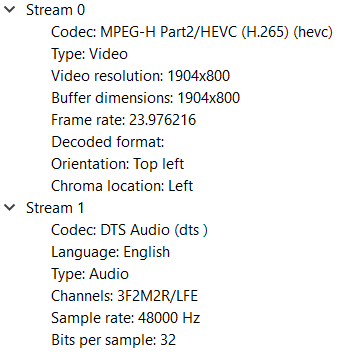
However, in this case below, the resulting H.264 file is half the size of the H.265 (4GB vs 7GB files respectively):
h.265 is generally 30 to 40% smaller in file size copy for copy
Handbrake (depending on your settings) will decrease an h.264 by a similar amount
when you transition from h.265 to h.264 you are compressing the h.264 file so the end result is very similar in size to the h.265
Same size but the quality for the h.264 will be less, although you may not be able to see it visually
There is more than one variable so you will see different results with different files
Taking a 10 bit source video and turning it into an 8 bit
Cutting DTS audio out and converting it AAC is also reducing the file size somewhat significantly in a lot of cases. DTS is a less compressed format
As a test you can run that file through handbrake again letting the DTS pass through instead of converting it to AAC and see how close the file sizes are
Good points by Jays. Audio compression from DTS to AAC can save some space (I do not know how much, but I think DTS is lossy, which is usually 10x bigger than compressed). 10-bit to 8-bit may save space, but I do not have enough experience there to know how much… but technically the bit size of the colors goes from 10 to 8, so i’d expect ~20% saving by shaving 2 bits off of every single color.
Don’t forget that just because something is H265 compressed doesn’t mean it is all that compressed. If you use constant quality, you must pick a compression level. This QP level goes from 0 (lossless, insanely huge file-size) to 50 or more. Suggestion for good quality-to-compression is ~20ish. The original source of a 265 video might have used a really low level of compression, like 5, to get a 7 GB H265 video. If you use a suggested number of 20 or so, that can easily turn the video into 3-4GB.
This is what annoys me so much about video compression. I don’t like that there are a thousand settings and quality levels, so anything to do with compression isn’t a simple “just throw it through handbrake” step, like makeMKV ripping a disc is.
Yes, I agree. Compression is such a guessing game. I understand the need for all the customizations but wish there was some sort of standards that could be defined as being the most accepted compressions settings for specific scenarios.
Oh well, glad we have the option to compress at all.
I’m sure at some point I’ll regret using H.264 over H.265 but for now the support for H.264 makes it the go to.
Hard drive space is cheap, and my comfort is more important. I liked back when I could click at any spot in a video and it immediately played from that point. H.264 is just as responsive. H.265 adds a bit of delay, I suspect because of the compression algorithm. It uses key frames often seconds apart, and basically only streams the differences between each frame over time. So if you click on any spot, the player will often have to find the previous key frame and spend a second or two skipping forward in the stream from there to find the exact spot you selected. This tiny delay is frustrating to me.
Yes, I too find this frustrating. I prefer responsive streaming: quick start up at loading and fast-forward and rewind.
Add to that the problem of how a H.265 stream hits the server with it cannot be direct played and I find H.265 is a recipe for disaster on my server.
I do see the possible benefit of H.265 in using less upstream bandwidth (from the server). If my clients all could direct play H.265 I could run 1080p streams instead of 720p on my limited ISP upstream. I don’t see direct play H.265 being the norm for a few more years.
As for local data streaming, I personally don’t see much need for better streams than what H.264 can provide. It isn’t like DVD vs Bluray.
I agree too that HDD space is relatively cheap. 30 TB drives are right around the corner. A couple of those would handle most Plex libraries at H.264 is my guess.
Here’s the most compatible settings in my experience:
Video H.264, level 4.0
Audio AAC stereo 225 kbps
Depending on the quality level and the encoding speed I choose, I can get a higher visual quality than most of what’s available in “scene releases”. And they play directly on 99% of the clients I’ve tested them on.
(I am including better audio streams as well, but always sorted behind the AAC stereo track.)
I don’t bother with hardware encoding. In my experience it’s neither storage efficient, nor high quality.