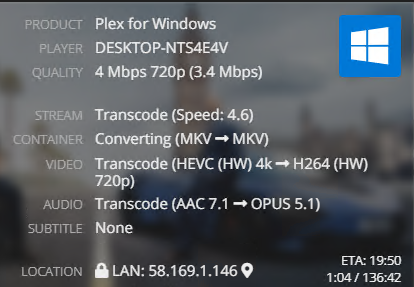
Server has 8 gb of ram, Intel J5040, intel 605 graphics. This setup can easily do 4-6 transcodes.
The issue is the hardware decoding stops working from time to time and requires a server restart. This results in the CPU being pinned at 100% and makes it unusable for HEVC transcodes. Having to constantly restart the server to get it to work properly isn’t really workable for me, I need to fix this.
Yes I am aware this is a 4k transcode and that plex hates 4k, its the only 4k file I have and just happened to be the most recent play that resulted in the issue. This happens with 1080p content as well.
In this image, you can see that the CPU is pinned and the GPU is doing very little
Be realistic, you only have 8 GB of RAM which the GPU can access 3.8 GB. Each 4k Transcode needs ~ 1.3 GB and enough CPU to handle the audio so 3 streams under the best of conditions. If other streams are under way and there isn’t enough RAM for the decode or the driver crashes then it drops to the CPU. At least you didn’t have any subtitles to burn in.
Validate that you are using the latest (27.20.100.9168) DCH drivers and keep an eye on the total number of streams when this fails. Not saying that you don’t have an issue just that it may take more digging.
I should have made it more clear, by 4-6 I mean general use, not 4k transcodes. I literally have 1 4k file, its like 0.01% of my library.
Anyway it happened again without playing any 4k files and the server didn’t get above 3 simultaneous transcodes.
Before Restart:
After Restart:
I didn’t realise but my graphics driver was out of date, I had a version from Sep 2020, let’s hope this fixes it, if it doesn’t I will be back otherwise you can assume its sorted.
I ran into similar behavior whenever I used RDP. Hardware encoding with quicksync would work great until I RDP-ed in, after which it would always fall back to software only. Only a reboot would fix it. Apparently RDP uses some hardware encoding and it conflicts with the settings that Plex uses for ffmpeg.
You may be on to something here, I am using the windows remote desktop connection thing to use the server. Is there any solution for this? is there different software that won’t cause the issue? The google remote desktop software for example?