I more update. I tested with today’s 1.15.1.791 update (windows), and the new webclient 3.91, result is the same.
same issue with 1.15.2.793
OK I picked up a new CPU and system board. i3-8100 hd630 igpu, cofee lake. This is the latest intel SQV and the problem is EXACTLY THE SAME. This is not a haswell bug, this is a plex bug.
Since you have a new system, can you try a PMS Linux install to see if you can reproduce the poor PQ.
I included feedback above of it happening on Haswell plus Synology, Linux and this Synology (918+) runs Linux 4.4 kernel. Do you think there is value in testing in a non-Synology Linux OS? If there is a reason to think so, I can do so. That the primary reason I got this new system, to test troubleshoot well, that and I got it all cheap  (memory express clearance pile MB+case, EVGA PSU, spare ram, used i3-8100+stock cooler=260 Can$)
I did not observe the degraded picture quality viewing jellyfish-20-mbps-hd-hevc as a transcoded stream. Here were my server variables:
- PMS v1.14.1.5488
- Ubuntu 18.04.2 LTS
- NUC8i7
- HW Transcoding
Thank you very much for your test. Did you happen to view the transcoded stream in chrome web client with bitrate to max and confirm it used hw encoding for that viewing? Those were common in my problem cases. I am installing Ubuntu server to replicate your test. Are you using server or desktop.
Are you using plex native install or docker ?
I was using Firefox web client with max bitrate down to 720p 4Mbps. In all cases it was HW decoding and HW encoding–zero copy. I am using Ubuntu Desktop 18.04.2 LTS HWE kernel. I dedicate the NUC to PMS so there is no need for using Docker.
Thanks, Achilles. When transcoding to 720p 4Mbps mine works properly as well. For some reason, the destination bitrate seems to be part of the problem.
I am still building my headless ubuntu server on the recently purchased gear, and I don’t have all my notes together to post yet but, last night I was able to note that the move to Linux has made significant differences.
- Transcoding is no longer a part-time situation. It always kicks in. Windows was seemingly random when it would kick in, averaging about 50%.
- I was able to view this sample file without degradation! I was never able to see that under Synology, nor under Windows. I can not yet see the variable that Windows and Synology have in common, but the Linux does not, but this was very encouraging.
- I am getting an even greater appreciation of the drudgery that Synology saves. and having to lose a SATA port for an OS drive in Linux server also sucks!
Confirmed
These combos do NOT have the severe video degradation issue with the jellyfish-20-mbps-hd-hevc.mkv sample file
Server:OS:Ubuntu-18.10-Desktop, updates to 3/22/2019 PMS:1.15.2.793, QSV enabled and in effect
Viewer:OS:Win10_1809, updates to 3/22/2019, Chrome Web viewer 3.91.0, Transcode:max
Server:OS:Ubuntu-18.10-Server, updates to 3/22/2019 PMS:1.15.2.793, QSV enabled and in effect
Viewer:OS:Win10_1809, updates to 3/22/2019, Chrome Web viewer 3.91.0, Transcode:max
While the Ubuntu build works better for the 20 mbps samples, it completed will not play the higher bitrate HEVC samples (60mbps+)
I am thinking this is just a waste of time at this point, we have to wait for Plex (and the tech they build upon) to improve their hardware transcoding support.

Thank you for testing! I will try that exact file. Can you please let me know what tool you pulled that stream info from? I would like to use it as well to look for differences.
Tautulli
As supplemental, I tried the same.
- I cannot play Original bitrate to the browser (PC not fast enough)
- 1080p below
- 720p below.









Is that “stream info” screen capture from the android app perhaps? I don’t see it in the web app. in any case, the info is there.
When I play the 140 mbps HEVC 10 bit I get nothing at all. I pause it to capture the details from Tautulli and I see
Product Plex Web
Player Chrome
Quality Origional (220.6Mbps)
Stream Transcode (Speed:0.4)
Container Transcode MKV>MP4
video transcode (HEVC (HW) 4k > H264 (HW) 1080p)
audio transcode (TrueHD 5.1 > AAC Stereo)
Subtitle none
Location Locked LAN ip address)
bandwidth 213.6 Mbps
Seems to fail between 45 Mbps and 50 Mbps when Hardware Transcoding is enabled.
45Mbps Works


50 Fails (circle just spins)
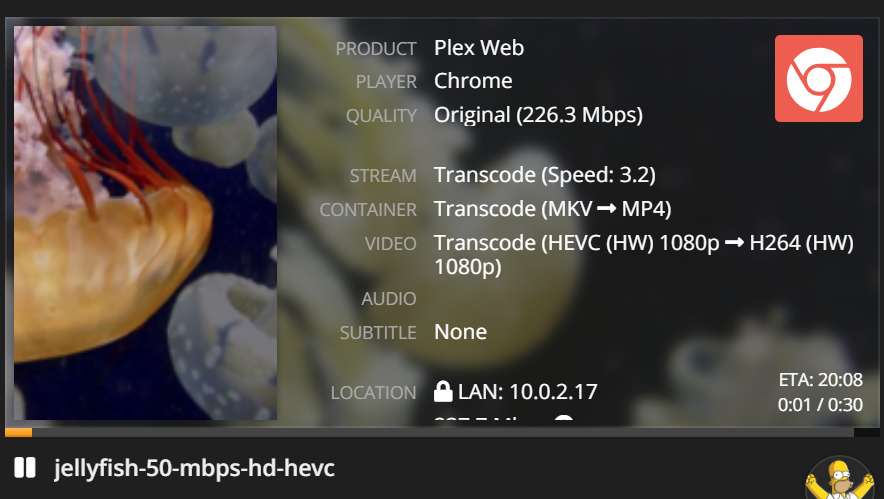

Now if I disable Hardware Transcoding, the 50Mbps file plays properly
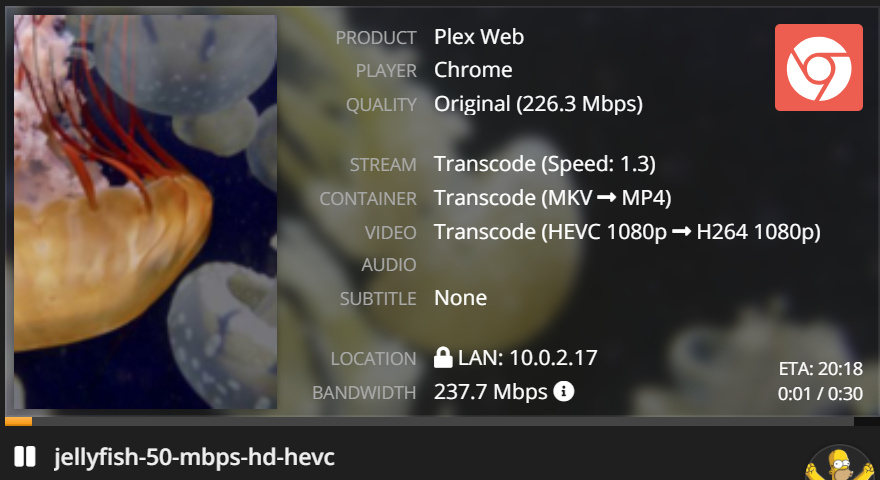

Thanks for assisting Chuck.
Since Switching to Ubuntu for PMS, I can play these files at 1080p-20Mbps and at 4Mbps
I just can’t play them at maximum with hardware transcode enabled.
My Client is a Intel i9-7900 10 core x 4.3 Ghz with 1060-6G Win10-1809
This topic was automatically closed 90 days after the last reply. New replies are no longer allowed.
