Server Version#: 1.24.0.4930
Player Version#:
Tuner Make/Model: Hauppauge cordcutter TV 1653
Guide/Lineup name:
Using XMLTV?:
Channel number/Name:
From their website it says quote " Plex now supports dual ATSC tuners on the Cordcutter TV"
Can anyone verify this. Can a Plex employee verify?
I am struggling to get this to work.
I successfully updated the firmware on the Hauppage 1653 to 428 (1.1.0-428r1), the lastest available from Happauge. Its working, verified on phone and the Roku Hauppage app “myTV”.
I’m using Plex Media Server 1.24.2.4973 on Windows (the beta Channel).
Plex is only saying its scanning for HDHomerun devices.
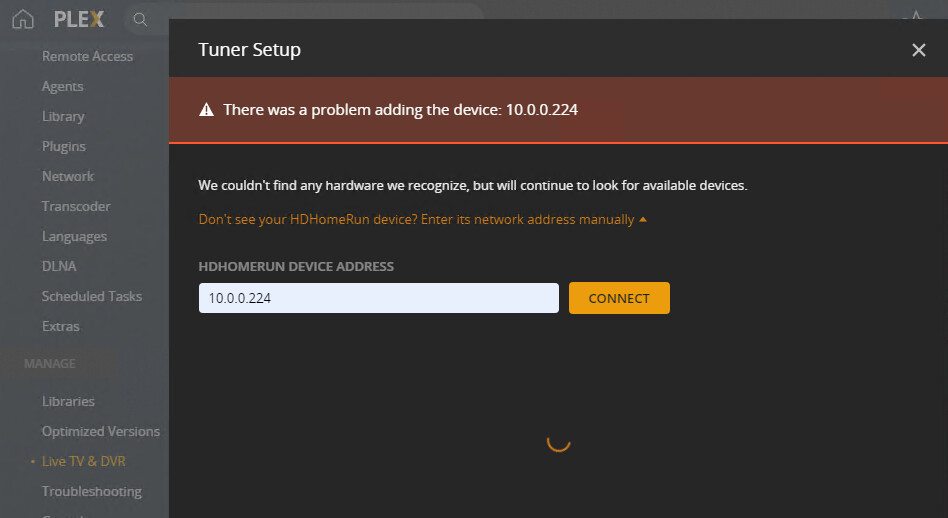
I’ve tried connecting to the device using IP address, http://x.x.x.x:80, and nothing is found.
Anyone else have any tips?
I finally got it to work, but these are the steps I performed. To get PLEX to see the cordcutter TV you first need to plug the device into a port on your router. It’ll find it. Go through the setup and scan channels. Once that is done, you can unplug the device from the router and move it wherever you like. Make sure you’ve gone through the setup for the device to set it up on your wireless network.
Once that is done, power it up. You’ll be able to see the channels and record programs normally. The only thing is anytime you’ll need to rescan channels or change settings for the DVR, you’ll need to plug it back into the router. Make and save your changes. At that point unplug the device from the router and power up in a different location and you’re working fine again.
1 Like
Excellent! I’ll try those steps!
No luck from me. I’ve reset the 1653, to ensure its not using WiFi at all. Everything is ethernet, all the way. Re-applied the firmware, as instructed, and verified the myTV app can see it and tune correctly. Plex won’t see it at all.
Any other suggestions?
Image of the waiting for auto discovery…
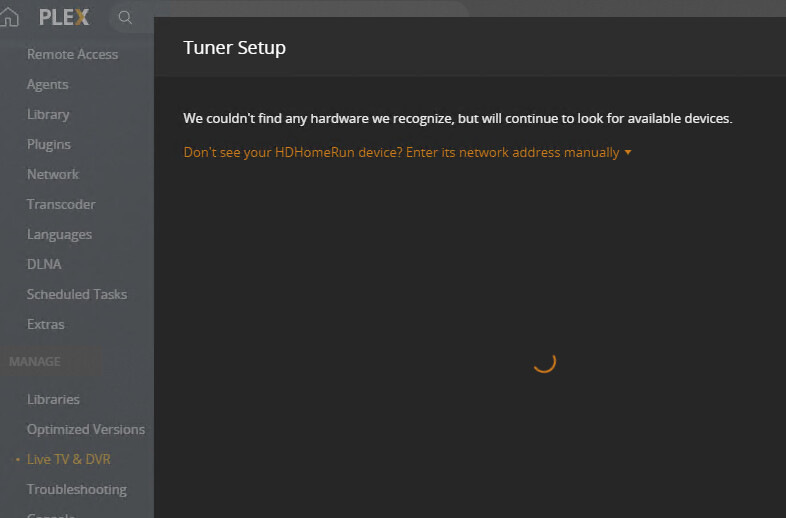
Image of the error when attempting to add manually…
Make sure you have all firewalls and VPN’s turned off during the setup. You can re-enable them after successful setup. Let me know how that goes.
It was not a firewall issue… it was an issue with the Cordcutter itself. It did not want to switch over to wired ethernet easily without a config reset and several reboots. I was finally able to get it to work. I have ordered an HDHomeRun to compare, and will likely return to CordCutter… if its not reliable on WiFi, then I will not use it.
Cordcutter works reliably for me over wifi.
This topic was automatically closed 90 days after the last reply. New replies are no longer allowed.
