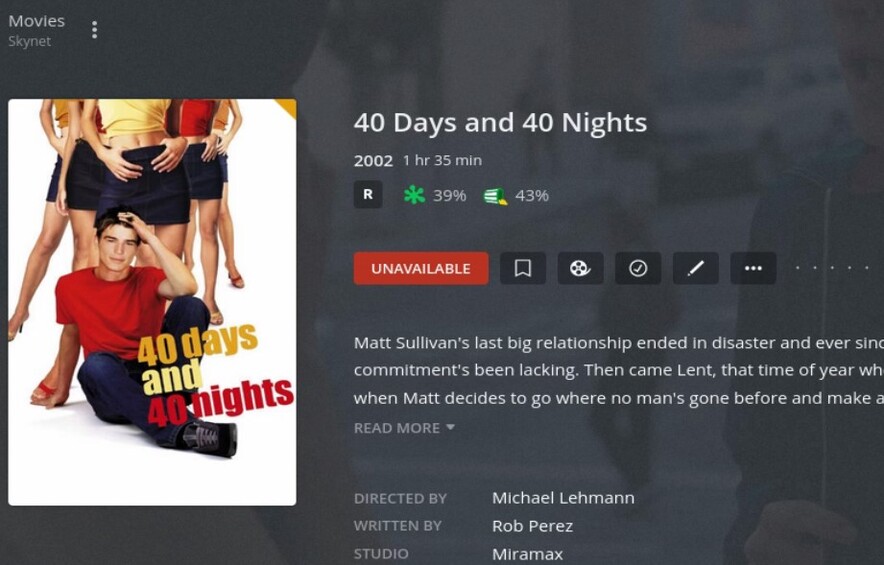
I have installed Plex Media Server on Ubuntu 22.04 recently. It is working fine except for the “Empty Trash”. The movie won’t remove from the library after being deleted from the hard disk. It shows “Unavailable” instead of showing the “Garbage” icon. I’ve tried automatic and manual processes, but all in vain. I have reinstalled the server, but the issue still exists.
Here are the folder permissions -
ronnie@Skynet:/var/lib/plexmediaserver/Library/Application Support/Plex Media Server$ ls -l
total 48
drwxr-xr-x 6 plex plex 4096 Oct 24 11:07  Cache
drwxr-xr-x 3 plex plex 4096 Oct 24 10:17  Codecs
drwxr-xr-x 3 plex plex 4096 Oct 24 10:17 'Crash Reports'
drwxr-xr-x 2 plex plex 4096 Oct 24 10:17  Drivers
drwxr-xr-x 3 plex plex 4096 Oct 24 10:32  Logs
drwxr-xr-x 3 plex plex 4096 Oct 24 10:32  Media
drwxr-xr-x 3 plex plex 4096 Oct 24 10:32  Metadata
-rw-r--r-- 1 plex plex    3 Oct 24 10:24  plexmediaserver.pid
drwxr-xr-x 2 plex plex 4096 Oct 24 10:17  Plug-ins
drwxr-xr-x 7 plex plex 4096 Oct 24 10:17 'Plug-in Support'
-rw------- 1 plex plex  736 Oct 24 10:33  Preferences.xml
drwxr-xr-x 2 plex plex 4096 Oct 24 10:17  Updates
ronnie@Skynet:~$ ls -l /mnt/disk1/plexmedia/
total 4
drwxr-xr-x 2 ronnie ronnie 4096 Oct 24 10:33 movies
Oct 24, 2022 10:33:36.547 [0x7fb051050b38] DEBUG - Library timeline cull complete with 8 items left.
Oct 24, 2022 10:33:36.547 [0x7fb051050b38] DEBUG - Scanning Movies using en-US(Plex Movie) with 1 current media items and 1 section locations in the database.
Oct 24, 2022 10:33:36.547 [0x7fb051050b38] DEBUG - Performing a scan with 'Plex Movie' (language: en-US virtual: 0).
Oct 24, 2022 10:33:36.547 [0x7fb051050b38] DEBUG -   * Scanning /mnt/disk1/plexmedia/movies
Oct 24, 2022 10:33:36.547 [0x7fb051050b38] DEBUG -   * Marking media not available in /mnt/disk1/plexmedia/movies
Oct 24, 2022 10:33:36.547 [0x7fb051050b38] DEBUG -   * Taking 1 items out of the map (which has 1 items) for being unavailable.
Oct 24, 2022 10:33:36.547 [0x7fb051050b38] DEBUG -   * Taking 1 directories out of the map (which has 2 dirs) for being unavailable.
Oct 24, 2022 10:33:36.547 [0x7fb051050b38] DEBUG -     * Taking directory 'Blitz.2011.1080p.BluRay.H264.AAC-RARBG' (2) out of map.
Oct 24, 2022 10:33:36.547 [0x7fb051050b38] DEBUG -     * Taking parent directory '' (1) out of map.
Oct 24, 2022 10:33:36.548 [0x7fb051050b38] DEBUG - Activity: updated activity 1828c5dc-7446-4b17-8b0e-fbdb36900ab3 - completed 99.0% - Scanning Movies
Oct 24, 2022 10:33:36.548 [0x7fb051050b38] DEBUG - Scanner [Plex Movie]: Idle and left with 1 media items.
Oct 24, 2022 10:33:36.548 [0x7fb051050b38] DEBUG - Removing 0 media items that were left.
This is the only clue of incorrect permissions making the movie unavailable.
Oct 24, 2022 10:33:36.547 [0x7fb051050b38] DEBUG -     * Taking directory 'Blitz.2011.1080p.BluRay.H264.AAC-RARBG' (2) out of map.
Oct 24, 2022 10:33:36.547 [0x7fb051050b38] DEBUG -     * Taking parent directory '' (1) out of map.
Make certain to have rx for /mnt, /mnt/disk1, /mnt/disk1/plexmedia and lastly, /mnt/disk1/plexmedia/movies in the “world” field (right-most permissions group)
A little update.
I added another movie and scanned it. This time the poster of the previous movie ‘Blitz’ shows the ‘Garbage’ icon. To be sure I deleted the second movie and scanned it again, but the poster of the second movie doesn’t show the “garbage” icon like before but shows “unavailable” when clicked.
After deleting the files, I scanned the library, emptied the trash, and cleaned the bundles. But the movie is still there. I even deleted the root folder (movies), but the movie is still there with marked “unavailable”
If you delete the root folder, PMS will never delete the media.
(this is deliberate to protect against external HDDs being unplugged and entire libraries being removed by accident).
Put the media folder back in place
-OR-
Remove the media folder from the list of folders (best choice)
Sorry, By root folder I mean media folder which contains the movies folder.
Ok, I delete the library and create a new one. Add the movie to the library> delete it from the hard disk>scan it>empt trash>clean bundles>movie is still there
Let’s create a test PMS but save everything you’ve done.
Sign out of Plex/web
Stop PMS
In a terminal window
sudo bash
cd /var/lib/plexmediaserver
mv Library  Library.save
Start PMS
Close the web browser
Open an incognito browser window
Open the server by IP address (loopback or LAN)
Create a new server – HOWEVER
– Give it a TEST name so we won’t conflict with your main server
– Add only one media library
– Use the directory path which contains the one media file which causes you trouble.
– 4. Let it scan and complete normally.
When complete
Download the logs ZIP file
Attach here for me to review.
If this recreates & captures your error, then I’ll make arrangements with you to get your databases
PMS is working fine. The actual problem is the movies are not deleted from the library even though they are deleted from the hard disk. I didn’t delete the movie from the disk as you did not mention it in the comment.
This bothers me. There is a certificate mismatch where none should exist.
Oct 25, 2022 03:34:10.256 [0x7fd780328b38] DEBUG - Completed: [127.0.0.1:44984] 401 GET / (7 live) GZIP 0ms 552 bytes
Oct 25, 2022 03:34:10.613 [0x7fd780328b38] WARN - [CERT] TLS connection from [::ffff:192.168.0.11]:44110 came in with unrecognized plex.direct SNI name '192-168-0-11.5326e3a3314040ea9650d2d113cb2438.plex.direct'; using installed plex.direct cert
Oct 25, 2022 03:34:10.619 [0x7fd780328b38] DEBUG - CERT: incomplete TLS handshake from [::ffff:192.168.0.11]:44110: sslv3 alert bad certificate
Oct 25, 2022 03:34:10.633 [0x7fd77921db38] DEBUG - Request: [192.168.0.11:47030 (Subnet)] GET /media/providers (7 live) #459 GZIP Signed-in Token (sloke123) (Firefox)
Have all involved browsers been restarted?
Unrecognized SNI will occur if one browser still has the production server cached but connecting to the TEST server.